Custom Provisioning File for Yealink DECT

ianandrews

Silver Partner
Basic Certified
Joined
Jul 18, 2024
Messages
39
Reaction score
9
Good Morning,
I'm looking for some pointers on how i creete a provisioning file where the SIP transport is TCP rather than UDP and how i assign this to some phones but not all?
 
What are you trying to archive with this?
 
Thanks for your reply, I am trying to get W70B's to use TCP rather than UDP, I'm finding that sometimes they will get stuck on "registering" and when i manually change it to TCP, it registers (highly likley something on the customer's network)

My fear is that if the phone reprovisions, it will update to UDP.

I think i've found that i need to copy the existing template and add this in:
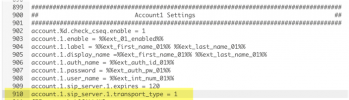
account.1.sip_server.1.transport_type = 1

I've also realised that once i create a new template, this is the template that all existing phones of this type will use and the only way to change it, is to delete and readd the phone.
 
That should not be necessary if the PBX is local to the DECT, or if you use an SBC (when the PBX is remote).

Changing it to TCP will not solve underlying problems, maybe act as a temporary band-aid.

So make sure you are using an SBC if the PBX is remote.
 
The DECT is remote to the 3CX and unfortunately these are legacy sites that wrre migrated over from an Asterisk based phone system where its not possible to install an additional phone or dedicated SBC.
 
Hi @ianandrews

You will need to go in to Advanced > Templates > DECT
Find the current Yealink W70B Template and press Copy

1746243955096.png

Remove the regep (shown highlighted)

1746244004562.png

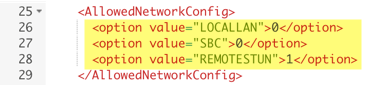
Turn on STUN and turn OFF other methods if you do not have SBC or Router Phone
1746244076138.png

Add TCP to your Account Config
1746244160604.png

I hope this helps :)

Best,
Lance
 
Thanks Lance, Really appreciate your help.
 
  • Like
Reactions: lancerichards
Hi Lance,

I created 2 custom templates, one called _default and another caled _TCP, regardless of the order i add them or if i delete the phone, add it as new, it always selects the template _TCP even if i've selected the _default during the add stage.

I will admit that i have only done the steps from your screenshots 1 and 4, because i had already got to this point through trial and error and i wanted to limit the numebr of edits in case i bricked something, is that possibly the reason?
 
Hi Lance,

I created 2 custom templates, one called _default and another caled _TCP, regardless of the order i add them or if i delete the phone, add it as new, it always selects the template _TCP even if i've selected the _default during the add stage.

I will admit that i have only done the steps from your screenshots 1 and 4, because i had already got to this point through trial and error and i wanted to limit the numebr of edits in case i bricked something, is that possibly the reason?
I have provided you the EXACT steps @ianandrews
If you don't follow them, then it's on you to debug!

Your issue is that you have skipped steps (namely removing the regexp!!)

Why cut corners and make life hard for yourself?

Best
Lance
 
  • Like
Reactions: bitn2
I have provided you the EXACT steps @ianandrews
If you don't follow them, then it's on you to debug!

Your issue is that you have skipped steps (namely removing the regexp!!)

Why cut corners and make life hard for yourself?

Best
Lance
Understood. I thought that would probably be the reason. I gues i just wanted to undersatnd each step. thank you again.
 
  • Like
Reactions: lancerichards

Latest Posts

Forum statistics

Threads
111,962
Messages
589,996
Members
164,868
Latest member
swegner