Custom salesforce integration

Status
Not open for further replies.

Juan Marriott

Silver Partner
Advanced Certified
Joined
Oct 24, 2017
Messages
105
Reaction score
40
Hello, I am looking for a custom integration with salesforce; I need to ask the caller for an ID then look up on salesforce with that ID instead of the callerID
Any ideas or recomendations?
 
CFD + CRM Lookup components.
 
  • Like
Reactions: GregG_3CX
So, it can be done?
 
  • Like
Reactions: GregG_3CX
Hello Edossantos,
Need a little help here:
Task: customer have salesforce, but doesnt want to use "callerID" for the CRMlookup. Want to use "studentID".

I have already on CFD:
1.user imput
2.promt user imput to confirm
3. custom CRM lookup (worlikng on this)
4. should I modify salesforce template to use "studentID" instead of "callerID"?
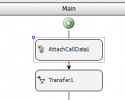
5. Do I need to use "attach call data"?
 
4. should I modify salesforce template to use "studentID" instead of "callerID"?
No, when invoking the CRM Lookup component, you have different types of queries. If you use "Custom Query", you can specify the filtering options you want. If you check the standard template we provide, you will see that when executing this custom query, 3CX will invoke the Salesforce REST API using this endpoint:
[Url]/services/data/v55.0/search/?q=[Query]

Here's the documentation from Salesforce regarding this endpoint:
https://developer.salesforce.com/docs/atlas.en-us.api_rest.meta/api_rest/resources_search.htm

Then, you can create an SOSL query to filter contacts according to your needs.

5. Do I need to use "attach call data"?
If you then need to transfer the call to a queue, and let agents see the contact details, then you will need to attach 2 properties to the call:
1) public_lookup_displayname_override > This is the contact name to show
2) public_crm_contact > This is the JSON of the CRM search result, which in your case you will need to build:
JSON:
{
    "FirstName": "John",
    "LastName": "Doe",
    "Email": "[email protected]",
    "ContactUrl": "https://example.com/contacts/42013984654",
    "CompanyName": "",
    "PhotoUrl": null,
    "ContactType": 0,
    "PhoneBusiness": "+123456789",
    "PhoneBusiness2": null,
    "PhoneHome": null,
    "PhoneHome2": null,
    "PhoneMobile": "",
    "PhoneMobile2": null,
    "PhoneOther": null,
    "FaxBusiness": null,
    "FaxHome": null,
    "Pager": null,
    "ContactRawData": "42013984654|Contacts"
  }
 
Hi @edossantos,

I appreciate your help we were using the attached data with "public_crm_contact_url" to set a custom screen Popup but after the update seems this not working or changed to another name do you idea about the new value name or where I can find it.

Thanks in advance
 
Hi @edossantos,

I appreciate your help we were using the attached data with "public_crm_contact_url" to set a custom screen Popup but after the update seems this not working or changed to another name do you idea about the new value name or where I can find it.

Thanks in advance
Yes, this has changed, check my response above, the details are there.
 
Hi @edossantos,
many thanks for your prompt reply,
I already try to change the value of attach data to be "public_crm_contact" but it's not working,
can you clarify what you means by "This is the JSON of the CRM search result, which in your case you will need to build:"
As in our case we use the attach data only without any CRM integration
 
Hi @edossantos,
many thanks for your prompt reply,
I already try to change the value of attach data to be "public_crm_contact" but it's not working,
can you clarify what you means by "This is the JSON of the CRM search result, which in your case you will need to build:"
As in our case we use the attach data only without any CRM integration
Can you show how you're attaching the public_crm_contact property? How you're building this JSON.
 
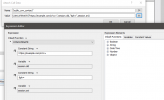
I don't have CRM integration at all I just attach data with the URL then transfer to queue and it was working fine before the update

Screenshot (1385).png
 
I don't have CRM integration at all I just attach data with the URL then transfer to queue and it was working fine before the update

View attachment 37350
I understand that. But what expression are you using in your CFD app to create the value for the property public_crm_contact?
 
attached
 

Attachments

  • Screenshot (1387).png
    Screenshot (1387).png
    26 KB · Views: 6
You're setting the property to an URL. But you need to set it to a JSON, which must have a property for the URL. The property should be set to something like this:
JSON:
{
    "FirstName": "John",
    "LastName": "Doe",
    "Email": "[email protected]",
    "ContactUrl": "https://example.com/contacts/42013984654",
    "CompanyName": "",
    "PhotoUrl": null,
    "ContactType": 0,
    "PhoneBusiness": "+123456789",
    "PhoneBusiness2": null,
    "PhoneHome": null,
    "PhoneHome2": null,
    "PhoneMobile": "",
    "PhoneMobile2": null,
    "PhoneOther": null,
    "FaxBusiness": null,
    "FaxHome": null,
    "Pager": null,
    "ContactRawData": "42013984654|Contacts"
  }
 
I got your point the misunderstanding was due to the old version accepting URLs only,
thank you
 
  • Like
Reactions: edossantos
Status
Not open for further replies.

Latest Posts

Forum statistics

Threads
111,973
Messages
590,075
Members
164,895
Latest member
jasonkkrause