custom speed dials and provisioning

Status
Not open for further replies.

Toddalex2000

Premier Customer
Joined
Aug 26, 2017
Messages
44
Reaction score
2
I have all my phones provisioned and manage where line keys and speed dial are placed using the BLF tab in 3cx. Some users like to change them around at the phone so it throws off what i show in 3CX vs what the phone actually has.

Should i even bother with speed dials or just let the user manage them?
 
I have all my phones provisioned and manage where line keys and speed dial are placed using the BLF tab in 3cx. Some users like to change them around at the phone so it throws off what i show in 3CX vs what the phone actually has.

Should i even bother with speed dials or just let the user manage them?

Let the user manage them through the webclient.

https://<yourdomain>.3cx.<country>/webclient

Once they log in, have them go to "Settings" and then "BLF Settings". They can set the BLFs to whatever they want right there.
 
  • Like
Reactions: jbryant84
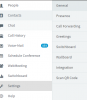
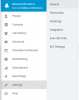
Under settings I show General, Presence, Call Forwarding, Greetings, Switchboard, integration, Scan QR Code. Don't see BLF Settings anywhere
 
i figured out how to make it work. The link in the welcome message doesn't get the user to the interface to manage their phone. I had to use the link that we use for the 3CX management dashboard and assign them rights to manage their own extension
 
Just remember, when you make the changes the phones will take some time to pick up the changes. Phones are re provisioned every 24 hrs.

You can also use the 3CX client (windows) to manage the blf keys.
 
Just checked my webclient BLF keys are under Settings - BLF Settings
 
11378 you see something similar to this? i don't see BLF
 
I see

11379


What version of 3CX are you running, we are on V16 SP1
 
15.5.15502
 
  • Like
Reactions: Toddalex2000
  • Like
Reactions: Toddalex2000
Status
Not open for further replies.

Forum statistics

Threads
111,931
Messages
589,804
Members
164,803
Latest member
fcentral