Customer PBX upgraded from V18 PRO to V20 Ent and new V20 license will not apply to the system and dropping calls

empowersolutions

Silver Partner
Basic Certified
Joined
Sep 22, 2023
Messages
11
Reaction score
1
As the title states, we upgraded one of our last customers to V20 and because the portal would not allow us to upgrade their license without the system being on version 20, we completed the upgrade. The portal still indicating an upgrade was not possible, so we purchased a new V20 Enterprise key for the same amount of concurrent calls. When we try to replace the key on the PBX, we receive this error. It is a valid key and the server has access to all the same network ports etc.. which it has had access to for some time. This is causing call drop issues for the client because they are showing 0 licensed concurrent paths now. Also, for some reason now in our partner portal we are unable to open tickets despite being in a qualified partner tier. This is the reason we are posting this here instead of opening a ticket at the moment.
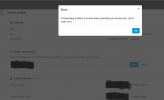
Screenshot 2025-04-15 085223.png
 
From the screenshot, I can see that your expiry of this key is the 8th of April 2025.

What version of the PBX is this from? The newly purchased key is a Version 20 key which cannot be activated on version 18. You will need to take a backup of your existing system, and install version 20. It would have been best to just renew the key rather than buy a new one.
 
From the screenshot, I can see that your expiry of this key is the 8th of April 2025.

What version of the PBX is this from? The newly purchased key is a Version 20 key which cannot be activated on version 18. You will need to take a backup of your existing system, and install version 20. It would have been best to just renew the key rather than buy a new one.
Hey Nicholas,

The system is currently on version 20 now, so the version 18 key is of course not valid, and the version 20 key is not allowing us to apply it to the system with the error provided in the screenshot.

With regards to renewing the key, we attempted to both upgrade the key from the portal, but it would not allow us to upgrade the key even prior to expiration stating the system was running on version 18 and needed to be on version 20 before the key could be upgraded. When we attempted to renew it, the only option was to renew for version 18, not 20, so with the somewhat conflicting/confusing messaging in the portal we followed the directive of the upgrade option which indicated to upgrade the system first.
 
Which update of Version 20 did you restore to? make sure you download the latest one. If youre using an old one it wont be able to communicate with the activation server.
 
  • Like
Reactions: Evolute IT
It is currently on Version 20.0 Update 6 (Build 486 Alpha)
 
Any help would be greatly appreciated as the client is actively dropping calls and there is nothing we can do about it at this point on our end from the looks of things if the license wont properly activate.

It is also a little irritating that we are unable to open a support request for this either...
 
Bueller..... Bueller....
 
Anybody? I have a pretty irritable client over here and no answers for them....
 
Did you try on the u5 (released) version?

Verified connectivity out from the 3CX server?
 
I have tried calling my account manager concerning the missing support tickets in our account to address this issue and no answer. This forum has not been at all helpful either other than to confirm that the key is not activating as it should. We have followed all of the appropriate steps at this point and are not receiving any joy. We are going to attempt to renew the existing PRO key instead of moving the client to Enterprise as we had planned and discussed with them. If this works, I expect 3CX will issue a refund for the Enterprise key we are unable to use.
 
The renewal of the existing key worked and registered as version 20 without issue. There was never an issue with the network or the system itself. I will be requesting a full refund of the Enterprise key we purchased and are unable to use.
 
@empowersolutions
The error we can see from your screendump, does state an Network problem, not a License problem.
The 3CX server will try to connect to activate.3cx.com, and this should be possible, where it seems it can not.

I have found this in the Forum:
https://www.3cx.com/community/threads/unable-to-reach-3cx-license-activation-server.87471/

Basically it states to make sure the DNS server is set to Google 8.8.8.8 and 8.8.4.4

If i ping today (tis can and will change over time), it seems to goto IP 172.64.152.237
Pinging activate.3cx.com [172.64.152.237] with 32 bytes of data


Does this work good on your server?
 
@empowersolutions
The error we can see from your screendump, does state an Network problem, not a License problem.
The 3CX server will try to connect to activate.3cx.com, and this should be possible, where it seems it can not.

I have found this in the Forum:
https://www.3cx.com/community/threads/unable-to-reach-3cx-license-activation-server.87471/

Basically it states to make sure the DNS server is set to Google 8.8.8.8 and 8.8.4.4

If i ping today (tis can and will change over time), it seems to goto IP 172.64.152.237
Pinging activate.3cx.com [172.64.152.237] with 32 bytes of data


Does this work good on your server?
Appreciate the response. Unfortunately this was not the issue. The server can see the activation server clean and clear without issue. Pings and traceroutes all clear. The issue was the system would not allow us to apply the Enterprise key and accept/activate it.
 
Okay, that is a clear answer :).
Well the license thing can only be fixed by 3CX, and nobody else.

You could try to setup a complete new 3CX server with the Ent. license, just to see if the License works.
Just set it up in your windows PC/Laptop, with a new FQDN.

If the License does not work at all, it should become clear.
Lets say it works, that would mean the License is fine, but that would also mean the License can NOT be swapped in the V20 update 5 ??? or something wrong with the configuration ???

Afterwards you will need to log into your 3CX account and release the FQDN from the License to reuse it again.

Not sure if you want to put in all this effort without being sure to fix any, or just wait for 3CX to responde to your license request.
Good luck.
 
Okay, that is a clear answer :).
Well the license thing can only be fixed by 3CX, and nobody else.

You could try to setup a complete new 3CX server with the Ent. license, just to see if the License works.
Just set it up in your windows PC/Laptop, with a new FQDN.

If the License does not work at all, it should become clear.
Lets say it works, that would mean the License is fine, but that would also mean the License can NOT be swapped in the V20 update 5 ??? or something wrong with the configuration ???

Afterwards you will need to log into your 3CX account and release the FQDN from the License to reuse it again.

Not sure if you want to put in all this effort without being sure to fix any, or just wait for 3CX to responde to your license request.
Good luck.
I appreciate the response and assistance. As you surmised, we are proceeding with a refund. Time is money and my curiosity is not worth the time it would take to spin up a VM and test all of this out. At the end of the day, the system works, the client is no longer dropping calls, and we definitively know it can communicate with the activation server cleanly. We will just have to tackle the task of upgrading the client to Enterprise another time. Receiving and making calls was more important than additional features right now.
 
  • Like
Reactions: paulodagraca

Latest Posts

Forum statistics

Threads
111,964
Messages
590,000
Members
164,869
Latest member
hpgitsupport