- Joined
- Jan 6, 2022
- Messages
- 6
- Reaction score
- 0
When I test integration from 3CX Management Console I get:
CRM Integration is working OK but contact number does not exist. Check log for more info or try a different number.
In the output I can see that contact is found:
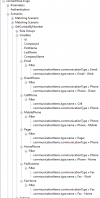
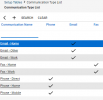
But no ContactUrl provided. I'm speculating that is because CRM returns
"mobileGuid":"d1d850b5-7794-426e-b9c2-6f35b74bb477","defaultPhoneType":"Phone - Mobile","defaultPhoneNbr":"+48500600700"
instead of PhoneMobile but I'm no specialist at 3CX integrations.
Call journaling on outbound calls works great. When calling from contact field in CRM adds activity, when calling from ticket adds time. GetCompanyByNumber returns valid output when testing.
CRM Integration is working OK but contact number does not exist. Check log for more info or try a different number.
In the output I can see that contact is found:
Code:
Started scenario with empty id
Request text: https://eu.myconnectwise.net/login/companyinfo/helpdeskpl
Response text: {"CompanyName":"helpdeskpl","Codebase":"v2021_3/","VersionCode":"v2021.3","VersionNumber":"v4.6.93565","CompanyID":"Helpdesk","IsCloud":true,"SiteUrl":"api-eu.myconnectwise.net","Region":"EU","AllowedOrigins":["*.connectwisedev.com","*.myconnectwise.net","euchat.myconnectwise.netoperator/id_token","app.timezest.com","eu.myconnectwise.net"]}
Response finished
Variable Version set to v2021_3/
Variable IsCloud set to True
Started GetCompanyByNumber
Request text: https://api-eu.myconnectwise.net/v2021_3/apis/3.0/company/companies?conditions=phoneNumber='%2B48500600700' OR faxNumber='%2B48500600700'
Response text: []
Response finished
Finished GetCompanyByNumber
Finished scenario with empty id
Started scenario with empty id
Request text: https://eu.myconnectwise.net/login/companyinfo/helpdeskpl
Response text: {"CompanyName":"helpdeskpl","Codebase":"v2021_3/","VersionCode":"v2021.3","VersionNumber":"v4.6.93565","CompanyID":"Helpdesk","IsCloud":true,"SiteUrl":"api-eu.myconnectwise.net","Region":"EU","AllowedOrigins":["*.connectwisedev.com","*.myconnectwise.net","euchat.myconnectwise.netoperator/id_token","app.timezest.com","eu.myconnectwise.net"]}
Response finished
Variable Version set to v2021_3/
Variable IsCloud set to True
Started GetContactByNumber
Request text: https://api-eu.myconnectwise.net/v2021_3/apis/3.0/company/contacts?conditions=inactiveFlag=false&childconditions=(communicationItems/communicationType='Phone' OR communicationItems/communicationType='Fax') AND communicationItems/value='%2B48500600700'
Response text: [{"id":12,"firstName":"Testowy","lastName":"Kontakt","company":{"id":19297,"identifier":"XYZTestCompany","name":"XYZ Test Company","_info":{"company_href":"https://api-eu.myconnectwise.net/v4_6_release/apis/3.0//company/companies/19297","mobileGuid":"2685633f-6375-4375-9df2-9ae518232583"}},"site":{"id":1002,"name":"Main","_info":{"site_href":"https://api-eu.myconnectwise.net/v4_6_release/apis/3.0//company/companies/19297/sites/1002","mobileGuid":"c1a1d306-3e15-4218-be55-319018a5cd11"}},"relationshipOverride":"","inactiveFlag":false,"marriedFlag":false,"childrenFlag":false,"disablePortalLoginFlag":true,"unsubscribeFlag":false,"mobileGuid":"d1d850b5-7794-426e-b9c2-6f35b74bb477","defaultPhoneType":"Phone - Mobile","defaultPhoneNbr":"+48500600700","defaultBillingFlag":false,"defaultFlag":false,"companyLocation":{"id":2,"name":"Helpdesk","_info":{"location_href":"https://api-eu.myconnectwise.net/v4_6_release/apis/3.0//system/locations/2"}},"communicationItems":[{"id":44108,"type":{"id":1,"name":"Email - Work","_info":{"type_href":"https://api-eu.myconnectwise.net/v4_6_release/apis/3.0//company/communicationTypes/1"}},"value":"[email protected]","defaultFlag":true,"domain":"@gmail.com","communicationType":"Email"},{"id":44110,"type":{"id":4,"name":"Phone - Mobile","_info":{"type_href":"https://api-eu.myconnectwise.net/v4_6_release/apis/3.0//company/communicationTypes/4"}},"value":"+48500600700","defaultFlag":true,"communicationType":"Phone"}],"types":[],"ignoreDuplicates":false,"_info":{"lastUpdated":"2022-01-31T07:08:29Z","updatedBy":"hjastr","communications_href":"https://api-eu.myconnectwise.net/v4_6_release/apis/3.0//company/contacts/12/communications","notes_href":"https://api-eu.myconnectwise.net/v4_6_release/apis/3.0//company/contacts/12/notes","tracks_href":"https://api-eu.myconnectwise.net/v4_6_release/apis/3.0//company/contacts/12/tracks","portalSecurity_href":"https://api-eu.myconnectwise.net/v4_6_release/apis/3.0//company/contacts/12/portalSecurity","activities_href":"https://api-eu.myconnectwise.net/v4_6_release/apis/3.0//sales/activities?conditions=contact/id=12","documents_href":"https://api-eu.myconnectwise.net/v4_6_release/apis/3.0//system/documents?recordType=Contact&recordId=12","configurations_href":"https://api-eu.myconnectwise.net/v4_6_release/apis/3.0//company/configurations?conditions=contact/id=12","tickets_href":"https://api-eu.myconnectwise.net/v4_6_release/apis/3.0//service/tickets?conditions=contact/id=12","opportunities_href":"https://api-eu.myconnectwise.net/v4_6_release/apis/3.0//sales/opportunities?conditions=contact/id=12","projects_href":"https://api-eu.myconnectwise.net/v4_6_release/apis/3.0//project/projects?conditions=contact/id=12","image_href":"https://api-eu.myconnectwise.net/v4_6_release/apis/3.0//company/contacts/12/image?lastModified=2022-01-31T07:08:29Z"}}]
Response finished
Variable Id set to 12
Variable CompanyId set to 19297
Variable FirstName set to Testowy
Variable LastName set to Kontakt
Variable CompanyName set to XYZ Test Company
Variable Email set to
Variable DirectPhone set to
Variable CellPhone set to
Variable MobilePhone set to
Variable Pager set to
Variable HomePhone set to
Variable FaxBusiness set to
Variable FaxHome set to
Finished GetContactByNumber
Finished scenario with empty id
Started CreateContactRecord
Response finished
Finished CreateContactRecord
Result obtained
But no ContactUrl provided. I'm speculating that is because CRM returns
"mobileGuid":"d1d850b5-7794-426e-b9c2-6f35b74bb477","defaultPhoneType":"Phone - Mobile","defaultPhoneNbr":"+48500600700"
instead of PhoneMobile but I'm no specialist at 3CX integrations.
Call journaling on outbound calls works great. When calling from contact field in CRM adds activity, when calling from ticket adds time. GetCompanyByNumber returns valid output when testing.
Last edited: