D717 does not show up in 3CX Phones area using PnP and SBC

Status
Not open for further replies.

relay700

Customer
Joined
Jan 14, 2022
Messages
8
Reaction score
4
1st help request so go easy on me :)

I have our 3CX system up in Azure and a local SBC using the 3CX ISO on a VM.
The PnP process works perfectly fine for D785 but not working for our D717s or the C520 conference phones.
Weird.
I have updated the firmware to latest 3CX approved version, 10.1.84.15.
I have done multiple factory resets on the D717.
I am using Ubiquity Unifi Pro POE switches.

Any ideas on what to try next??
 
You are most likely not receiving the PnP messages the phones are sending

1. Ensure the PBX does not have any of the relevant IPs in the blacklist

2. Ensure SBC has a single NIC only, and is on the same LAN and subnet as the phones

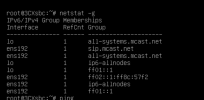
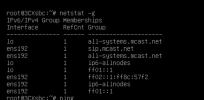
3. Ensure it is joined in the SIP multicast group https://www.3cx.com/docs/plug-and-play-ip-phone/#h.vimqlwec6uwc

4. Check that the phone got an IP and that it is accessible via web UI at least

If all the above is correct and you still don't see them, my guess it that the network switches are not passing the message along. That's something you will have to look into via your equipment documentation, they might be blocking it by default or by the way you have them set up currently.

PS: Disable DHCP Option 66 - confirm you don't have it enabled
 
Thanks for the response!
1, checked and no RFC 1918 address listed... I am using 192.168.120.x address for VOIP
2, The SBC is a VMware VM and has only one nic connected to it. Static IP assigned. 192.168.120.x
3, learning and testing now
4, Phone receives correct IP from VOIP subnet, 192.168.120.x
I can open the web page for the D717, no problem.
 
  • Like
Reactions: JohnS_3CX
The ultimate test is to run a pcap on the SBC machine, and factory reset the D717.

If the pcap shows anything coming from the phone ip as a source, and 224.0.1.75 as destination, the SBC should be able to see it.

If not, then everything standing between the phone and the SBC needs to be checked for multicast filtering.
 
Have you checked dhcp option 66 on the 92.168.120.x network, as this overrides pnp

If you plug the D717 into a working D785 network port, what happens ?

On the Unifi port, do you have Port Isolation or Storm Control enabled

1661266768181.png
 
Last edited:
This is the local SBC results:
1661266992841.png
 

Attachments

  • 1661266954366.png
    1661266954366.png
    82.3 KB · Views: 2
Have you checked dhcp option 66 on the 92.168.120.x network, as this overrides pnp
If you plug the D717 into a working D785 network port, what happens ?

On the Unifi port, do you have Port Isolation or Storm Control enabled

View attachment 31662

I am using PF Sense as a temp firewall and using it for DHCP in the VOIP 120 VLAN.
WIll investigate option 66 in PFsense DHCP server.

I do not have Port Isolation or Storm Control enabled on any of the networks.
 
Have you checked dhcp option 66 on the 92.168.120.x network, as this overrides pnp

If you plug the D717 into a working D785 network port, what happens ?

On the Unifi port, do you have Port Isolation or Storm Control enabled

View attachment 31662
I can plug the D785 into any port and it will show up in the PnP Phones are of the phone system.
I just tried swapping the connections between the 2 phones and same results.
 
Have you checked dhcp option 66 on the 92.168.120.x network, as this overrides pnp

If you plug the D717 into a working D785 network port, what happens ?

On the Unifi port, do you have Port Isolation or Storm Control enabled

View attachment 31662
I am using PFsense for firewall and DHCP server.
There does not appear to be an option 66 to configure.
 
Status
Not open for further replies.

Members Online Now

Forum statistics

Threads
111,832
Messages
589,284
Members
164,662
Latest member
DejanMDS