Dashboard = Activation Failed but License Settings = Correct license

Status
Not open for further replies.

VictorYourITGroup

Bronze Partner
Joined
Mar 5, 2019
Messages
46
Reaction score
11
Hi
Installed 3CX and did a restore from a backup.
When I go to the Dashboard it shows activation failed.
I go to License settings and it shows the correct license.

I had created VM machine and restored once, did not get right IP from DHCP.
Set MAC to Static and set DHCP to give me IP I wanted.
I did a new install.
Install went fine but then showed error on dashboard but Settings->License shows the correct license.

3CX Version 18.0 build 897
Hyper-V host of Debian ISO. (doubled recommended settings for VM)
8 call max, 5 users, ~15 phones
Static MAC address set up.
Backup is from earlier version of 18.0

Thanks,
Victor
 
Have you checked the gateway/DNS of the VM.

Ensure your network switch is external.
 
Hello, having same issue here since 1 month and no avail.

Support is not helping much on this case unfortunately and they are only relying on the firewall test. My system has been working like charm for the past 7 years with the firewall test failed since i've some S-nat in between. I just need to restart the server everyday for reportings to work.

activate.3cx.com is well reachable as well from the LAN.

Hoping to find an adequate solution to that!!!

Rgds,
 
Hello, having same issue here since 1 month and no avail.

Support is not helping much on this case unfortunately and they are only relying on the firewall test. My system has been working like charm for the past 7 years with the firewall test failed since i've some S-nat in between. I just need to restart the server everyday for reportings to work.

activate.3cx.com is well reachable as well from the LAN.

Hoping to find an adequate solution to that!!!

Rgds,
What version of the PBX are you on?
 
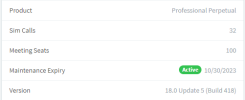
V18 U5 (build 418)
 

Attachments

  • 3cx.png
    3cx.png
    10 KB · Views: 3
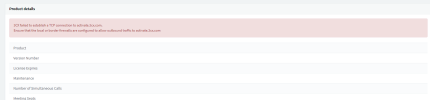
Once i click on the license, I get his error as attached.
 

Attachments

  • 3cx failed.png
    3cx failed.png
    16.7 KB · Views: 10
Have you checked the gateway/DNS of the VM.

Ensure your network switch is external.
Hi Keiferschild,
Sorry for the delay in replying.
Yes, I had checked DNS and GW.
I had done this because I wanted to make sure it was not an issue reaching the activation server.
And I was able to reach the activation server.
Thanks,
Victor
 
Hi All,
Following up, I had found a backup of the VM of the phone system.
Restored that VM and all is working.
Sorry I could not continue the trace this error.
Thanks,
Victor
 
Status
Not open for further replies.

Forum statistics

Threads
111,974
Messages
590,081
Members
164,899
Latest member
mazet