DB access on .xlsx file through ODBC.

Status
Not open for further replies.

BesOn

Joined
Jan 21, 2016
Messages
16
Reaction score
0
Hello. I am trying to access excel spreadsheet by Database Access. I downloaded driver for ODBC Excel, installed drivers for Windows Database Access 2010.

I want to connect to the file sort it and get unknown cell value. I tried get count of row.

SELECT count(*) FROM [CustomersSheet$] WHERE id='1' .

In compilation I want to play result of database access
databaseAccessComponent1.QueryResult
databaseAccessComponent1.ScalarResult

Tried both. Did work. (

Will appreciate any help.

P.S.: Office version: 2010 32 bit
File format report.xlsx
 

Attachments

  • Capture.PNG
    Capture.PNG
    19.1 KB · Views: 4,895
  • Capture2.PNG
    Capture2.PNG
    43.7 KB · Views: 4,892
Hi there,

Please check this article that shows how to do that:
http://www.3cx.com/blog/docs/vad-phone-support-portal-4/

And pay special attention to the important notes regarding x64 operating systems. As far as I can see in the screenshot, you're in a 64 bits operating system, but Microsoft only provides 32 bits drivers. Then, the VAD application will not find the ODBC data source. In that case, it's better to export the data to a CSV file and read the information from there.

Kind regards.
 
Edossantos, thank you for your reply. I read all this 4 topics about building IVR :) How I can check that my 3CX VAD sees this file? When I try to connect it through ODBC it appears in gray color and could not be selected...
 
edossantos said:
Hi there,

Please check this article that shows how to do that:
http://www.3cx.com/blog/docs/vad-phone-support-portal-4/

And pay special attention to the important notes regarding x64 operating systems. As far as I can see in the screenshot, you're in a 64 bits operating system, but Microsoft only provides 32 bits drivers. Then, the VAD application will not find the ODBC data source. In that case, it's better to export the data to a CSV file and read the information from there.

Kind regards.

What about Oracle DB's? How it can be connected on 3CX? Should I install driver on server, like ODBC? In window
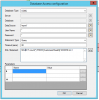
"Database Access Configuration" I can see only Data Source. Server and Database unavailable.

Thank you.
 
Please check the following article regarding VAD app troubleshooting:
http://www.3cx.com/blog/docs/troubleshooting-vad-applications/

If the ODBC datasource can't be found, you will see a file named "Errors_DatabaseAccess.log" inside your app folder, for example "%ProgramData%\3CX\Instance1\Data\Http\Interface\ivr\ProjectName_BuildNumber\Errors_DatabaseAccess.log". That file will explain the issue.

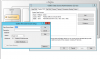
But for sure, your sceenshot shows the platform "32-bit" for the datasource "report", so the VAD app which runs as a 64 bits app will not see it. And Microsoft doesn't provide 64-bits ODBC drivers for Excel, so it will not work...

In regards to Oracle, you can install Oracle client libraries in the 3CX server, and then you have 2 options: connect via ODBC or connect via native Oracle client library. This second option is preferable as it's more performing. Oracle provides 32 and 64 bits libraries, so it will work.

Kind regards.
 
edossantos said:
Please check the following article regarding VAD app troubleshooting:
http://www.3cx.com/blog/docs/troubleshooting-vad-applications/

If the ODBC datasource can't be found, you will see a file named "Errors_DatabaseAccess.log" inside your app folder, for example "%ProgramData%\3CX\Instance1\Data\Http\Interface\ivr\ProjectName_BuildNumber\Errors_DatabaseAccess.log". That file will explain the issue.

But for sure, your sceenshot shows the platform "32-bit" for the datasource "report", so the VAD app which runs as a 64 bits app will not see it. And Microsoft doesn't provide 64-bits ODBC drivers for Excel, so it will not work...

In regards to Oracle, you can install Oracle client libraries in the 3CX server, and then you have 2 options: connect via ODBC or connect via native Oracle client library. This second option is preferable as it's more performing. Oracle provides 32 and 64 bits libraries, so it will work.

Kind regards.

Okay, thank you for enhanced answer. Will try to access on oracle database in that case.
 
Status
Not open for further replies.

Forum statistics

Threads
112,322
Messages
591,887
Members
165,470
Latest member
Robert Lee