Solved DDNS - IPV4 hanging at "detecting" and goes offline

Status
Not open for further replies.

ChrisGER

SOHO User
Advanced Certified
Joined
Jul 14, 2019
Messages
29
Reaction score
12
Hello Community,
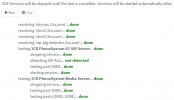
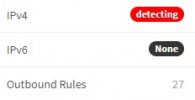
I'm getting desperate because my "self hosted" 3CX PBX gets stuck in "deteting" status when changing public ip. I find here in the forum leide no suitable solution, or whether one can execute the DDNS update by command again.

- What is the minimum necessary for the 3CX to register and use the new public IP ?
- Firewall, FQDN, Ports ? for SophosXG

Is there any information about this that needs to be taken into account ?

Thanks forward
ChrisGER
 

Attachments
  • DDNS01.jpg
    DDNS01.jpg
    6.6 KB · Views: 14
Last edited:
Are you blocking outbound traffic / ports for the 3CX ip address - if so open up the firewall rules and see if you have the same issue.
 
  • Like
Reactions: ChrisC_3CX
You could also run the firewall checker which will give you an indication if you can contact 3CX's STUN server successfully. The 3CX STUN servers is what the PBX contacts to determine it's new public IP address too.

You can run the Firewall checker in "Dashboard >> Firewall". Bear in mind that this will restart 3CX's services so better run it when the PBX is not being used.
 
Out of necessity I have set up any/any activation (see screenshot) for the 3CX PBX. But even there I don't see any destinations that might be needed for the ddns update on 3CX and PBX site.
Inbound the rules are configured based on the 3CX guide.

emergency-rule.jpg
 

Attachments

  • emergency-rule.jpg
    emergency-rule.jpg
    15.1 KB · Views: 13
Have you ran the 3CX firewall checker and confirmed it passes?
 
You could also run the firewall checker which will give you an indication if you can contact 3CX's STUN server successfully. The 3CX STUN servers is what the PBX contacts to determine it's new public IP address too.

You can run the Firewall checker in "Dashboard >> Firewall". Bear in mind that this will restart 3CX's services so better run it when the PBX is not being used.
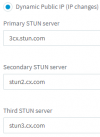
The following are by default configures
1644930445450.png
are these correct or outdated ?
 
All seem to be wrong, replace them with:

1. stun.3cx.com
2. stun2.3cx.com
3. stun3.3cx.com
 
Have you ran the 3CX firewall checker and confirmed it passes?
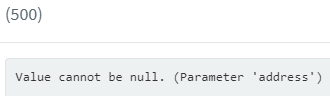
The 3CX Firewall Checker is in the "deteting" phase running in an internal error and do not start
1644930610519.png

See screenshot :(
 
Please refer to my last reply, and do the following:

1. Go to 2Settings >> Network >> Public IP >> External IP Configuration" and correct all stun servers as per above.
2. Apply the settings and go to "Dashboard >> Firewall" and run the firewall checker.
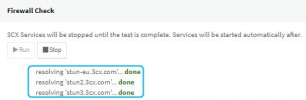
3. Make sure that you see the correct server addresses (the one you set before) at the very beginning of the firewall test:
1644930809567.png
4. Let me know if the firewall checker passes 100%. (ALL GREEN)
 
Another feature :( i put my atually ip in the static field -> all trunks are going online after refresh registration actuvuty. but if i go back to dynamic - the detecting comment in the ipv4 field is back and dose not get any update :(

Any idea ?
 
Can you please confirm if you followed the procedure in my last reply? Did you correct the stun servers and run the firewall checker again? What happened?
 
Please refer to my last reply, and do the following:

1. Go to 2Settings >> Network >> Public IP >> External IP Configuration" and correct all stun servers as per above.
2. Apply the settings and go to "Dashboard >> Firewall" and run the firewall checker.
3. Make sure that you see the correct server addresses (the one you set before) at the very beginning of the firewall test:
View attachment 27926
4. Let me know if the firewall checker passes 100%. (ALL GREEN)
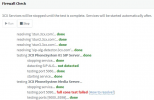
Here is my result from the FW checker - I'm in the implementation to get 3CX primary online for PBX at this location.

1644932390963.png

5090 is the last failure in the checker process. that can depense on one IN/OUT rule on Sophos to get the resullt green and 100% of the FW checker green.
 
All seem to be wrong, replace them with:

1. stun.3cx.com
2. stun2.3cx.com
3. stun3.3cx.com
you show 38 minutes ago the 1st STUN is stun-eu.3cx.com is this one located ein EU and stun.3cx.com outside EU region ?
 
you show 38 minutes ago the 1st STUN is stun-eu.3cx.com is this one located ein EU and stun.3cx.com outside EU region ?
stun-eu.3cx.com is indeed automatically set on eu based PBXs but if you run a dns lookup on both you'll see that stun.3cx.com actually resolves to more ips and it includes the ones of stun-eu too.

Since communication with our stun servers seem ok, try this:

1. Go back to "Settings >> Network" and change the settings to Dynamic IP then click on OK.
2. Go to "Dashboard >> Services" and select all 3CX Services then click on "Restart"

Important: Restarting all 3CX Services will render the PBX temporarily unavailable dropping all active calls.

Let me know if it gets stuck on "Detecting" again.
 
For today the the light is green and the tunnel port was fixed from my site.

3CX_001.jpg

Tomorrow it will be interesting to see if the new IP has appeared on the 3CX and if the trunks are active.
A 24h wow phenomenon I had unfortunately often. so I'm excited and look forward when the 3CX now runs as desired.

Thx for the quick support.
ChrisGER
 
  • Like
Reactions: ChrisC_3CX
You're very welcome! I'll leave this open for now so that you can let us know if anything comes up!
 
Great :) if you have a list of minimum destinations based on IP / FQDN can you please share this via PM to change from destionation any to the required only (e.g. STUN, Activation and so on). Media will be configured by country filter.

thx forward
Chris
 
We do not have a ready list of FQDNs or IPs to provide as they are not static and can therefore change at anytime without warning, but if it is security you're worrying about you could check out our 3CX Academy course on Security & Anti-Fraud to learn more about how 3CX protects you against malicious attacks: https://www.3cx.com/3cxacademy/videos/advanced/security-with-3cx-phone-system/

It goes without saying that you can of course harden security even further by utilizing your firewall but try to do so without hindering 3CX's functionality.
 
Today the first feedback after an IP change by the provider, how the 2 active providers acted.
Versatel is coming up "green".
Sipgate is down "red
Under yesterday's address both were online (green).

For Sipgate I use the DE / Sipgate TRUNK profile. Currently I get the following error only under Sipgate:

[CM504005]: Registration failed for: Lc:10006(@ChrisGER[<sip:[email protected]:5060/UDP>]); Cause: Cause: 408 Request Timeout/REGISTER from local

Any Idea ?
 
Today the first feedback after an IP change by the provider, how the 2 active providers acted.
Versatel is coming up "green".
Sipgate is down "red
Under yesterday's address both were online (green).

For Sipgate I use the DE / Sipgate TRUNK profile. Currently I get the following error only under Sipgate:

[CM504005]: Registration failed for: Lc:10006(@ChrisGER[<sip:[email protected]:5060/UDP>]); Cause: Cause: 408 Request Timeout/REGISTER from local

Any Idea ?
If my memory serves me correctly, even though Sipgate is Register-based, they still "lock" to a specific IP.
By the time your IP changed, you probably need to call/contact them, tell them your new Public IP Address, then you will be able to register again.
 
Status
Not open for further replies.

Forum statistics

Threads
111,974
Messages
590,081
Members
164,899
Latest member
mazet