Debian Install - Screen on console after reboot

Status
Not open for further replies.

ncl_bains

Silver Partner
Joined
Mar 16, 2019
Messages
2
Reaction score
0
Hi

We are new to 3CX and running some tests in our virtual environment.
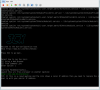
i have installed the Debian package, when you first install and boot the VM you get a screen detailing the IP address, see attached.

When I reboot the VM and login I just get the command prompt, is there a command I can type to get back to this screen?

Thanks
 

Attachments

  • 3CX Screen.PNG
    3CX Screen.PNG
    130.7 KB · Views: 34
Are you saying rather than go to that URL and configure your PBX you just decided to reboot it again? While there is a way to get it going again you can of course roll back to a snapshot or just reinstall and this time don't ignore that step.
 
Hi

We needed to shutdown the VM and couldn't find an option to shutdown from the URL. Is there a way to get back to the 3CX Screen with a command without having to revert to snapshots or reinstall?
 
Try the following:
Code:
 sudo /usr/sbin/3CXWizard --cleanup
 
i don't want to carry out a clean install, from what i understand this will run the wizard to carry out a clean install.

I would just like hte 3CX screen to repair so we can see what IP the device is running on
 
If you are able to login to the machine via the console, then run this command to show the eth's IP.

Code:
ifconfig -a
 
Or just check your virtual machine management portal to see what IP address has been allocated.
 
Status
Not open for further replies.

Forum statistics

Threads
111,918
Messages
589,735
Members
164,790
Latest member
Sgtpsyco