Delay after sending call to external number

Status
Not open for further replies.

cyberdemon

Silver Partner
Basic Certified
Joined
May 19, 2023
Messages
28
Reaction score
1
Hello, we are having an issue with our SIP Trunk settings for one of our clients. The issue occurs when dialing an external number, the PBX sends the call across the SIP Trunks, then just sits and waits. It can be as short as 3 seconds to over 30 seconds, it doesn't apparently seem to have a rhyme or reason what causes the difference between the delay timing. We have had this issue before. We reached out to our SIP Provider and gave them the timestamp of the call. They investigated and found that when our system is sending out the request for the call, it is sending to the IP Address for the Origination server instead of the IP Address for the Outbound Server. I set the logs to Medium logging and made a call from the webclient to an external number. I can see that the first SIP Trunk it tries matches the IP of the Origination Server. Checking the SIP Trunk configuration, the first SIP Trunk has the Origination IP that I see in the Log, but the config shows that there is an Outbound Proxy set to the correct Outbound Server IP. In theory, the call should be using the IP set for the Outbound Proxy but it just doesn't even try. I confirmed what I saw with the Carrier before making this thread. They agree they see the call I discussed, and it's sending from the Origination IP instead of the Outbound IP.


Now here's the big wrench for support here: It's an unsupported SIP Trunk. We currently do not have plans or a desire to change our SIP Provider as they have been very helpful in the past. Since then, 3CX has dropped support for this SIP Provider and the SIP Provider no longer offers information about configuring the 3CX PBX for their services. This should not be an issue though as our other clients have this same setup and it does not appear to have the same issues.


The only other thing I can think to mention is that sometimes I have gotten a 400 Bad Request but this too is sporadic. Does anyone else experience this issue? Please help!
 
It might help if you divulged who the provider is, as others also using them, may have encountered the same issue. I assume it is not a secret.

Did the issue just begin recently? Do you use other SIP providers that are working correctly?
 
  • Like
Reactions: Guillaume Bourgeois
Hello,

1. Could you let us know whether your trunk is configured as REGISTER or IP-Based?

2. Please run a Firewall checker on 3CX and share the results.

3. What brand and model is your router?

4. Can you share the logs of a call (in text format) and indicate the expected outcome?

For example:
https://www.3cx.com/blog/docs/analyzing-sip-call/

You might also consider including a "Flow" of the call for a clearer understanding of how the call should behave.
 
@leejor We are using VoIP Innovations. They had an issue last week where they were unable to transfer any calls to external phone numbers. Troubleshooting this issue has brought us to where we are now. We use this SIP Provider for nearly all of our 3CX Systems. The only exception is our in-office system is using Spectrum SIP and we have not had issues. The other clients that use 3CX/VoIP Innovations are not experiencing the issues.

@Guillamue Our Trunk is configured using IP. I have run the Firewall checker, the results are listed below.
  • resolving 'stun-us.3cx.com'... done
  • resolving 'stun2.3cx.com'... done
  • resolving 'stun3.3cx.com'... done
  • resolving 'sip-alg-detector.3cx.com'... done
  • testing 3CX PhoneSystem 01 SIP Server... done
    • stopping service... done
    • detecting SIP ALG... not detected
    • testing port 5060... done
    • starting service... done
  • testing 3CX PhoneSystem Media Server... done
    • stopping service... done
    • testing port 5090... done
    • testing ports [9000..9398]... done
      • [REMOVED PORT TEST DUE TO TOO MANY CHARACTERS-THEY ALL PASSED]
    • starting service... done
Our Router in the Client's office is a Ubiquiti Dream Machine Pro. This is connected to AT&T Fiber. We host our PBX on Amazon Lightsail, our SBC is installed as a VM on their Business Server.

Included in my next post below is a censored log of a call I performed from the webapp to my personal cell number. After dialing the number and hitting send, it takes 5 seconds before it actually starts to ring. You can see where it has tested the routes at 2:14:42 and finally alerts the line at 2:14:47.
 
07/22/2024 2:14:54 PM - Leg L:4.2[Line:10000>>+1231XXXXXXX] is terminated: Cause: BYE from local
07/22/2024 2:14:54 PM - [CM503008]: Call(C:4): Call is terminated
07/22/2024 2:14:54 PM - Leg L:4.1[Extn:200] is terminated: Cause: BYE from local
07/22/2024 2:14:50 PM - [CM503007]: Call(C:4): Extn:200 has joined, contact <sip:[email protected]:5063/UDP>
07/22/2024 2:14:50 PM - [CM503007]: Call(C:4): Line:10000>>+1231XXXXXXX has joined, contact <sip:[email protected]:0/UDP>
07/22/2024 2:14:50 PM - L:4.2[Line:10000>>+1231XXXXXXX] has joined to L:4.1[Extn:200]
07/22/2024 2:14:47 PM - [CM505003]: Provider:[VI 1] Device info: Device Not Identified: User Agent not matched; Capabilities:[reinvite, replaces, able-no-sdp, recvonly] UserAgent: [] PBX contact: [sip:[email protected]:5060]
07/22/2024 2:14:47 PM - [CM503002]: Call(C:4): Alerting Line:10000>>+1231XXXXXXX by contact <sip:[email protected]:0/UDP>
07/22/2024 2:14:47 PM - Currently active calls - 1: [4]
07/22/2024 2:14:42 PM - [CM503027]: Call(C:4): From: Extn:200 ("Test, Test" <sip:[email protected]:0>) to T:Line:10002>>+1231XXXXXXX@[Dev:sip:[email protected]]
07/22/2024 2:14:42 PM - [CM503004]: Call(C:4): Route 3: from L:4.1[Extn:200] to T:Line:10002>>+1231XXXXXXX@[Dev:sip:[email protected]]
07/22/2024 2:14:42 PM - Line limit check: Current # of calls for line Lc:10002(@VI 3[<sip:[email protected]:0/UDP>]) is 0; limit is 4
07/22/2024 2:14:42 PM - [CM503027]: Call(C:4): From: Extn:200 ("Test, Test" <sip:[email protected]:0>) to T:Line:10001>>+1231XXXXXXX@[Dev:sip:[email protected]]
07/22/2024 2:14:42 PM - [CM503004]: Call(C:4): Route 2: from L:4.1[Extn:200] to T:Line:10001>>+1231XXXXXXX@[Dev:sip:[email protected]]
07/22/2024 2:14:42 PM - Line limit check: Current # of calls for line Lc:10001(@Vi 2[<sip:[email protected]:0/UDP>]) is 0; limit is 4
07/22/2024 2:14:42 PM - [CM503025]: Call(C:4): Calling T:Line:10000>>+1231XXXXXXX@[Dev:sip:[email protected]] for L:4.1[Extn:200]
07/22/2024 2:14:42 PM - [CM503027]: Call(C:4): From: Extn:200 ("Test, Test" <sip:[email protected]:0>) to T:Line:10000>>+1231XXXXXXX@[Dev:sip:[email protected]]
07/22/2024 2:14:42 PM - [CM503004]: Call(C:4): Route 1: from L:4.1[Extn:200] to T:Line:10000>>+1231XXXXXXX@[Dev:sip:[email protected]]
07/22/2024 2:14:42 PM - Line limit check: Current # of calls for line Lc:10000(@VI 1[<sip:[email protected]:0/UDP>]) is 0; limit is 4
07/22/2024 2:14:42 PM - Call(C:4): Call from Extn:200 to XXXXXXX matches outbound rule 'Local'
07/22/2024 2:14:42 PM - [Flow] Call(C:4): has built target endpoint: Out#:>>Rule{Local}>>XXXXXXX for call from L:4.1[Extn:200]
07/22/2024 2:14:42 PM - [Flow] Target endpoint for XXXXXXX is Out#:>>Rule{Local}>>XXXXXXX
07/22/2024 2:14:42 PM - [CM503010]: Call(C:4): Making route(s) from Extn:200 to <sip:[email protected]:5060/UDP>
07/22/2024 2:14:42 PM - [CM505001]: Endpoint Extn:200: Device info: Device Not Identified: User Agent not matched; Capabilities:[reinvite, replaces, able-no-sdp, recvonly] UserAgent: [3CX WebRTC proxy] PBX contact: [sip:[email protected]:5060]
07/22/2024 2:14:42 PM - [CM500002]: Call(C:4): Info on incoming INVITE from Extn:200:

Invite-IN Recv Req INVITE from 127.0.0.1:5063 tid=ab41a206507bf10c Call-ID=2S1eoU1fKKLK5h9IZ48s-g..:

INVITE sip:[email protected]:5060 SIP/2.0

Via: SIP/2.0/UDP 127.0.0.1:5063;branch=z9hG4bK-524287-1---ab41a206507bf10c;rport=5063

Max-Forwards: 70

Contact: <sip:[email protected]:5063;rinstance=9b752fed0071c100>

To: <sip:[email protected]:5060>

From: "Test, Test"<sip:[email protected]>;tag=9db48732

Call-ID: 2S1eoU1fKKLK5h9IZ48s-g..

CSeq: 2 INVITE

Subject:

Allow: INVITE, ACK, CANCEL, OPTIONS, BYE, REGISTER, SUBSCRIBE, NOTIFY, REFER, INFO, MESSAGE

Content-Type: application/sdp

Proxy-Authorization: Digest username="hfI6GzLqNS",realm="3CXPhoneSystem",nonce="414d5359669ea19237:77047c47a135a01af8e96c63f325350d",uri="sip:[email protected]:5060",response="8634ff11e63bae4e0b500fe85747a088",algorithm=MD5

Supported: replaces

User-Agent: 3CX WebRTC proxy

Content-Length: 367


v=0

o=3cxVCE 1218879045 1753166160 IN IP4 127.0.0.1

s=3cxVCE Audio Call

c=IN IP4 127.0.0.1

t=0 0

m=audio 8646 RTP/AVP 0 8 9 109 101

a=rtpmap:0 PCMU/8000

a=rtpmap:8 PCMA/8000

a=rtpmap:9 G722/8000/1

a=rtpmap:109 opus/48000/2

a=fmtp:109 maxplaybackrate=48000;stereo=1;useinbandfec=1

a=rtpmap:101 telephone-event/8000

a=fmtp:101 0-15

a=ptime:20

a=sendrecv

07/22/2024 2:14:42 PM - [CM503001]: Call(C:4): Incoming call from Extn:200 to <sip:[email protected]:5060>

Edit: Just want to point out something from that log that is possibly causing issues. Under the Route test, you can see it says it's attempting [Dev:sip:[email protected]]. This lines up correctly to our first Trunk that we are dialing, but this is the IP for the inbound calls. Looking at the settings for our SIP Trunks, VI1 has the 64.136.173.31 IP listed as the Host address, with a Outbound Proxy of 64.136.174.30. According to VoIP Innovations, the call is attempting the 64.136.173.31 IP, not the 64.136.174.30 IP.
 
Last edited:


I see, I see. Could you please send us a screenshot of your configuration?
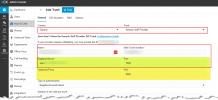
What interests me is what is highlighted in yellow in the attached screenshot.

1721673754425.png
 
  • Like
Reactions: Evolute IT
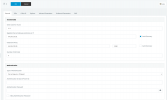
We are on V18 still. I'm hoping we can upgrade to V20 tonight but the engineer that has been handling those upgrades has not been able to get this system done due to timing conflicts. I've included the requested information below:
V1forForum.png
 
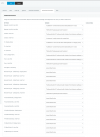
You are on V18. Even simpler. Please take a screenshot of the 'Outbound Parameters' tab.
I will tell you what to change.
 
Before edit :
Check that incoming calls are still working. (To avoid worsening your problem)

If Working ;
Replace everything labeled 'GWHostPort' with 'OutHostPort'.
After, on the first page, uncheck 'Auto Discovery'.

Then make a call. Working ?
Try the incoming calls again, are they still working?

FYI :
This should address your issue. 'GWHostPort' refers to the 'Registrar/Server/Gateway Hostname or IP' field, and 'OutHostPort' refers to the 'Outbound Proxy' field.
 
If I uncheck AutoDiscovery, it sets the port to 0. Attempting to save it, it reenabled auto discovery.
 
Change for port 5060
 
Okay I changed the setting for VI1, the outbound rules have 3 SIP Trunks defined as VI1, VI2, and VI3. These are matching VI's documentation about their IP's located here. When dialing out with the changes you have suggested (only applied to VI1), there is still a delay after attempting the Routes before the "Alerting Line" event. The Logs still are saying the SIP IP is 64.136.173.31 for Route 1.
 
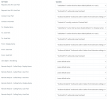
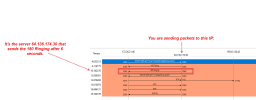
Okay, I've analyzed the capture you sent me. Here it is in an image.
From here, either try another server (IP) or contact them to find out why they are slow to send the Ringing. Is it because their own outbound routes have issues?


1721678048135.png
 
  • Like
Reactions: Evolute IT
Thank you so much Guillamue. I am reaching out to them now and will be discussing this with them.
 
  • Like
Reactions: Guillaume Bourgeois
According to this documentation,
voipinnovations Doc

it seems they want your IP.
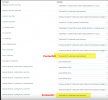
No problem, if that's what they need, you can change the settings highlighted in yellow to the "ContactUri" value.


1721679003162.png
 
  • Like
Reactions: Evolute IT
Thanks Guillaume. I made those changes in your most recent post and the dial delay has improved. Speaking with VoIP innovations, they say they see over 8 seconds of delay from the carrier so they are opening a ticket with them as well. I am going to continue tweaking the SIP Trunk settings for the other SIP Trunks (Still VoIP Innovations) to match the VI1 that I have been changing so far. I appreciate your help very much.
 
Okay I have made changes to all of our SIP Trunks to match those Outbound Parameters. I also added a +1 to the Main Trunk Number as VoIP Innovations mentioned that their number was not in the correct format. He's worried the carrier he is opening a ticket with will respond to the inquiry mentioning the formatting, so I made that change. As of now, outbound calls have about a 5 second delay between the routing test to alerting, which is much better than before. I'm not certain that the problem has been completely resolved yet but we definitely have improvements. Thanks!
 
Okay I have made changes to all of our SIP Trunks to match those Outbound Parameters. I also added a +1 to the Main Trunk Number as VoIP Innovations mentioned that their number was not in the correct format. He's worried the carrier he is opening a ticket with will respond to the inquiry mentioning the formatting, so I made that change. As of now, outbound calls have about a 5 second delay between the routing test to alerting, which is much better than before. I'm not certain that the problem has been completely resolved yet but we definitely have improvements. Thanks!

Now, this is the part where I am "boring".
I wouldn't be a good collaborator if I didn't warn you about the risks, and you may already know the "drill" ; for long-term reliability and to ensure future compatibility with 3CX updates, you should consider using a supported provider. I understand the desire to stay with VOIP Innovations, but if VOIP Innovations truly wants their 3CX clients to feel confident, they should undertake the interoperability steps with 3CX.

They need to comply with the following requirements:
https://www.3cx.com/docs/supported-sip-trunk-requirements/

Then, execute the test plan:
https://www.3cx.com/docs/sip-trunk-test-plan/

After that, they can fill out the application form to 3CX:
https://www.3cx.com/partners/sip-trunks/voip-provider-interop-form/

If 3CX approves, an agent will contact them to discuss a business agreement.

If VOIP Innovations does not follow these steps, you should seriously reconsider your choice and possibly switch to another provider. There are many providers who strive to meet 3CX standards to gain customer trust, and I assure you they will be much more deserving of your trust if VOIP Innovations does not take the necessary steps. ;)

No need to reply to my message, I'm just asking you to consider it :-)
Regardless, I'm happy to help you.
 
Status
Not open for further replies.

Latest Posts

Members Online Now

Forum statistics

Threads
111,831
Messages
589,276
Members
164,660
Latest member
RJenkinsROCK