- Joined
- Apr 18, 2017
- Messages
- 54
- Reaction score
- 4
Hi
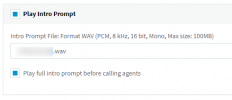
We have an intro prompt that plays in a Call Queue once our customers press option 1. If someone hangs up while the prompt message is still playing we get a Missed Call email. We want to set it so we only get the missed call email if the prompt has finished and the customer is then in the queue for say 10 seconds. Any idea how we would achieve this?
The only idea I have for this is setting the maximum queue wait time to 10 seconds, then redirecting them to another call queue?
We have an intro prompt that plays in a Call Queue once our customers press option 1. If someone hangs up while the prompt message is still playing we get a Missed Call email. We want to set it so we only get the missed call email if the prompt has finished and the customer is then in the queue for say 10 seconds. Any idea how we would achieve this?
The only idea I have for this is setting the maximum queue wait time to 10 seconds, then redirecting them to another call queue?