Dell sonicwall woes, unmatched mapping.

Status
Not open for further replies.

hogan71088

Gold Partner
Joined
Nov 30, 2015
Messages
144
Reaction score
36
Having great difficulty getting our dell sonicwall to correctly work with 3cx v15, have followed the 3cx guide and everything seems correct but getting an unmatched mapping on everything.

Firmware version is: SonicOS Enhanced 5.9.1.7-2o

Source port remap is disabled. Can anyone please help?
 
The hotfix according to dell support is included in the current firmware version...
 
hogan71088 said:
The hotfix according to dell support is included in the current firmware version...

I can confirm 5.9.1.7-2o works fine. There is an addition setting you have to set tho.

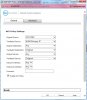
On the OUTBOUND rule, under the ADVANCED tab, you should have the 'Disable Source Port Remap' option checked.

If that doesn't help, PM me and I'll shoot you some screenshots from my own setup that works fine now that I upgraded to 5.9.1.7-2o
 
PM Sent - although it seems to be sat in the outbox...
 
Same here, feel free to post here if you can.
 
Ok, lets see how this works ;)

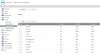
First I made sure the upgrade worked properly, and I was on the right firmware :
Attachment_1

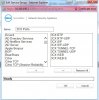
Next, I created all the ports I needed in Firewall-Service Objects
Attachment_2

Then I added the ports to a Service Group to make life easier.
Attachment_3

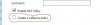
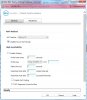
I then created two NAT rules using the 'Create a Reflexive Policy' option on the first page. Make sure you CHECK the box, I took the screenshot and forgot to have it checked ;)
Attachment_4

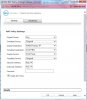
Once the rules were complete, they look like this in the Nat Policies

Outbound :
Attachment_5
Attachment_6


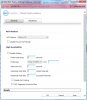
Inbound :
Attachment_7
Attachment_8


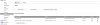
Once you apply the rules, check in the NAT-Policies list to ensure that your inbound/outbound NAT-Policies for 3CX occur BEFORE any general NAT policies - otherwise you'll never get to the 3CX one (Sonicwall does top-down processing, once it matches, it stops processing). So if you have a general outbound Any-Wan Primary IP NAT policy (which is pretty normal) then make sure your 3CX outbound policy occurs BEFORE the general one. Line 8 on my firewall has the 'disable source port remap' option set.

7 Any - Original - Wan Primary IP - 3CX PBX - 3CX Ports - Original
(Inbound, on the 3CX ports, forward to the PBX and leave the source IP and port unchanged)

8 3CX PBX - WAN Primary IP - Any - Original - Any - Original
(Outbound, from the PBX, translate the source to the WAN IP, leave the ports as is (Source Port remap disable))

9 Any - Wan Primary IP - Any - Original - Any - Original
(Outbound, Anything from any, Hide behind the WAN IP, leave the ports as is (but source port remap is allowed)

I can now perform the firewall test without issue, and all ports come back Green.

Let me know if that helps !!

Steve
 

Attachments

  • 2.jpg
    2.jpg
    106.9 KB · Views: 375
  • 3.jpg
    3.jpg
    63.2 KB · Views: 361
  • 4.jpg
    4.jpg
    8.9 KB · Views: 371
  • 5.jpg
    5.jpg
    75.9 KB · Views: 377
  • 6.jpg
    6.jpg
    74.8 KB · Views: 368
  • 7.jpg
    7.jpg
    78.1 KB · Views: 357
  • 8.jpg
    8.jpg
    75.9 KB · Views: 356
  • firmware_1.jpg
    firmware_1.jpg
    75.6 KB · Views: 321
Thank you so much for taking time to post that.
 
No problem - hopefully it gives you enough to get it working :)
 
Thank you for bringing in the screenshots und descriptions.
It helped me a lot!

Thumbs up! :)
 
You also have to use the first static IP in your assigned block. Or at least up until a year ago. Wasted hours of my life troubleshooting that issue.
 
Status
Not open for further replies.

Forum statistics

Threads
111,870
Messages
589,487
Members
164,716
Latest member
jvon@essentialnetworktech