Departments

Status
Not open for further replies.

Lockheed

Customer
Joined
Nov 12, 2020
Messages
7
Reaction score
0
Hi,

I don't find settings for departments in 3CX plugin, it was removed?

Thanks
 
Hi @Lockheed,

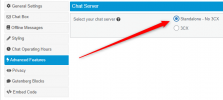
The Departments section is available in the Standalone Live Chat, but not in the 3CX version.

1640012951104.png
 
  • Like
Reactions: Lockheed
Hi @Lockheed,

Using the 3CX Live Chat, you can create 4 different Call Queues as well as 4 different Live Chats in the Messaging section, and have each department on a different page on your website (so like Support, Sales etc as different pages, and have each chat pointing to a specific page).
 
Hi @Lockheed,

Using the 3CX Live Chat, you can create 4 different Call Queues as well as 4 different Live Chats in the Messaging section, and have each department on a different page on your website (so like Support, Sales etc as different pages, and have each chat pointing to a specific page).
How?

My webmaster says that he could setup only 1 url
 
Hi @Lockheed,

It will require a 'work-around' solution using the HTML code generator: https://www.3cx.com/live-chat/code-generator/

As mentioned by my colleague here: https://www.3cx.com/community/threads/wordpress-chat-to-multiple-queues.78346/post-359208

"If you are using the WordPress plugin, you can explicitly set in what pages you want to use the plugin or not. On those pages that you want to have different configuration, you can use the code generator (https://www.3cx.com/live-chat/code-generator/) to populate HTML script with another queue.
On those specific pages that you want different queues, you will have the HTML script in place.

If you are using any other CMS or standalone HTML,you will generate multiple scripts that can be placed in different pages, with different configuration (queues) ."
 
  • Like
Reactions: Evolute IT
Status
Not open for further replies.

Forum statistics

Threads
112,149
Messages
590,965
Members
165,171
Latest member
Mahlon