Solved Deployment with large backup file

Status
Not open for further replies.

AlexStew

Free User
Joined
Jun 29, 2021
Messages
3
Reaction score
0
Hello,

I experiencing issues while i am trying to deploy my instance on self-hosted with a backup file over 500MB. The installation progress bar says ‘YOUR PBX IS DELAYED’. I am waiting more than 1 hour now.

Any suggestions ?
 
Hi @AlexStew,

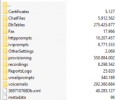
Can you post a screenshot of your backup file showing its content ( Filename, Size )? There might be some unnecessary files inside. We could delete them in order to minimize the size of your backup file and try again to deploy it.

Waiting for your response.
 
Hi Andreas,

Screenshot attached.

1624943688037.png
 
@AlexStew i think you are deploying to 3cx hosted and not self hosted as there is no backup option to upload on self hosted via 3cx Wizard.
Also can you please let us know the exact size of your backup ?
 
@NikosT_3CX, you’re right. I was trying to deploy it on 3CX hosted instead of self-host. Let me try and find a guide to deploy it on self-host.
 
  • Like
Reactions: cobaltit
Sounds like the provisioning folder is the biggest. Probably firmwares.
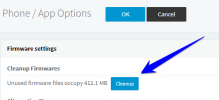
This. If you are coming from a recent version of 3CX there is an option to cleanup the firmware folder:

1625016852971.png

I would use that and then take a new backup.
 
Status
Not open for further replies.

Forum statistics

Threads
111,974
Messages
590,081
Members
164,899
Latest member
mazet