Desktop App can't make calls until closed and reopened

Status
Not open for further replies.

SteveITS

3CX MVP
Silver Partner
Advanced Certified
Joined
Jun 20, 2018
Messages
4,477
Reaction score
2,191
First, can/should there be a new forum for Desktop App? Is it under Web Client or Windows?

On to the issue...I've run into this I think 3-4 times since upgrading to v18 a few months ago, but I happen to be on an older PC and no one else complained so I didn't think much of it. However today a client ran into it also.

The Desktop App seems to be operating fine, but if you try to call any number, even extensions or *777, it starts to connect and immediately terminates the call. No call log entries or activity log entries. The "fix" is to close the app from the system tray icon and start it again after which all is fine.

I'm not sure how to duplicate it other than wait several weeks. I tend to leave my PC logged in but locked; this client's PC logs out every night so 3CX should have been started up new this morning. I had kind of mentally linked it to some sort of disconnection from the audio driver on my PC but now that it's happened to another it seems I should pursue it.

both servers:
Linux 18.0.237
hosted in a data center (by us)

One thing I do note on my PC/app is that in the mornings the status/chat doesn't update until I click on the program window. Though again, the call problem doesn't happen every day.
 
Hi!

First, can/should there be a new forum for Desktop App? Is it under Web Client or Windows?
You would want to create then under "Windows".

Now onto your problem, could you please tell us what version of the Desktop App you are using?
 
could you please tell us what version of the Desktop App you are using?
18.5.28, but it had happened dating back a couple of months, just rarely.
 
Hi Nick, I'll try that and ask my client if he wants to. However it may be a month or two for me before I can say for sure it's working, and this was his first report since their 3CX install in July or thereabouts.
 
V18 Update 2 is just around the corner and with the Desktop App that will be shipped with it, there are many improvement, including stability ones.
Let us know how it goes.
 
It's been fine for a couple of weeks until today. Client called, coworker answered and parked them, called me to tell me. I answered, talked to my coworker, and hung up. When I pressed the SP0 BLF, the dialer went grayed out like it does at the beginning of dialing, but then after a second or so the call (appeared to have) dropped. *777, same thing. However I could hear the *777 keypresses as the headset was still connected/active. As before, closed the desktop app and (re)started it to resolve. So in this case although it was after 4 days of not being used, the first call worked. And I did receive the incoming call's ring as well (the client, before the other person answered). I answered the first with the headset button (Sennheiser/EPOS), though I do that a lot.
 
It's been fine for a couple of weeks until today. Client called, coworker answered and parked them, called me to tell me. I answered, talked to my coworker, and hung up. When I pressed the SP0 BLF, the dialer went grayed out like it does at the beginning of dialing, but then after a second or so the call (appeared to have) dropped. *777, same thing. However I could hear the *777 keypresses as the headset was still connected/active. As before, closed the desktop app and (re)started it to resolve. So in this case although it was after 4 days of not being used, the first call worked. And I did receive the incoming call's ring as well (the client, before the other person answered). I answered the first with the headset button (Sennheiser/EPOS), though I do that a lot.
Hi!

You could you confirm what version of the Desktop App you were using when this happened?
Also this behavior looks similar to if the Desktop App disconnected from the server. It reconnects automatically after ~60-90 seconds max. Did you happen to leave it for a while to see if it "recovers" by itself?
 
Windows shows it as 18.7.7. It does sound similar to a disconnect, but I do not get the standard message indicating the client was disconnected. I can't wait very long as I can't leave a client on hold but can try that if I can next time it happens and someone's not parked. I don't recall if I clicked around the app interface besides in the dialer. Also of note I was on Remote Desktop to my office and wasn't disconnected, or others in my house, so I don't think it was an Internet issue.
 
Also of note I was on Remote Desktop to my office and wasn't disconnected, or others in my house, so I don't think it was an Internet issue.
It's good that at least we know it wasn't an internet disconnection, it may have been something that disconnected the client from the server though, even server-side.
The client by the way is installed on your PC at home right? You weren't operating it though the Remote Desktop and it is installed on the remote host you were connected to?

Also, where is the 3CX Server installed?


I can't wait very long as I can't leave a client on hold but can try that if I can next time it happens and someone's not parked.
That would be very useful.
Also what you could do in preparation is put your 3CX System in Verbose logging mode. You can do this from the Management Console --> Dashboard --> Activity Log --> Settings.
Then once it happens again, keep a note of the time, then from the Management Console in the upper-right corner, click "Support" then generate the support info.
In this ZIP file you will find the "3cxManagementConsole.log" file.
Search around the time the disconnection happened.
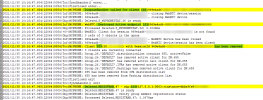
If the client is disconnected, you will see some log entries similar to this (Extension 103 was used in this example):
1638260654479.png
 
The desktop app is running on my home PC.
The 3CX server is in our data center. Linux under KVM.
The issue with verbose logging is I'd need to leave it that way for a couple weeks to a month or more waiting for it to happen again...
Thanks.
 
The desktop app is running on my home PC.
The 3CX server is in our data center. Linux under KVM.
The issue with verbose logging is I'd need to leave it that way for a couple weeks to a month or more waiting for it to happen again...
Thanks.
Assuming you enough disk space, the Verbose logs to rotate, so it's not going to take up all of your disk space even leaving it for a month.
I'd say on average, it will be consuming 200-300 MB more disk space at any given time.

Also if your system isn't SUPER busy and you are following the recommended hardware specs, you should be fine.
 
Hi Nick, it happened just now when I tried to make my first call of the day. None of those four lines appear in the log file. Other functions of the client such as status and chat are fine, before and after I tried the call. After 8 minutes of pulling the log and typing here, *777 still doesn't work.

edit: I meant to say I did see 18U2 was out today, with a new .10 app, will update this weekend.
 
  • Like
Reactions: NickD_3CX
Please do, yes.
Also, would it be possible to disable the Headset integration for a few days to see if this has something to do with it?
 
OK, will do and report back at some point...if it happens, probably 1-3 weeks, if not, probably longer. Thanks.
 
  • Like
Reactions: NickD_3CX
Hi
I have a similar problem, I have upgraded my 3cx to v18 running on windows server 2016R2, and updates last week to update 2, my desktop apps are also updated. My desktop app gives me problems every day with no audio. Once I end the process and open again it works for a couple of hours, then the same again. My users are working from home and connect into the work network (VPN) using Global Protect, and some Zscaler. I have the same issue with the users even when using the webclient running on chrome on windows 10 machines.
Any idea on where to start looking for this problem?
I have a feeling this is a different problem than what the OP is describing.

The OP is saying that at some point, they can't dial. You are saying that you have no Audio during calls from one point onward.
Did I understand correctly?
 
That's different then as I can't dial. re: VPN, 3CX has posted on other threads to make sure the VPN is connected before the 3CX app connects.
 
  • Like
Reactions: NickD_3CX
Hi Nick
Yes, I made sure of the updates, the system is on v18 update 2 build 307 and the desktop app 18.7.10
My users only when working from home and connecting to the workplace with VPN, they do not have audio in calls. Sometimes by ending the desktop app process and reopening it there is audio. But little bit later in the day the same problem again .I can always dial, but the audio is a problem.
OK, so it is a different type of problem completely.

In order to keep things nice and tidy in each thread, I will delete the comments so as not to throw other people off that may be reading this, but please create a new thread in the Webclient section with the exact same information you posted before so we can check it.
First free tip, make sure you are allowing UDP ports 9000-10999 through the VPN.
 
Also, would it be possible to disable the Headset integration for a few days to see if this has something to do with it?
It happened yesterday, on 18u2 and the new Desktop App. Headset integration has been set to None, though I realized the EPOS software is now running after a boot on Dec. 26 to install Windows 10 21H2. I had left the app open as I always do. I sent a chat, entered a contact, and then couldn't dial. I didn't document it in the beginning of this but when it happens it always seems to be in the morning or after a period of idle time like overnight 6pm to 9am, or in this case several days over the weekend...and note I was on the PC several times over the weekend, I just hadn't made any calls. In fact I sent a chat on Saturday.

I had previously found a post suggesting changing the USB selective suspend setting so I did that, but do not have the USB controller setting noted there ("Allow to turn off this usb").
 
It happened yesterday, on 18u2 and the new Desktop App. Headset integration has been set to None, though I realized the EPOS software is now running after a boot on Dec. 26 to install Windows 10 21H2. I had left the app open as I always do. I sent a chat, entered a contact, and then couldn't dial. I didn't document it in the beginning of this but when it happens it always seems to be in the morning or after a period of idle time like overnight 6pm to 9am, or in this case several days over the weekend...and note I was on the PC several times over the weekend, I just hadn't made any calls. In fact I sent a chat on Saturday.

I had previously found a post suggesting changing the USB selective suspend setting so I did that, but do not have the USB controller setting noted there ("Allow to turn off this usb").
Once you realize this happens again (dialing and the dialer immediately terminates), before restarting the app, go to %appdata%\3CXDesktopApp\logs\ on your PC and copy all files to a temp folder on your desktop, the zip them up and send them to me in a PM so we can check client side. Also mention the time when you attempted to dial and it terminates so we can narrow down the logs we need to check.
 
Status
Not open for further replies.