Solved DIAL CODE *641 or *642 don't work V20 upgrade on primes

Status
Not open for further replies.

Johseph

Customer
Joined
Jun 25, 2024
Messages
3
Reaction score
1
Good morning everybody,

I'v a problem with dial code *641 and *642 after V20 upgade on primes pbx, it's impossible to active Out-of office and reactive In-office.
It's a 3CX V20 bug ?
 
Hi there.
V20 does not have global Force system out of office hours, as not each department can be independent company and 1 single user should not make system unavailable.
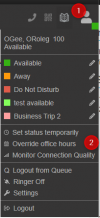
What you can do now, is from your Webclient, click on your profile and then Override office hours, then you will be able to select to which department it should apply and how long :

1719321114213.png
 
Hi there.
V20 does not have global Force system out of office hours, as not each department can be independent company and 1 single user should not make system unavailable.
What you can do now, is from your Webclient, click on your profile and then Override office hours, then you will be able to select to which department it should apply and how long :

View attachment 42163


I can't program *641 and *642 to direct IP Phone dial button: aren't you?
 
No, dial code won't work
 
  • Sad
Reactions: RCCradio
  • Like
Reactions: OlegR_3CX
You are welcome. Have a nice day
 
Status
Not open for further replies.

Latest Posts

Forum statistics

Threads
112,276
Messages
591,637
Members
165,393
Latest member
Carlos - EC Mates