Dial Extension at Any Time

Status
Not open for further replies.

JasonD

Customer
Joined
Jan 20, 2022
Messages
28
Reaction score
1
We are setting up a call flow app and are stuck, we want to perform the following:

Inbound call is received and the menu greeting is played:

"If you know your parties extension you may dial it at any time, for sales press 1, for accounting press 2, for our dial by name directory press 3".

We obviously know how to capture the 1, 2 or 3 option, but how do we do the extension transfer?

Thanks,

Jason
 
Hi @JasonD

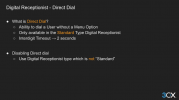
You do not need a call flow app for this. This is possible with just a Standard Type Digital Receptionist.

Select your options 1, 2 and 3 and the option for direct dialing does not require an option in the Digital Receptionist.

1653046860800.png
 
  • Like
Reactions: Evolute IT
I understand this can be done from a Digital Receptionist, however, the rest of our call flow can not be handled by the DR so we need a call flow app and need to know how to properly setup the dial an extension at anytime from a call flow app menu.

Additionally, we use Amazon Polly for our greetings and you can't use that service from a Digital Receptionist which causes other issues in that our voice would not be the same from greeting to greeting, which is a mandatory requirement that all greetings be the same voice and we prefer the text to speech services.

Jason
 
Then you are complicating your life for no reasons. You can always route from the IVR to a CFD if needed.

Why do you need to fully control the flow in CFD?
 
Our call flow has nested menu's, the first checks the number to route to the correct starting point, then it plays the menu (which should have the dial extension at any time) and from the first menu, they could be routed to a call queue or to a sub-menu (which would also have the dial extension at any time option).

Make sense?
 
Our call flow has nested menu's, the first checks the number to route to the correct starting point, then it plays the menu (which should have the dial extension at any time) and from the first menu, they could be routed to a call queue or to a sub-menu (which would also have the dial extension at any time option).

Make sense?
You still don't need CFD to do that... IVRs can have many levels.
 
  • Like
Reactions: sam.phillips
IVR's also do not integrate with the Amazon Polly service for text to speech and our menu options change frequently so having to constantly record greetings is not an option, instead we use this service to allow for changing on the fly without the need to re-record a bunch of greetings.

I'd really just like pointers on how to do what I'm asking vs. being told we aren't doing it right. We have many reasons for using the CFD, including database lookups and just need to add the dial an extension at any time via the CFD.

Thanks,

Jason
 
Then you'll need to not only grab the 3-digits DTMF but also verify that the entry is valid before forwarding.
 
Correct, what we haven't figured out is how to embed the user input into the menu in the CFD, this is the help we are looking for.
 
Correct, what we haven't figured out is how to embed the user input into the menu in the CFD, this is the help we are looking for.
The UserInput component instead of using the Menu component. You'll have to create the IVR yourself, not use the Menu for this.
 
Ok, I've rebuilt the call flow using the user input and I have one issue, when evaluating the user selection I can get the option for length of 4 to transfer to the dialed extension, but I am not able to get it to evaluate the user InputBuffer for a specific value (ie. 1) to then transfer to the next step of the call flow. I am using Equal(Open_userInput.Buffer,1) and I get an invalid option everytime.

Thoughts?

Jason
 
Ok, I've rebuilt the call flow using the user input and I have one issue, when evaluating the user selection I can get the option for length of 4 to transfer to the dialed extension, but I am not able to get it to evaluate the user InputBuffer for a specific value (ie. 1) to then transfer to the next step of the call flow. I am using Equal(Open_userInput.Buffer,1) and I get an invalid option everytime.

Thoughts?

Jason
Try using EQUAL(TO_STRING(Open_userInput.Buffer), "1")

Also, make sure that's processed before your 4-digits. You can also use a conditional to check GREAT_THAN(LEN(Open_userInput.Buffer), 4)
 
So my input option allows for upto 4 digits, I then check the following

EQUAL(TO_STRING(Open_userInput.Buffer), "1")
EQUAL(TO_STRING(Open_userInput.Buffer), "2")
EQUAL(TO_STRING(Open_userInput.Buffer), "3")
GREAT_THAN(LEN(Open_userInput.Buffer), 4)

The first three options all respond with "You have made an invalid selection" and the last option works. Why will the first three not evaluate as true when option 1, 2 or 3 are selected?

Jason
 
Scrap the last post, I figured it out. I had forgot to set the input to 1 to 4 digits and it was set for 3 to 6 and thus a 1 digit entry was invalid. All is working now, thanks for your help!!
 
  • Like
Reactions: Evolute IT
Scrap the last post, I figured it out. I had forgot to set the input to 1 to 4 digits and it was set for 3 to 6 and thus a 1 digit entry was invalid. All is working now, thanks for your help!!
With your previous post, yes that should work.
 
Status
Not open for further replies.

Forum statistics

Threads
111,832
Messages
589,284
Members
164,662
Latest member
DejanMDS