Dial from batch file help please?

Status
Not open for further replies.

YG1234

Forum User
Joined
Jul 23, 2020
Messages
11
Reaction score
1
Hi I am trying to setup a dial from batch file for our CRM. The version of 3CX is 16.0.4.493 Pro license. I have the following in the batch file:

@echo off

set new_num=%1
set new_num=%new_num:tel:=%

"C:\ProgramData\3CXPhone for Windows\PhoneApp\CallTriggerCmd.exe" --dial %123456%

Whilst this almost works when 3cx goes to dial it just has a load of numbers in the dial field (please see pic) Can anyone tell me what I am doing wrong? Many thanks
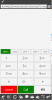
3cx error.png
 
Right so I now have a batch file called makecall.bat which has the following code in it:

@echo off

"C:\ProgramData\3CXPhone for Windows\PhoneApp\CallTriggerCmd.exe" --call %1

".\makecall.cmd 9065551234"

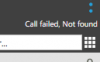
this currently results in this happening:call failed.png

Fancy a job, what I mean is that I have got to get this working so if you would like to help and confident that you can get it working, would gladly pay you.
 
Right so I now have a batch file called makecall.bat which has the following code in it:

@echo off

"C:\ProgramData\3CXPhone for Windows\PhoneApp\CallTriggerCmd.exe" --call %1

".\makecall.cmd 9065551234"

this currently results in this happening:View attachment 17507

Fancy a job, what I mean is that I have got to get this working so if you would like to help and confident that you can get it working, would gladly pay you.
The command you then need to run to use that bat file is:

.\makecall.bat "<a phone number>"

it should work. If not, there might be an issue with the outbound rules as it shows "not found". What country are you from?
 
  • Like
Reactions: YG1234
DM to continue this thread.
 
This issue is now resolved thank you for all your help.
 
  • Like
Reactions: Evolute IT
Status
Not open for further replies.

Latest Posts

Forum statistics

Threads
112,324
Messages
591,897
Members
165,476
Latest member
awan05