Dial from batch file help please?

Status
Not open for further replies.

YG1234

Forum User
Joined
Jul 23, 2020
Messages
11
Reaction score
1
Hi I am trying to setup a dial from batch file for our CRM. The version of 3CX is 16.0.4.493 Pro license. I have the following in the batch file:

@echo off

set new_num=%1
set new_num=%new_num:tel:=%

"C:\ProgramData\3CXPhone for Windows\PhoneApp\CallTriggerCmd.exe" --dial %123456%

Whilst this almost works when 3cx goes to dial it just has a load of numbers in the dial field (please see pic) Can anyone tell me what I am doing wrong? Many thanks
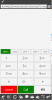
3cx error.png
 
When you invoke:
"C:\ProgramData\3CXPhone for Windows\PhoneApp\CallTriggerCmd.exe" --dial %123456%

%1 takes the value from the argument of your batch, and then 23456 is added at the end. So it looks like if you're sending that long number as script argument. Is that your case? How are you invoking this script?
 
You may want to consider using the "--call" command rather than the "--dial" command. "--call" immediately invokes the call while "--dial" just places the phone number in the field and requires you press the call button to actually place the call. You can get syntax help by typing "--help".
 
  • Like
Reactions: edossantos
Hi I changed to the call command and I removed the 23456 so the script now looks like this:
@echo off

set new_num=%1
set new_num=%new_num:tel:=%

"C:\ProgramData\3CXPhone for Windows\PhoneApp\CallTriggerCmd.exe" --call %1%

All that happens now is I get a blank ms dos box but it doesn't automatically dial the number. The way I am invoking this script is using the dial command in goldmine CRM this in turn points to a users config file in goldmine which points to the batch file. I have no problem running the script from goldmine it just seems that the script that is running is incorrect and wont automatically dial the number in a contact on goldmine. hope that makes sense? and I appreciate your reply's thanks
 
When you test, always test from the most direct route first. Can you run the command interactively from a command windows without variables. Once you have that working, take the same command and put it into the batch file. Once that is working, replace the literals with variables and get that working. Then, once you have the batch file working manually, try calling it from goldmine.

I noticed one syntax error:

--call=%1%

Don't forget the equal sign after "call".
 
I created a batch file which contains the following:
Code:
"C:\ProgramData\3CXPhone for Windows\PhoneApp\CallTriggerCmd.exe" --call %1

I invoke it like this:
mybatch.cmd 101

And it calls extension 101 from my 3CXPhone for Windows.

Please note that the variable which contains the number received as parameter is %1 and not %1%.

So probably your previous script is sending a wrong number. Maybe you can remove the ECHO OFF to see what's being invoked.
 
I appreciate the help thanks however I am still not making any headway on this. I have taken echo off as suggested and come up with this. As I am obviously a newbie compared to you guys can anyone point me to where I can read up on this syntax stuff please?
3cx batch file with echo off.png
 
I appreciate the help thanks however I am still not making any headway on this. I have taken echo off as suggested and come up with this. As I am obviously a newbie compared to you guys can anyone point me to where I can read up on this syntax stuff please?
View attachment 17504
Your syntax is wrong. Check his example above.

You need the params --call with a simple number. Not "makecall:&Dial...".
 
Thanks I have tried with that and it does nothing im afraid, I think it would be safe to say that I dont completely know what I am doing at this point which is why I am asking if there is any documentation online that I can study to get a better understanding of it all.

@echo off

set new_num=%1
set new_num=%new_num:tel:=%

"C:\ProgramData\3CXPhone for Windows\PhoneApp\CallTriggerCmd.exe" --call %1
 
Thanks I have tried with that and it does nothing im afraid, I think it would be safe to say that I dont completely know what I am doing at this point which is why I am asking if there is any documentation online that I can study to get a better understanding of it all.

@echo off

set new_num=%1
set new_num=%new_num:tel:=%

"C:\ProgramData\3CXPhone for Windows\PhoneApp\CallTriggerCmd.exe" --call %1

Put this in a "makecall.cmd" file:


Code:
@echo off

"C:\ProgramData\3CXPhone for Windows\PhoneApp\CallTriggerCmd.exe" --call %1

Then, call the code this way:

".\makecall.cmd 9065551234"

%1 is the first argument, being the phone number.
 
I apologise for being stupid but what is a makecall.cmd file? & how do I use ".\makecall.cmd 9065551234" to call the code in a dos window?

I am only used to having the code saved in a batch file and use goldmine to trigger it that was the only way I was ever show how to use it.
 
I apologise for being stupid but what is a makecall.cmd file? & how do I use ".\makecall.cmd 9065551234" to call the code in a dos window?

I am only used to having the code saved in a batch file and use goldmine to trigger it that was the only way I was ever show how to use it.
I'd recommend you hire a programmer or IT expert then. You seem confused by all this, so I'd hire someone before I break something lol
 
haha you wont break anything I am ok with I.T :) just not syntax of 3cx it seems
 
haha you wont break anything I am ok with I.T :) just not syntax of 3cx it seems
It's a batch file, 3CX is just the program you call in it, which is very easy. I explained it above.

As to how you would use it in Goldmine, I don't know, just make sure it sends the phone number only and not a string full of "&Dial=..."
 
I just been advised to read up about call flow designer would that help?
 
all you do with goldmine is put this in the users .ini file and it will run the batch script triggered by the end user clicking on dial in goldmine if that makes sense.
[Modem]
DDEDIAL=&Dial,,\\SERVER\Goldmine2\3dial64.bat "%s"
HangupTime=30
AreaCode=0000
TAPITranslation=1
DeviceID=0
 
I just been advised to read up about call flow designer would that help?
Not for what you need. Not at all.

Call Flow Designer is different. Like I said, hire someone who really knows these things, you'll waste so much time trying to understand that it will cost more in the end ;)
 
all you do with goldmine is put this in the users .ini file and it will run the batch script triggered by the end user clicking on dial in goldmine if that makes sense.
[Modem]
DDEDIAL=&Dial,,\\SERVER\Goldmine2\3dial64.bat "%s"
HangupTime=30
AreaCode=0000
TAPITranslation=1
DeviceID=0
For this, the DDEDIAL would be:

Code:
&Dial,,\\SERVER\path\to\makecall.bat "%s"

Put the two lines I told you in that "makecall.bat" or .cmd, it's the same thing.

That code should run on the client-side.
 
Not for what you need. Not at all.

Call Flow Designer is different. Like I said, hire someone who really knows these things, you'll waste so much time trying to understand that it will cost more in the end ;)

Fancy a job? :)
 
Status
Not open for further replies.

Forum statistics

Threads
112,326
Messages
591,899
Members
165,479
Latest member
Senergia