DID not routing to the correct extension?

Status
Not open for further replies.

Song

Bronze Partner
Basic Certified
Joined
Nov 12, 2018
Messages
379
Reaction score
24
Hi,

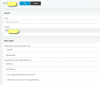
I have assigned a DID for a extension. But everytime I called the DID it just go to the auto attendant. Anyone know what is causing this? Why its not going straight to the extension? I see the incoming route for DID is pointing to extension 123. But calls are still being coming into the auto attedant. Am I missing anything? I think something global is causing this . Where do I check?

thank you
 

Attachments

  • inbound.png
    inbound.png
    28.6 KB · Views: 6
most probably your rule is not applied because your number is not in same format your sip provider send it. so rule found no matching.
To avoid this problem modify your rule and don't set complete DID number but for example only the last 5 or 6 digits
IF your number is 10 digit ie. 0102030405 , in inbound rule set *030405, try this.

To see some more details set your log in verbose
 
still not working. I don't know why. I add CID rule in the inbound rule and added *2221 as that is the last 4 digit of the number you told me and route it to extension 128. But still getting the auto attendant. So strange. :(. I know it must be something simple.
 
I already have my inbound rule setup already with the DID. ok I turned on the activites log and turn on verbose. For some reason it the PATTON Analog Device 4323 FXO gateway is not passing the DID. instead i look closely it is passing the FXO number. So for the DID i dial it uses 000014. Which is for FXO14. So I added the 000014 DID into the DID and added it to the user and it worked!! Wonder why it is not passing the DID instead passing the FXO port. Maybe that is how it work with the PATTON Smart Analog device?

thank you!!
 
You customised your own template if I recall so it could likely be an error with this.

You can find out more about what the Patton is doing yourself (unless you want to contact Patton Support who will assist) by running the following command set on the CLI of the unit:

enable
debug call‐router
debug call‐control
debug fxo
debug ccfxo
debug context sip‐gateway signaling detail 5
debug context sip‐gateway transport detail 5
debug context sip‐gateway error

As per: https://www.patton.com/support/kb_art.asp?art=446&p=128

FYI there is no model Patton 4323 - you mean Patton 4324 ?

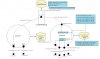
I have also attached a diagram of how the layout of a standard FXO Patton should look (obviously yours would be x 24 on the FXO interfaces and ports).
 

Attachments

  • Standard_FXO_3CX.jpg
    Standard_FXO_3CX.jpg
    126.2 KB · Views: 1
Status
Not open for further replies.

Latest Posts

Forum statistics

Threads
111,939
Messages
589,843
Members
164,822
Latest member
Lengo