Digit missing on caller ID across bridge

Status
Not open for further replies.

contoured_solutions

Silver Partner
Joined
Dec 2, 2021
Messages
43
Reaction score
5
Hello! I have a client with two 3CX instances, one in America and one in Mexico, which are connected via a bridge. When a Mexico extension calls the US PBX, the first digit is stripped from the extension on the inbound call. I have checked the outbound rules on both ends and in both cases the "Strip Digits" option is set to 0. I'm not sure what else it could be. Any ideas?
 
Just so that we first better understand the situation:

• What version of 3CX are the two PBX running? Check under "Dashboard >> Information >> License/Version".

• You say there's a digit missing from the Caller ID but then you mention the Strip Digit option on the Outbound Rule. The Caller ID refers to the "From" number and the Strip Digit option strips digits from the "To" number(dialed number). That said, could you please clarify where the digit is being stripped from with an example perhaps. Lets say you call from extension 101 on PBX A to extension 102 on PBX B. What does 102 on PBX B see, is it 01 instead of 101?

• Do you use a prefix to reach the bridged PBX? For instance, do you need to dial 9102 to reach extension 102 on PBX B?

• Does the issue happen in both directions? For instance, does it also happen for calls from the US PBX to the Mexico one or only when it's the other way around?
 
Just so that we first better understand the situation:

• What version of 3CX are the two PBX running? Check under "Dashboard >> Information >> License/Version".

• You say there's a digit missing from the Caller ID but then you mention the Strip Digit option on the Outbound Rule. The Caller ID refers to the "From" number and the Strip Digit option strips digits from the "To" number(dialed number). That said, could you please clarify where the digit is being stripped from with an example perhaps. Lets say you call from extension 101 on PBX A to extension 102 on PBX B. What does 102 on PBX B see, is it 01 instead of 101?

• Do you use a prefix to reach the bridged PBX? For instance, do you need to dial 9102 to reach extension 102 on PBX B?

• Does the issue happen in both directions? For instance, does it also happen for calls from the US PBX to the Mexico one or only when it's the other way around?
When a Mexico user calls a US extension, the US person receives the calls, but the US user sees the incoming call with the first digit missing.

Their versions are 18.0.237

The users do not dial a prefix for the bridge.

I think the issue only occurs from Mexico. I will verify.
 
When a Mexico user calls a US extension, the US person receives the calls, but the US user sees the incoming call with the first digit missing.
So is the digit missing from the caller's number? Let's say 101 calls 102, do you see 01 on 102's device?

In order to first determine on which PBX this is happening I'd recommend enabling Verbose Logging on both and then checking the Activity Log on both. Enable verbose Logging in "Dashboard >> Activity Log >> Settings" on both PBXs and then make the call. Confirm the issue persists and then go into "Dashboard >> Activity Log" and use the "filter" button to only display that specific call. Check the "Remote-Party-ID" field for the Caller number, what does it contain, is it indeed missing one digit? You should compare the SIP INVITE sent from the originating PBX and the SIP INVITE received by the destination PBX to hopefully determine where the issue is occurring.
 
Sorry for the long wait. It took me a while to coordinate a time with the Mexico folks.

Here is what the call from Mexico looks like. In the following example, extension 132 is calling 214.

12/20/2021 9:45:50 AM - L:435.2[Extn:132] got Terminated Recv Req BYE from 192.168.1.208:49925 tid=Pj307d579c9aa64c3791520413503e7f5a Call-ID=CKXpiFE6qvoNet57ooK-1A..: BYE sip:[email protected]:5060 SIP/2.0 Via: SIP/2.0/UDP 192.168.1.208:49925;rport=49925;branch=z9hG4bKPj307d579c9aa64c3791520413503e7f5a Max-Forwards: 70 To: "USA USER" <sip:[email protected]:5060;nf=b>;tag=30501d06 From: <sip:[email protected]>;tag=04bf3c5a826d4999b9d46d95f858a139 Call-ID: CKXpiFE6qvoNet57ooK-1A.. CSeq: 1659 BYE User-Agent: 3CXPhone for Windows 16.3.0.264 Content-Length: 0


Here is what is received on the USA PBX

12/20/2021 9:45:04 AM - L:5458.3[Extn:214] got Terminated Recv 487/INVITE from 127.0.0.1:5483 tid=1795eb21e80eff0e Call-ID=cD70ow8eKRdA4okEmKUpwQ..: SIP/2.0 487 Request Terminated Via: SIP/2.0/UDP 127.0.0.1:5060;branch=z9hG4bK-524287-1---1795eb21e80eff0e;rport=5060 To: <sip:[email protected]>;tag=ef8c462e From: "MEXICO USER"<sip:[email protected]:5060;nf=b>;tag=822ec949 Call-ID: cD70ow8eKRdA4okEmKUpwQ.. CSeq: 1 INVITE User-Agent: 3CX Mobile Client Content-Length: 0

As you can see the call goes out with all extension digit intact on the Mexico side, but comes into the USA PBX with the first digit missing. I checking the Outbound settings on the Mexico side and no digits are being stripped. What else could be going on?
 
This looks like the internal leg, you'll have to check the external one which is between the two PBXs, try the following:

• On the PBX that received the call. go to "Dashboard >> Activity Log"

• Select Filter and select
- "20/12/2021 12:00 AM - 21/12/2021 12:AM"
- Search by Extension: <Bridge_EXT_#> (example: 10001)
- Search by Call: "All Calls"

• Search the logs for the call to extension 214 at approximately 9:45:04 and check the SIP INVITE. There should be a field that says "Remote-Party-ID" and that is the one that should carry the from extension number (132). Is it 132 or 32?

• If it's 32, you will have to do this same thing on the originating PBX.
 
Last edited:
  • Like
Reactions: ChrisC_3CX
This looks like the internal leg, you'll have to check the external one which is between the two PBXs, try the following:

• On the PBX that received the call. go to "Dashboard >> Activity Log"

• Select Filter and select
- "20/12/2021 12:00 AM - 21/12/2021 12:AM"
- Search by Extension: <Bridge_EXT_#> (example: 10001)
- Search by Call: "All Calls"

• Search the logs for the call to extension 214 at approximately 9:45:04 and check the SIP INVITE. There should be a field that says "Remote-Party-ID" and that is the one that should carry the from extension number (132). Is it 132 or 32?

• If it's 32, you will have to do this same thing on the originating PBX.


Okay, I found this:

Code:
12/20/2021 9:45:01 AM - [CM500002]: Call(C:5458): Info on incoming INVITE from Line:10004<<+132:
Invite-IN Recv Req INVITE from 127.0.0.1:5080 tid=2c0764480382026a Call-ID=AfgVJRTlFdESxBeP8M8q1Q..:
INVITE sip:[email protected]:5060;rinstance=8772d63c8e2ab083 SIP/2.0
Via: SIP/2.0/UDP 127.0.0.1:5080;branch=z9hG4bK-524287-2---2c0764480382026a;rport=5080
Via: SIP/2.0/UDP 201.140.137.228:5090;branch=z9hG4bK-524287-1---tunneltid;rport;bridgeid=10004
Via: SIP/2.0/UDP 127.0.0.1:5060;branch=z9hG4bK-524287-1---2c0764480382026a;rport=5060
Max-Forwards: 68
Record-Route: <sip:[email protected]:5080;user=proxy;uri;bridgeid=10004>
Contact: <sip:[email protected]:5060>
To: <sip:[email protected]:5060;rinstance=8772d63c8e2ab083>
From: "MEXICO USER"<sip:[email protected]:5060;rinstance=8772d63c8e2ab083>;tag=9f7d965a
Call-ID: AfgVJRTlFdESxBeP8M8q1Q..
CSeq: 2 INVITE
Allow: INVITE, ACK, CANCEL, OPTIONS, BYE, REGISTER, SUBSCRIBE, NOTIFY, REFER, INFO, MESSAGE, UPDATE
Content-Type: application/sdp
Proxy-Authorization: Digest username="10004",realm="3CXPhoneSystem",nonce="414d535961c0c11d34:eda10730c5df184b32adc99975ca6411",uri="sip:[email protected]:5080;user=proxy;uri;bridgeid=10004",response="aee63ec3b59d8eabd61b4a6b2cad88f9",algorithm=MD5
Supported: replaces, timer
Remote-Party-ID: "MEXICO USER"<sip:132@mexicopbxaddress:5060>;party=calling
Content-Length: 281

It looks as though the receiving PBX is getting the full extension number. What could be stripping this on the USA side?
 
Have you tried what was mentioned in the thread @leejor posted?

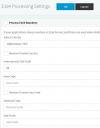
Do this on both PBXs:

• go into "Settings >> E.164 Processing"
• uncheck all options
• Change country to something else other than you own

1640165331443.png


Apply and then try the same call again, do you get the same behavior?
 
Have you tried what was mentioned in the thread @leejor posted?

Do this on both PBXs:

• go into "Settings >> E.164 Processing"
• uncheck all options
• Change country to something else other than you own

View attachment 26717


Apply and then try the same call again, do you get the same behavior?
Did this on both ends and the user reported the same issue.

While this was unchecked, USA users could not make outbound calls. Does that sound correct?
 
Did this on both ends and the user reported the same issue.
I did confirm this to be a known issue so I also tested a bit and found that I can replicate it when implementing a very similar configuration to yours. It does stop occurring when I chance the Country under the E164 processing settings so please make absolutely sure that you've not only disabled the option on the US PBX but that you have also changed the country to one that does not start with +1.

While this was unchecked, USA users could not make outbound calls. Does that sound correct?
This actually makes sense if your Outbound Rules are not configured to accommodate for this. That said, I'd recommend configuring your Outbound Rules in such a way so that these calls are formatted correctly.

You could for instance create an Outbound Rule that matches calls starting with + and then strips 1 digit (the + sign) and prepends 00 before sending the call to the provider. Try adjusting the Outbound Rules a bit with E164 disabled and let me know if you manage to get Outbound Calls working again.
 
Status
Not open for further replies.

Forum statistics

Threads
111,974
Messages
590,083
Members
164,901
Latest member
Silent_Guru