Disable Extension

Status
Not open for further replies.

Jason Hayes

Advanced Certified
Joined
Mar 5, 2019
Messages
84
Reaction score
17
Hi, always confused what "Disable Extension" does. If a member of staff leaves, how do you prevent them from having access 3CX? WebClient, you can change the password, that works. Windows Client, disabling their extension still means they can view, Chats, Recent Calls, view other members of staff's present information. Changing their Authentication ID and Password on the Phone Provisioning tab, after a few "re-register" clicks or closing and re-opening the Windows Client, updates the account info (on the Windows Client) with the New ID and Password, allowing them back in. Deleting the Extension is not allows possible due to HR and/or Forensic investigations, they may need to see the chats and/or phone calls made, call stats in reports (if in Queues, if you delete the extensions, their stats disappear). Also the member of staff may not be dismissed and return to work, they have been told to take "garden leave" and when they return, have the right to have everything restored as it was. I may be missing a tick box in the management console, but the only way I can stop access to the Windows Client is to tick "Block Remote Tunnel", when I do that everything goes grey and is not assessable, they can see their chats (titles), but not click on them. Shouldn't "Disable Extension", prevent any access, Web Client, Windows Client (simply present 3CX empty as if there was no account present), Management Console, iOS App, Android App, etc, etc.
 
The official way to prevent access by former employees is to delete the extension. If you expect to need reports then you can run them before deleting.
 
  • Like
Reactions: Evolute IT
The official way to prevent access by former employees is to delete the extension. If you expect to need reports then you can run them before deleting.
Thanks Cobaltit. But delete the extension, isn't always have option, the world I work in you need preserve evidence, deleting the Extension to prevent access is a bit over the top. So "Disable" isn't "Disable"? That must be a security risk. The 3CX team, could you offer an understanding to this. May be answer how do you temporary disable an extension, whilst under investigation to prevent a user access it? 3CX can be installed on so many devices, work, home, mobile etc.
 
I understand your concern but that doesn't change how the PBX functions today. So you have to choose the lesser of two evils. You could also take a backup/snapshot for reference. But as you have discovered, the disable feature was not designed with your scenario in mind. It basically disables calling. So as it stands today, can you can't do the same thing as one might do for an AD account or mailbox.
 
  • Like
Reactions: Evolute IT
Hey @Jason Hayes,

You could try the below in the given order:

1. First, Disable the extension in the Management Console under Extensions >> Edit >> Options. This will prevent the extension from being able to make and receive calls.

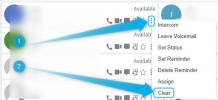
2. Then, Clear the extension. This can be from an extension that has Receptionist rights enabled under Extensions >> Edit >> Rights >> Enable "Perform receptionist operations...". Simply access the Webclient of the extension that has Receptionist Rights, go to People, click on the three dots of the extension you want to clear and then click on Clear:
1612179825381.png

This will clear the extension's info (Name,email, etc) and also prevent the extension from being able to reprovision when used on on the 3CX Apps (Windows, Android, iOS apps).

3. Regenerate the extension's credentials from the 3CX Management Console >> Extensions section. Simply select the Extension you want to regenerate the credentials for and then click on "Regenerate" above:
1612179675365.png

The extension should now have no way of reprovisioning, have no presence information and not be able to make or receive calls.
 
  • Like
Reactions: idstech
@Jason Hayes

Just want to add that, as @cobaltit correctly already mentioned, deleting the extension is in fact the official way to prevent access.
 
Hey @Jason Hayes,

You could try the below in the given order:

1. First, Disable the extension in the Management Console under Extensions >> Edit >> Options. This will prevent the extension from being able to make and receive calls.

2. Then, Clear the extension. This can be from an extension that has Receptionist rights enabled under Extensions >> Edit >> Rights >> Enable "Perform receptionist operations...". Simply access the Webclient of the extension that has Receptionist Rights, go to People, click on the three dots of the extension you want to clear and then click on Clear:
View attachment 20434

This will clear the extension's info (Name,email, etc) and also prevent the extension from being able to reprovision when used on on the 3CX Apps (Windows, Android, iOS apps).

3. Regenerate the extension's credentials from the 3CX Management Console >> Extensions section. Simply select the Extension you want to regenerate the credentials for and then click on "Regenerate" above:
View attachment 20433

The extension should now have no way of reprovisioning, have no presence information and not be able to make or receive calls.

Love this and thank you, but.....

If someone leaves the organisation and for HR/Legal (possibly until dismissed) you need to leave their extensions/chat/call history/Q Stats in place, how do you do this? Clear and Regenerate clears their history. Why does "Disable Extension" only stop them making calls, if this is the case why is it not labelled "Disable Making Calls", rather then "Disable Extension".
 
Understood, however 3CX allows you to create scheduled backups, those backups will contain that information if it is ever needed in the future and can be restored to retrieve the information (even on a spare system).

You can also check the ideas section and upvote it if it has been posted, or post it as a new idea.
 
Status
Not open for further replies.

Forum statistics

Threads
111,973
Messages
590,079
Members
164,896
Latest member
sameage