Disable user access to webclient call recording

Status
Not open for further replies.

Bruce Smith

Premier Customer
Joined
Mar 28, 2020
Messages
75
Reaction score
19
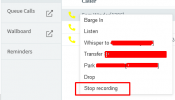
Hi All, is there a way to disable a user access to stop and start call recording from the webclient.

stop recording-from web.png

Thanks.
 
Hi Bruce,

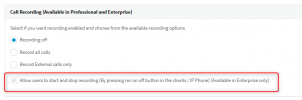
Please disable the Start and Stop Recording feature to archive your requirment. (See the following for your reference)

Goto Extension ---> Options
1627641340423.png

Thanks,
RA.
 
  • Like
Reactions: Evolute IT
What Cal4care | RA says is indeed true, however, it is only to prevent stopping/starting the recording of a call you yourself are on. If you want to prevent the user from stopping/starting the recordings of calls he/she is not a part of, you will have to disable the "Perform operations" right under "Extensions >> Edit >> Rights" for that extension:
1627641838798.png

Note: Do bear in mind that you will lose all functions that go with the "Perform operations" right as well.
 
  • Like
Reactions: Bruce Smith
What Cal4care | RA says is indeed true, however, it is only to prevent stopping/starting the recording of a call you yourself are on. If you want to prevent the user from stopping/starting the recordings of calls he/she is not a part of, you will have to disable the "Perform operations" right under "Extensions >> Edit >> Rights" for that extension:
View attachment 23270

Note: Do bear in mind that you will lose all functions that go with the "Perform operations" right as well.
Those should be 100% separated. Divert/Transfer is necessary but allowing to manage recording is not.

ACL is the only big thing 3CX has to work on lol Better right management, and not just adding "Monitor" and calling it a day.
 
Hi Bruce,

Please disable the Start and Stop Recording feature to archive your requirment. (See the following for your reference)

Goto Extension ---> Options
View attachment 23269

Thanks,
RA.


@Cal4care | RA it does not apply to web clients, I have that enabled and it only works on the the Phone and PC application client.

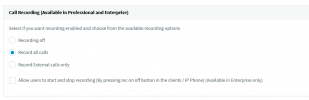
My current setting 1627649318983.png
 
it does not apply to web clients, I have that enabled and it only works on the the Phone and PC application client.
It will work but only if you are clicking on a call you are apart of, if you are clicking on a call that involves to other extensions you will still have the option to stop/start the recording, provided of course that you have the "Perform Operations" right within that same extension group. As mentioned above you will have to remove that specific right under "Extensions >> Edit >> Rights".
 
What Cal4care | RA says is indeed true, however, it is only to prevent stopping/starting the recording of a call you yourself are on. If you want to prevent the user from stopping/starting the recordings of calls he/she is not a part of, you will have to disable the "Perform operations" right under "Extensions >> Edit >> Rights" for that extension:
View attachment 23270

Note: Do bear in mind that you will lose all functions that go with the "Perform operations" right as well.
@ChrisC_3CX Hi Chris Thanks that has worked, as @Frederick Marcoux said it need to be split out or tied to the right option like @Cal4care | RA pointed out, it makes no logical sense to have it under "Perform operations" when you have this option " Allow users to start and stop recording...."

Version 18 is a good time to resolve this and every thing else.
 
  • Like
Reactions: Evolute IT
The general idea is that basic operations that can be made to a call fall under the "Perform Operations" right. These operations also include starting/stopping the recording of a call that you have permissions to perform operations on.

The option mentioned by Cal4Care | RA is only for your own calls and that is why it does not have an effect on the available operations for calls not involving your extension.

I do see your point however so you might want to consider submitting this in our Ideas section as a feature request. If you do not have the appropriate rights to do so you can always contact one of our 3CX Partners that has the necessary permissions and can therefore post on your behalf.
 
  • Like
Reactions: Evolute IT
Status
Not open for further replies.

Forum statistics

Threads
112,349
Messages
592,027
Members
165,513
Latest member
megalmazan