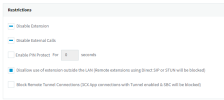
Disallow use of extension outside the LAN Disabled on all extensions

Status
Not open for further replies.

AMistich

Forum User
Basic Certified
Joined
Nov 25, 2020
Messages
27
Reaction score
1
Like the title says, just recently I found that all my extensions now have Disallow use of extension outside the LAN disabled. I cannot find any global setting to turn this back on for all extensions. Is there some way of doing this or do I have to go into each extension to correct this? Currently I am not running any SBCs or have any remote phones.

 
You do not have to enable this for SBC provisioned phones, only if stun configured.

1659026245756.png

If you have no sbc or stun phones, you do not have to untick this

3CX apps use the 3cx tunnel setting

1659026424990.png
 
You do not have to enable this for SBC provisioned phones, only if stun configured.

View attachment 31268

If you have no sbc or stun phones, you do not have to untick this

3CX apps use the 3cx tunnel setting

View attachment 31269
Basically for security reasons, none of the extensions should be used outside of LAN. When my PBX was set up all extensions had this option enabled since none of my phones are SBC provisioned or use STUN. At some point this was automatically disabled, and I would like to enable it so none of my extensions are allowed to be used outside of the LAN.
 
Ok so stupid me just figured it out. I didn't realize you can select all extensions and then edit
1659030549246.png
Which opened up the ability to enable that option.
1659030600893.png
 
Status
Not open for further replies.

Forum statistics

Threads
111,974
Messages
590,083
Members
164,899
Latest member
mazet