Disk space usage analysis

Status
Not open for further replies.

MPServeline

Bronze Partner
Basic Certified
Joined
Mar 1, 2022
Messages
115
Reaction score
14
Hi all,

Is there anywhere we can see what's using up disk space as we are running into an issue with rapid loss at the moment and need to resolve it as soon as possible:

1675675369738.png

I believe it can be chat logs and call logs but would be good to know where to go to reduce this or if we need to increase it?

Many thanks
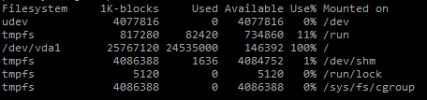
 
In shell you can run "du -h / --max-depth=2" to get the usage of the first two directory levels. "cd" or adjust the depth as desired to narrow it down.
 
  • Like
Reactions: MPServeline
Thanks Steve, much appreciated.
We're having a bit of an issue with SSH access at the moment but hope to get in tomorrow. After clearing logs, calls, etc. and restarting services we now have over 1GB free.

I did wonder how a reboot in the Terminal compares to restarting the services as well as normally we would restart the services to reboot?
 
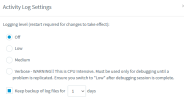
It's worth checking to make sure no-one has set the logging level to verbose (can also causes CPU spikes) or messed with the log duration (normal setting is Low - 1 day).

A reboot (rather than restarting services) will trigger an integrity check of the vdisk (if one hasn't been done for 180 days or the OS suspects the file system is "dirty"). It probably wouldn't reclaim any space but it is a difference.

I use NCDU to help me find where disk space has gone on Debian servers but that would need to be installed... and you're not supposed to install anything additional on 3CX.
 
  • Like
Reactions: MPServeline
That's great, thanks.
I did a reboot via Terminal on the Dashboard this morning and it went from just over 1GB free space to over 3GB of free space. I'll check the log settings as well now and will check out NCDU.
 
Sorry where do you check the log settings? Is it under custom parameters?
 
Sorry where do you check the log settings? Is it under custom parameters?
Dashboard > Activity Log > Settings

You can also browse the logs from the same page and see if any are larger than expected.

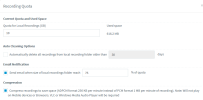
FWIW, whenever I've had mystery disk space issues it's always been call recording configuration related.
 
  • Like
Reactions: MPServeline
Thanks, all looks good there:
1675768841269.png
We did have a browse through the log directories but couldn't see anything more than a few MB anywhere.

Ref call recordings we have 25GB total space with 10GB quota by the looks of it:
1675768960311.png

We enabled compression and also frantically archived loads yesterday to Google Storage. It's a busy customer, they had 18 calls active when we were looking at the issue yesterday and the available space was dropping rapidly, 800mb at first down to about 600mb free in about 30 minutes and by midday it had run out and could no longer record any calls.
Logs were being purged etc. to try and make space as quick as possible.
 
Your partition shows 25767120 1k blocks which (I think!) equates to about 25Gb

That looks small to me, particularly for an install with a 10Gb quota for call recording - you should really have at least 40Gb (30Gb recommended + call recording).

Are you sure that you're innapropriately losing disk space or is it that you didn't have it in the first place and normal use means you're running out of space?
 
Thanks Lee, we're looking into the extra costs for increasing to 40GB with Digital Ocean now. I think it's our busiest customer so after having them onboard for well over a year now and them having also expanded their operations I think we need to try and keep up as I'd say it was normal use but just became more evident the speed at which it was being used up when we were watching the decrease in MB increments when it went under 1GB of free space.
 
I would definitely fix the vdisk / partition size first (and quickly), an extra 15Gb shouldn't cost more than a few $ per month.

You can only really quantify if anything is inappropriately using disk space once you know you have at least the recommended amount in the first place.

I suspect you'll find that the problem disappears with some additional storage. Don't forget, once the vdisk is expanded you will also need to expand the partition.
 
  • Like
Reactions: MPServeline
Excellent, many thanks Lee. They have recently added a new site and have just ordered some more phones so we definitely need to ensure we increase the capacity accordingly. Will see how things go, hopefully no issues signing off the extra costs.

Really appreciate your help on this, our other customers are hosted by 3CX but this is our biggest and self-hosted so encountering new issues and finding our feet a bit at times with it.
 
  • Like
Reactions: Lee Cramman
Status
Not open for further replies.

Forum statistics

Threads
111,974
Messages
590,081
Members
164,899
Latest member
mazet