DND

Status
Not open for further replies.

Tarheels

Platinum Partner
Advanced Certified
Joined
Dec 22, 2016
Messages
64
Reaction score
1
I have a customer that says their phones go into DND by themselves. Auto Switch is turned off off the extensions. Has anyone else had this issue? I did find one extension that had Auto Switch turned on. It was a overflow for a ring group that had the extensions in it going in DND.
 
Last edited:
I've got this one time on a 3CX V16 for a Snom D725 (phone has auto switch disabled)

another on a V15.5 with a Snom 720 also auto switch disabled

in both case i can't say if it's user who dnd the phone or a real DND coming alone from 3CX
Also both case extensions are just members of a ring group
 
Hi @Tarheels

The things that can cause a phone to enter DND mode are:
  • Pressing DND on device (or even its WebGUI)
  • Setting DND from 3CX Client / Webclient / Mobile Client
  • Setting DND by dial code / BLF Button
  • Setting DND from 3CX Dashboard Console
  • Auto-Switch
  • Office 365 integration (based on your schedule)
Have you checked all above possibilities?
 
Hi @Tarheels

The things that can cause a phone to enter DND mode are:
  • Pressing DND on device (or even its WebGUI)
  • Setting DND from 3CX Client / Webclient / Mobile Client
  • Setting DND by dial code / BLF Button
  • Setting DND from 3CX Dashboard Console
  • Auto-Switch
  • Office 365 integration (based on your schedule)
Have you checked all above possibilities?

Is there anywhere in the logs to see when or by what method DND (on any status) was changed? I have a client that was in DND and is claiming they did not make the change. I was assuming it was user error but after seeing this post, it does make me wonder.
Fortunately I was troubleshooting some other issues with the client and so logging was set at verbose at the time.
 
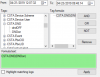
Might be possible to check that via the log, search for DoNotDisturbEvent and see if anything shows up around the time where you suspect the event took place. Not all the logs will appear on page though, you may have to download them from the Dashboard and use the 3CX BinLog viewer to be able to see the events by following this guide https://www.3cx.com/docs/3cx-log-viewer/

In the viewer you should apply the following filter:

10348

This will show you the events that took place on all extensions within the given time period you selected.

Once you nail down the exact time, remove the filter and look at the events just before and just after the moment to see additional information.
 
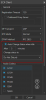
Also, please note that if you use a 3CX client, there is an option in Settings > Configure Accounts > Advanced Settings as seen below. That could also be changing the status for you automatically.

10352
 
Also, please note that if you use a 3CX client, there is an option in Settings > Configure Accounts > Advanced Settings as seen below. That could also be changing the status for you automatically.

Thanks JohnS, both of those pieces of information are very helpful. I was able to find where the user enabled/disabled DND in the log viewer. So, at least in my case, there was a clear explanation why the call was routed the way it was.
 
I'm glad it was resolved!
 
Status
Not open for further replies.

Forum statistics

Threads
111,922
Messages
589,748
Members
164,796
Latest member
Dame24