DNS Name instead of IP Adress in config file

Status
Not open for further replies.

PustyB

Free User
Joined
Feb 10, 2023
Messages
2
Reaction score
0
Hey.
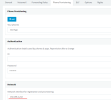
How could I change the 3CX configuration so that the phone provisioning shows a local DNS name pointing to my 3CX server?
1676223878420.png

Or where can I change the file generated for the 3CX Phone on Windows application when sending Welcome Mail to set the DNS address there instead of the IP address?
I mean line
" <PBXLocalAddr>192.168.1.212</PBXLocalAddr>"
 
Hey.
How could I change the 3CX configuration so that the phone provisioning shows a local DNS name pointing to my 3CX server?
View attachment 34214

Or where can I change the file generated for the 3CX Phone on Windows application when sending Welcome Mail to set the DNS address there instead of the IP address?
I mean line
" <PBXLocalAddr>192.168.1.212</PBXLocalAddr>"

First, The local DNS will no longer be supported soon.. Very soon.
But this is done during the initial configuration, in the Wizard.. but you should read this procedure and set up your SplitDNS instead (This is the solution that replaces localdns).
This will allow you to use the FQDN , as you would for local dns.

https://www.3cx.com/docs/creating-fqdn-split-dns/
 
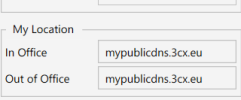
So I should configure split dns and use the domain name simultaneously in office and out of office?

1676274120138.png
 
sorry - still confused about the announcement about "static IPs and/or split dns" being required soon. we know statics IPs have been "mandated" for a while now, but, we do still have a few clients that can't simply get static IPs from their ISPs; so they are running in dynamic IP mode and have been working fine for years. additionally, we have many clients that have "unmanaged" networks. they don't have local DNS servers and don't want the cost to buy and maintain one. therefore, we are not sure what is going to work and what is not going to work when these changes that have been mentioned arrive. are local physical phones affected? local soft/webbrowser phones? mobile clients inside and/or outside an office? etc. additionally, if everything worked fine all these years without these changes, AND, if additional improvements were recently made with a FQDN "DNS helper" -- see: https://www.3cx.com/blog/news/v18-dns-helper/ -- we are just looking for some guidance/clear documentation as to what is changing, why these changes are required, and, how to address clients that want or need to keep their on-premise hosting rather than moving to that cloud that ALSO don't want to or can't move to static IPs and/or local DNS/split DNS. thank you all for any help/insight you can provide!!!
 
@PustyB Right, same name both places.

@UITcaf from the guide posted above, "This allows users to seamlessly connect with the 3CX Apps or the 3CX Web Client whether they are in or out of the office using the same secure FQDN / URL to the web client." So, it seems like they want HTTPS/certs to match up.

It's trivial for anyone on a Windows Server network, as posted in the guide. For others, advanced/fancier routers will support hostname overrides. NAT reflection might work but sends all connections through the router instead of direct to the LAN IP, so split DNS is preferred.
 
Status
Not open for further replies.

Forum statistics

Threads
111,933
Messages
589,809
Members
164,807
Latest member
Smax