Do anyone else's Yealink phones have messed up daylight savings time (UK) today?

Status
Not open for further replies.

Lee Cramman

Premier Customer
Advanced Certified
Joined
Jul 9, 2018
Messages
694
Reaction score
166
The clocks don't change for another week but all of our Yealink phones seem to have decided to go a week early... despite being set to the correct timezone.

Is anyone else experiencing this?
 
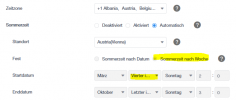
Yes, same issue here. The config from 3CX is set to the fourth Sunday of the month, but this year it's the 5th Sunday. It will happen again next year too unless it's fixed in a profile update.
 
Same here in Germany. Only fix I found was changing the time zone in the phone itself to another time zone and then changing the back to the one that was in use before. That is however very tedious especially If you have 100+ phones.
 
Same for us, we've had a lot of customers call in this morning with the same issue. 3CX have said they're looking into it
 
I've disabled Day Light Saving Feature within the phone templates for now and will need to change back next week.

From;
#Configure the daylight saving time feature; 0-Disabled, 1-Enabled, 2-Automatic (default);
local_time.summer_time = 2

To;
#Configure the daylight saving time feature; 0-Disabled, 1-Enabled, 2-Automatic (default);
local_time.summer_time = 0
 
I've disabled Day Light Saving Feature within the phone templates for now and will need to change back next week.

From;
#Configure the daylight saving time feature; 0-Disabled, 1-Enabled, 2-Automatic (default);
local_time.summer_time = 2

To;
#Configure the daylight saving time feature; 0-Disabled, 1-Enabled, 2-Automatic (default);
local_time.summer_time = 0
Afterwards do you have to reprovision the phones or do a reboot?
 
Same problem here, the default setting for the summer time is set to the 4th sunday in march. But this seems to be wrong, should be the last sunday in march.

1711361843896.png
 
Dear all
Same issue here.. Would be fantastic if 3cx could issue a new template in emergency ;)
 
That is a solution for a few phones. But it isn't for us as a partner with 100+ 3CX systems.
Can this setting of Last week (instead of fourth) be configured in 3CX?
Maybe the phone template?
 
We have same issue in Ireland (we have over 40 3CX systems)....my temp fix is to change system timezone to Iceland as they do not observer DST. Then revert back to Ireland timezone next weekend to get the system on DST correctly. Requires stop/start services (1 min downtime), but quicker than changing each phone timezone.
 
  • Like
Reactions: Peter PBX
We have same issue in Ireland (we have over 40 3CX systems)....my temp fix is to change system timezone to Iceland as they do not observer DST. Then revert back to Ireland timezone next weekend to get the system on DST correctly. Requires stop/start services (1 min downtime), but quicker than changing each phone timezone.
But the system timezone is correct, only the phones are wrong. If I were to change the system timezone to compensate it will affect business hours.

Or am I misunderstanding?
 
This will be an issue for the next 2 years and 2025 and 2026 have 5 Sundays in March.
 
But the system timezone is correct, only the phones are wrong. If I were to change the system timezone to compensate it will affect business hours.

Or am I misunderstanding?

But the system timezone is correct, only the phones are wrong. If I were to change the system timezone to compensate it will affect business hours.

Or am I misunderstanding?
Hi Lee, Iceland is on same time as UK/Ireland but does not observer DST, so 3CX template does not move time forward 1 hour - so changing temporarily to Iceland timezone on 3CX for this week will correct phone display times (each phone has to be configured to use "Global Timezone" if not already set like this - when 3cx restarts all phones will display correct time. If each phone is provisioned to use Ireland or UK time zone this will not work - you will have to change each phone to use "Global Timezone" and just reprovision the phones - they will then pickup the global 3CX timezone. Then on Saturday 30th night/Sunday 31st morning, change global timezone from Iceland to UK or Ireland and the DST will be in effect, and the phones will pickup the correct time.
 
  • Like
Reactions: Peter PBX
But the system timezone is correct, only the phones are wrong. If I were to change the system timezone to compensate it will affect business hours.

Or am I misunderstanding?
That is correct. It will affect the office hours.
 
For CET it is easiest to set the time zone to WAT (West Africa Time): Same time zone (UTC+1) but without Daylight Saving Time. Then reboot the system service and the time will run again.

Just don't forget to change the time zone back next Sunday!
 
What an annoying issue. Better to just leave ours and tell the staff. Don't want to mess with opening hours etc.
 
It seems also to be a problem on Broadsoft phone systems so I think it is more of a Yealink phone problem
 
Hi guys, it seems that we have multiple posts on this issue and the same was reported earlier today too.
 
That is correct. It will affect the office hours.
I'm in france. as the timezone has made the time change early. Is the time wrong only on the phones or also on the server? If yes for the server, does this affect the office hours for incoming calls in the current configuration.
 
Status
Not open for further replies.

Latest Posts

Forum statistics

Threads
111,962
Messages
589,993
Members
164,867
Latest member
swegner