DO Upgrade to V20

Status
Not open for further replies.

Amerson

Free User
Joined
Dec 10, 2023
Messages
5
Reaction score
0
I have several customers that are "Standard Annual 4SC" and hosted at Digital Ocean. After the latest update this week, all say your subscription will expire 1/1/24.

First question, is the expiration statement true?

Second, how do I upgrade a DO hosted to V20? I have been reading all day about having to setup a System Owner and the number of CPU's and Ram. and have met all the requirements as far as I can see. What I need is a set of instructions on how to do the actual upgrade. Something like "Click here" and then "go here" .....

Does anyone have to link for this.

Am I missing something?

Thanks
 
  • Like
Reactions: Evolute IT and N_G
So if I read this right, just wait till the "Release Canidate" is available?
 
Correct. Or a new install and restore.
 
So does anyone have a date when the "Release Canidate" will be released?
 
I’m sure the answer is, “when it’s ready” but “upcoming week” would be this week.
 
  • Like
Reactions: Evolute IT
Hey, come on, we not seriously talking about upgrading production customers to V20 beta or release candidate? This would be a VERY bad idea and something I would strongly discourage. Personally, I would never do this. Wait for the final official production release AT THE EARLIEST.
 
not seriously talking about upgrading production customers to V20 beta
I was assuming OP's question was about a test instance. OTOH, as alluded to in other threads I suspect a lot of people saw the upgrade to 18u9 beta, ran that, and then saw the update to v20 which was never marked as alpha or beta on the 3CX updates page. I personally plan to wait until 20u1 at least, given it sounds like a lot of things are missing from the currently available v20 version.
 
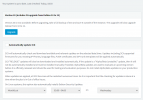
I agree 100% but as of yesterday,all the customers I have that are currently running the 4SC Standard edition, all of them will expire on 1/1/24. This popped up after the last update that auto ran last week. I don't like seeing this across the top of the screen.

1702309144334.png

I see a lot of post on the site with people having issues with the upgrade and I am petrified that something will go wrong.

After checking again this morning, this message has disappeared from all the clients except one. This makes me even more nervous when things change unexpectedly.

If the system will not stop working on 1/1/24, then I also will wait till V20 has been out for a while before the upgrade. Hopefully someone in the planning depart of 3CX will reply to this post and give us an update on how to proceed.
 
Were your free keys extended per the above blog post?
 
Yes, till 3/1/24
 
I could do with a few things being cleared up regarding this upgrade - the blog post says it's an RC, but there is no mention of this in the management UI, it looks like a standard release rather than a not-quite feature complete version of 3CX with a base OS update.

In the event that auto updates were enabled, will v18 installations be taken to v20 or does it qualify as a bigger update that won't automatically apply? The wording seems to suggest that as soon as the update is marked as a release then it auto-installs, so anybody using something like hotdesking with auto updates enabled will get a nice surprise.
 

Attachments

  • Screenshot 2023-12-11 180501.png
    Screenshot 2023-12-11 180501.png
    51.6 KB · Views: 12
In the event that auto updates were enabled, will v18 installations be taken to v20 or does it qualify as a bigger update that won't automatically apply?
Per this thread last week one of the 3CX staff said major versions like v20 would not be an automatic upgrade, and v18 will remain supported for 6-12 months:
https://www.3cx.com/community/threads/question-about-3cx-v20-deployement.123878/post-582607

Normally automatic updates are listed below the "Automatically update 3CX" panel.
 
Status
Not open for further replies.

Forum statistics

Threads
111,974
Messages
590,081
Members
164,899
Latest member
mazet