





New phone provisioning methods & more in V20 Beta 2.
V20 Beta 2 adds an exciting new feature - call processing scripts - this comes along with new phone provisioning methods and support for the latest Google Speech API. Read on for more details and to find out what else is new and important to note.
New Call Processing Scripts
Basically, you assign an extension and DID to your script - or send calls to this extension - which then trigger your script and allow you to add custom routing using standard C# code. See a detailed example here.
Admin Credentials No Longer Valid. Use System Admin/Owner
The Root credentials or Admin credentials previously used to login to the V18 Management Console are no longer valid. For V20 you must login using a System Owner or System Admin account!
System Owners will receive unwanted notification emails (such as backup successful) this will be changed in the release candidate. With Update 1, System Owners will no longer receive notification emails, only the System Admin will.
Google Transcription - Speech API V2 support
Google has announced that version 1 of its transcription service will be retired and replaced by a new API. You will need to reconfigure transcription after applying the update. Here’s how.
New Phone Provisioning Options
Beta 2 introduces new IP Phone provisioning options:
- Backlight Timeout
- Screensaver Timeout
- VLAN configuration
- Configure Power LED notifications
- Codec priority selection
- Custom ringtones - Distinctive Ringing
- Date Format
- Time Format
- Timezone
Only Secure FQDN for Web Client Login
V20 requires a secure login for the Web Client. If you login from a local IP - PUSH notifications and inbound and outbound calling will not work correctly. You will be shown the below warning message prompting you to use a secure FQDN.

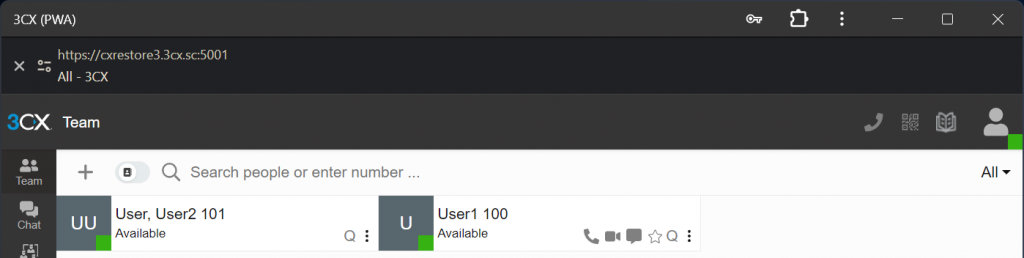
New Web Client URL Requires PWA Re-install
The Web Client URL has changed. You'll need to re-install the PWA for it to work. The PWA will show a box on top with an X button if you fail to reinstall it.
Features on Hold for Update 1
The below features are not included in Beta 2 nor the final version. If you absolutely need these from day one, you need to wait for Update 1. Update 1 will be available in January 2024 - a Beta version will be released before.
- Hot Desking
- Ability to create a Wireshark Capture
- Ability to schedule Reports
- Assign a name to a DID to tag a call
Non-Editable Features
Certain features will work, however, you will not be able to edit and make changes to their configuration settings - they will inherit your V18 settings. If you do not foresee any necessary changes before January 2024, when Update 1 is released, you can proceed to upgrade to V20.
- EDITING of FXS Devices
- EDITING of Bridges (without presence)
- EDITING of the Teams Configuration
Other new features
- Create a Fax extension to be used with an ATA connected to a fax machine.
- Fax cleanup option - deletes old faxes.
- Hide interaction history - System > Options > Hide interaction history.
Try the V20 Beta 2
- If you are running Version 20 BETA you will see an update "New 20.0 Beta 2”, click on it to install the update.
- Deploy a fresh V20 cloud installation here https://www.3cx.com/install/. Select "3CX Hosted (PRO/ENT)" then follow the steps.
- Deploy an on-premise installation here https://www.3cx.com/install/. Select "3CX Self Hosted / On Premise - PRO / ENT", Linux Platform and follow the installation steps.
Note: OS Upgrade will be visible to V18 users in the upcoming week when Release Candidate is available.
Stay Informed
Let us know your thoughts in our dedicated Partner or Customer Forums.
Hit the follow button on our X and LinkedIn pages to stay-up-to date on further developments.









 Copyright © 2026