Double Entry on Call Journaling

r42brian

Customer
Joined
Jun 9, 2025
Messages
7
Reaction score
2
I have gotten everything to work wonderfully as for contact lookup and linking. The problem is with Call Journaling I always get two posts of the same call? It shows as one as me (I was the user that created the connected app) and one as 'System'. The content in both logged calls is identical. It was doing the same thing for chat journaling as well, but we decided to not keep that enabled.

How can I find out what is driving this? I followed the Salesforce integration how-to pretty explicitly.

Appreciate any help or insight in to this!
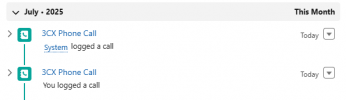
1752604914444.png
 
Interesting. Can you enable verbose logging and check the 3cxSystemService.log file in the Support Info? Search for "CRM:" and you'll find all requests/responses that are sent. You'll see it there if it sends it twice.
 
I appreciate the direction! It definitely appears to post twice from the 3CX end. Has the same activity for both.

Not sure why the Owner ID/response come back asterisked out...is that normal?

Code:
2025/07/14 13:04:55.710|0142|Info| [Integration.Crm.CallProcessingService] CRM: about to report 1 calls at maxConcurrency 16
2025/07/14 13:04:55.710|0142|Debg| [Integration.Crm.CallProcessingService] CRM: Triggering Call Journaling with values - CallType='Notanswered' - PhoneNumber='+15558675309' - ContactName='John Doe' - AgentExtension='203' - AgentFirstName='John' - AgentLastName='Doe' - AgentEmail='[email protected]' - ContactRawData='003Ui00000SvBHxIAN|Contact' - StartTime='07/14/2025 20:04:47' - EndTime='07/14/2025 20:04:55' - EstablishedTime='(null)'
2025/07/14 13:04:55.711|0142|Debg| [Integration.Crm.Engine.ResultVariableScenarioProcessor] CRM: Processing scenario 'ReportCall'.
2025/07/14 13:04:55.711|0142|Debg| [Integration.Crm.Engine.ScenarioAuthHttpClientProvider] CRM: All tokens are up to date

2025/07/14 13:04:55.859|0142|Debg| [Integration.Crm.Engine.ResultVariableScenarioProcessor] CRM: The response is: '********'
2025/07/14 13:04:55.860|0142|Debg| [Integration.Crm.Engine.ResultVariableScenarioProcessor] CRM: Filtered variables for matching:
2025/07/14 13:04:55.860|0142|Debg| [Integration.Crm.Engine.ResultVariableScenarioProcessor] CRM:    'OwnerId' = '********'
2025/07/14 13:04:55.860|0142|Debg| [Integration.Crm.Engine.ResultVariableScenarioProcessor] CRM: Processing scenario 'CreateCallActivity'.
2025/07/14 13:04:55.860|0142|Debg| [Integration.Crm.Engine.ScenarioAuthHttpClientProvider] CRM: All tokens are up to date
2025/07/14 13:04:55.861|0142|Debg| [Integration.Crm.Engine.ResultVariableScenarioProcessor] CRM: Performing POST request to 'https://company.my.salesforce.com' with message '********'.
2025/07/14 13:04:55.861|0142|Info| [_3CX.HttpClient] Sending 'POST/1.1' to 'https://company.my.salesforce.com/services/data/v55.0/sobjects/task'
2025/07/14 13:04:56.177|0142|Info| [_3CX.HttpClient] Received '201 Created' after 316.3ms
2025/07/14 13:04:56.178|0142|Debg| [Integration.Crm.Engine.ResultVariableScenarioProcessor] CRM: The response is: '********'
2025/07/14 13:04:56.178|0142|Debg| [Integration.Crm.Engine.ResultVariableScenarioProcessor] CRM: No matchings found.
2025/07/14 13:04:56.178|0142|Debg| [Integration.Crm.Engine.ResultVariableScenarioProcessor] CRM: Filtered variables for matching:
2025/07/14 13:04:56.178|0142|Debg| [Integration.Crm.Engine.ResultVariableScenarioProcessor] CRM:    'OwnerId' = '********'
2025/07/14 13:04:56.178|0142|Debg| [Integration.Crm.Engine.ResultVariableScenarioProcessor] CRM: Processing scenario 'CreateCallActivity'.
2025/07/14 13:04:56.178|0142|Debg| [Integration.Crm.Engine.ScenarioAuthHttpClientProvider] CRM: All tokens are up to date
2025/07/14 13:04:56.180|0142|Debg| [Integration.Crm.Engine.ResultVariableScenarioProcessor] CRM: Performing POST request to 'https://company.my.salesforce.com' with message '********'.
2025/07/14 13:04:56.180|0142|Info| [_3CX.HttpClient] Sending 'POST/1.1' to 'https://company.my.salesforce.com/services/data/v55.0/sobjects/task'
2025/07/14 13:04:56.558|0142|Info| [_3CX.HttpClient] Received '201 Created' after 377.9ms
2025/07/14 13:04:56.558|0142|Debg| [Integration.Crm.Engine.ResultVariableScenarioProcessor] CRM: The response is: '********'
2025/07/14 13:04:56.559|0142|Debg| [Integration.Crm.Engine.ResultVariableScenarioProcessor] CRM: No matchings found.
 
Because all ReportCall data and chained variables are hidden.

But that's interesting. Are you using a custom or modified template, or the official built-in one?
 
This is the official SalesforceV2 that is built in. Trying to see if there is anything on the Salesforce end that could do this. If there is a duplicate phone number field on an account or contact would it cause 3CX to push the data twice for find the number twice?
 
If there is a duplicate phone number field on an account or contact would it cause 3CX to push the data twice for find the number twice?
It wouldn't do that.
 
Tested and proved that is correct as well. Somewhere there's a loop to post twice, just also weird that it comes from two different users on the SF side. I authorized the connection with my account. Is there a way to use a generated key and keep my account out of the authorization link? Try to keep it to just the 'System' user?

How can I check the 3CX code/script to see why it is looping a second time?
 
Last edited:
Is this call made to a DID that hits just one extension? OR to some other Call handling facility?
 
Is this call made to a DID that hits just one extension? OR to some other Call handling facility?
Not sure about their specific case but we noticed an exact copy of this issue with a custom template we use for another CRM. Same thing happens, the scenario request is sent twice, somehow once with the user ID set and the other without it (causing the second log to show as system as well.)

Could this be related to the U6 CDR/CRM changes?
 
The Salesforce template tries to find a Salesforce user having the email of the agent's extension. If you have 2 users in Salesforce with this email address, then this will happen, because after getting the user (OwnerId), 3CX will invoke the REST API method to create the call for that user. Usually this shouldn't happen, because all your Salesforce users should have a different email address, but maybe for some particular email this happens? Maybe you're using a group email shared with many users?
 
All of our users have different emails. We do not share accounts at our facility.

Given this seems to happen per ConceptsWeb on a different CRM as well there must be some other setting or edge case in 3CX code getting pulled for the dupe.

My testing has been to/from a directly assigned DID user. Will test through queues and other pathways to see if it is consistent, as well as completely separate users and numbers.
 
Just out of curiosity, what do you see if you search for the agent's email in Salesforce Users? Does Salesforce return only 1 entry or more?
 
I get 1 contact result, but it also shows as 1 people being a user. I'll attempt removing it from one and checking result.
 
I get 1 contact result, but it also shows as 1 people being a user. I'll attempt removing it from one and checking result.
In that case this is something that 3CX needs to check..

@KyriacosS_3CX, maybe you can report this internally, so the QA team can check?
 
Confirming more details. Every call from internal or external is getting double noted. The only time it didn't for me was a queue call that went to voicemail. The only new bit of information, is it does seem to be tied only to my account. Something having to do with being the authorized user? Other employees testing are showing single call log entries posted as their own profile.

Is there a way to authenticate with an API user? It does show my user as the creator, which should be more accurate as a System/3CX API User.
 
Hi,

I did pick this up for internal verification, but I should note that as so far we have this one (fairly verified) case and no ticket pushing it, it's not rapidly climbing the priority ladder. I'll see where it stands.
 
The only time it didn't for me was a queue call that went to voicemail.
In that case the call is reported on the queue, not the extension, so there is no email associated, and the call is logged for the Salesforce admin who authorized the integration.

The only new bit of information, is it does seem to be tied only to my account. Something having to do with being the authorized user? Other employees testing are showing single call log entries posted as their own profile.
Interesting, then it's not a general issue and will be hard to reproduce by 3CX. Looks like something related to your specific user. The thing is, the template will invoke the API twice if the REST API endpoint querying the users associated with an email returns 2 entries. Maybe you can try invoking that REST API using Postman, and then check the results....
 
  • Like
Reactions: Evolute IT

Latest Posts

Forum statistics

Threads
111,973
Messages
590,075
Members
164,895
Latest member
jasonkkrause