DTMF issues with Patton.

Status
Not open for further replies.

Song

Bronze Partner
Basic Certified
Joined
Nov 12, 2018
Messages
379
Reaction score
24
Issues we have is when someone call the main number it goes to a auto attendant. User press 115, but its going to 111, user press 114 and it goes to 111. Seem like an issues with the DTMF tone or something. I have contacted Patton and they told me to change the DTMF Relay from default to RTP. I did that and it helped for like a month or so and the problem come back again. Its having more often now. So I tried to reboot the Patton and see if that will resolve it.

Anyone have this issues with Patton with DTMF? not passing the correct tone to 3cx?

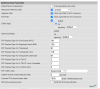
Should I try some other setting? Attached is the setting from Patton. Anyone know what setting I need to make to fix this? There is an option on the DTMF relay to set it to Signaling. Maybe I should try that?

Thank you in advance.
 

Attachments

  • dtmf-setting.png
    dtmf-setting.png
    172.7 KB · Views: 32
I'm assuming the Patton is a PSTN gateway? Model?
 
Your PSTN carrier may not be able to do anything as these are analogue lines. DTMF is being sent as audio. That said, there could possibly be a low level problem, caused by a faulty linecard in the central office, or, pair loss caused your distance from that office. There could also be a pad setting, on the gateway, that needs to change, if the level you receive, is too low.

I would first check to see if each PSTN line is havng the same issue, by calling in on each one, and testing. It may be that it is only one line having the issue, and if you find that to be the case, then report it to your provider,
 
Your PSTN carrier may not be able to do anything as these are analogue lines. DTMF is being sent as audio. That said, there could possibly be a low level problem, caused by a faulty linecard in the central office, or, pair loss caused your distance from that office. There could also be a pad setting, on the gateway, that needs to change, if the level you receive, is too low.

I would first check to see if each PSTN line is havng the same issue, by calling in on each one, and testing. It may be that it is only one line having the issue, and if you find that to be the case, then report it to your provider,
That seem to be right. I have tested the 5 lines calling each line 5 times and entering the digit 115 to see if it goes to 111 but all tested result is working fine. Its some random that I cannot produce the issues, but the user will report it to me.

I'll just call the carrier to trace their line just to make sure everything is clean.

Thank you for your help..
 
How many different callers, that you were aware of, were having that issue, or, at least, reported it?
 
its random. like two or three caller per day that when they hit 115 or 114 or 116 it sometimes goes to 111. i checked the 3cx log and it does show 115. or 114 or 116 that the user press. But for sure we asked the caller and says how did you get here? they says they press 115 and it goes to you 111.

So pretty random. last week it happen more often. then the previous 3 weeks. I rebooted the patton just to see if it make a difference..
 
There may be some other reason, other than a DTMF issue, as to why the callers are ending up at 111, especially if 3CX is confirming the correct digits. You might want to take a good look at the 3CX Activity Log for one of the "misdirected" calls. It may be routing to 111 for a very good reason.
 
I would also check things locally as well - for example:

* Firmware on the Patton is up to date: https://www.patton.com/support/upgrades/
* Gateway is provisioned with the latest 3CX template (and 3CX is current: https://www.3cx.com/blog/change-log/phone-system-change-log/).
* Also where is your gateway in regards to 3CX (VPN and local LAN only are supported for these variants).
* What codec is in use with the audio ?

Failing that you can also prove from site, (setup depending) the randomness of the issue makes this a bit of an issue. However as posted previously (and if you can either replicate or capture) you can run the CLI logging commands from the Patton gateway or run dumpcap for a long period via 3CX (this can be done on Windows or Linux): https://digitalsupport.ge.com/commu...w-to-use-Wireshark-for-long-duration-captures

If you can capture via Wireshark what you need to look for is/are the following:

(RTP) RFC2833: DTMF digits are transmitted by RTP Events complaint with RFC 2833:

This is your current setting and so long as you are not using sRTP to encrypt the audio (chances with 3CX are very slim) you can see the transmitted digits in the trace:

1601219379413.png

Using the capture filter rtpevent in Wireshark.

RFC 2833 is an in-band method that takes DTMF out o the RTP stream (that contains the audio or video) and into its own RTP stream. This means that the DTMF codes can survive even if the main stream is compressed.

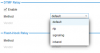
Since RFC 2833 is the most standard method used I would assume the Patton (although the setting does not specify) uses this method and not the older "Inband" way. I know Trinity variants offer 2833, Inband and SIP info however I cannot say for smartware.
1601219933611.png

Note: Standard inband is legacy, with Inband digits passed along just like the rest of your voice as normal audio tones using the same codec as your voice does. Obviously, this method inhibits the use of compressed codecs such as G729.

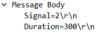
You could also always test/switch to "signalling/SIP INFO" SIP INFO (as below) sends the DTMF digits in SIP INFO messages which can be viewed in Wireshark in the RTP stream itself.
1601219794067.png

With this method you can also alter the transport type (as it is carried in the SIP signalling) to TCP (from UDP). TCP is a more reliable transport protocol as it ensures packets are delivered (using the SYN >> SYN/ACK >> ACK 3-way handshake).
 
Status
Not open for further replies.

Latest Posts

Forum statistics

Threads
111,964
Messages
590,000
Members
164,869
Latest member
hpgitsupport