Dummy Extension that routes to IRV during the day and External number at night

Status
Not open for further replies.

dogsbody

Customer
Joined
Aug 24, 2021
Messages
10
Reaction score
1
I have been fighting with this for two days, looked at so many posts and feel I have all the right info, just not in the right order :(

I'm trying to create a DDI number that customers with 24/7 support can call. Each customer has a different on-call engineer and DDI's are expensive so my idea is to create a number with an IVR that just says "please enter pin" (already done), the customer enters their pin which is actually an extension number.

In hours I want this extension to be routed back into our office Ring Group. Out of hours in needs to automatically call the on call engineer for that extension.

I have created a group and created a schedule for that group.

I have an extension and set the user up to automatically switch status during office hours however I now have the issue where that user is always unregistered and so doesn't switch status.

I've created dummy users before but they have always just permanently forwarded to a number or voicemail etc.

Any pointers greatfully appreciated. Thank you
 
What is the cost of your DDIs ? I don't understand, this is normally only a number , no ? so what's the cost of that, for me in France my sip provider bill me 0.3€ /month/by number
 
I knew someone would hook onto that point that wasn't the point of the post! :p I haven't yet found a 3CX verified DDI provider in the UK for less than £1.99 per number per month.

But back to my question ;) :)
 
Trying to answer your question give some more questions before answering something
  1. Is the IVR Pin the same for all callers ?
  2. is there only one group behind IVR ?
  3. Are office hours always the same for all ?
  4. Out of office hours is there always the same called number ?
  5. is the number called OOH an extension from 3CX or a mobile number changing all the time?
 
Thank you :-)

Is the IVR Pin the same for all callers ?
No, that was my "hack", each customer gets an "pin" which is actually just an extension number. They get the IRV, enter the "pin" and auto-magically get transferred to the extension due to 3CX

is there only one group behind IVR ?
I just made a group for the extensions that I'm using for the above as it allowed me to create some defaults for the future.

Are office hours always the same for all ?
Yes although they may differ from the site hours which is why i created the group for these extensions

Out of office hours is there always the same called number ?
No, the number called out of hours varies from customer to customer which is why I had the idea of separate extensions for each customer that would route differently out of hours

is the number called OOH an extension from 3CX or a mobile number changing all the time?
It is a static mobile number for that customer / extension that should never change

Thank you in advance
 
If I understand well you could manage this like:

During OH
Caller ---> IVR --->Dummy Ext in "Available status" with OH setup and automatic status change set up) ---> Final extension

During OOH
Caller ---> IVR ---> Dummy Ext in "DND status" sending call to external number or 3cx smartphone App with 3Cx extension)

Other way could be to use CFD and make a call flow to insert in your PBX but it needs knowledge about CFD use (i can't help on this)
 
What you have described is exactly what I want to setup :) I obviously didn't ask my question very well, sorry about that.

How do I get the extensions to change status when there is no one logged into them? The extension is already set to automatically switch status during office hours however it's also always unregistered.

There is an unregistered setting for "Available" but no unregistered setting for "DND".

I feel i am missing a core piece of info.

Thank you
 
How do I get the extensions to change status when there is no one logged into them?
you need to set hours in dummy extension, enable the automatic status switch in dummy is it what you've done?
These settings need to be done from webclient

something you didn't say and i missed to ask, what kind of PBX/ 3CX licence are you using? is it cloud ? hosted 3CX? self hosted? on premise? is it a startup plan ?
 
Last edited:
Yup, already done.

Where you I set where the extension routes? There is an unregistered setting for "Available" but no unregistered setting for "DND".
 
I obviously didn't ask my question very well, sorry about that
Not at all, you did well, very often askers are just claiming for help giving a minimum of context about what they did and they hope for a magical answer right on target since first reply.
 
Last edited:
Where you I set where the extension routes? There is an unregistered setting for "Available" but no unregistered setting for "DND".
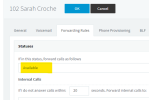
normally when in forwarding rules, you click on Available, and you should have the way to switch Away and then DND statuses
1680696433576.png
 
How do I get the extensions to change status when there is no one logged into them
That's not a problem until you use 3 of the existing statuses as Available, Away, DND for others they are not trigerred by automatic status change.
Other important thing to be sure switch to be executed you need to be out of the range hours it normally execute , if you are in then you just need to wait until the next automatic change, in between if you want to use it , you need to force the extension status manually.

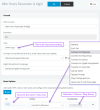
For status view or change this is here
1680698258940.png
 

Attachments

  • 1680698229123.png
    1680698229123.png
    34.4 KB · Views: 6
Last edited:
Thank you for all this help so far, I think we are getting to the specific bit i am struggling with...

The automatic status change appears to switch between "Available" and "DND" via the schedule. This is good.
I can setup the "Available" Status for this user to forward to the IRC when the phone is unregistered (which it always is)
But there is no setting to setup the "DND" Status for this user when the phone is unregistered (which it always is)

Does the DND status follow that forwarding rule no latter what state the phone is in (registered or unregistered)?
 
I have an extension and set the user up to automatically switch status during office hours however I now have the issue where that user is always unregistered and so doesn't switch status.
If you end up banging your head against the wall, you might consider sacrificing a physical device, that is actually registered. As I recall, there used to be a work around where the behavior changed when an unregistered set had the Ring my Mobile feature active, and/or the the extension was also used on an App. Since 3CX could not be certain that the mobile phone with the App was actually available until a Push was attempted, it assumed the extension was available. You might test to see if either of those make a difference with the status..
 
But there is no setting to setup the "DND" Status for this user when the phone is unregistered
Well in forwarding rules of the extension like I said previously you need to click on available and then appears a windows to select others statuses.
Then you click on DND and you are good to set up what forwarding you want in DND status .

On the 3CX PBX, the 3 default statuses AVAILABLE, AWAY, DND, are triggered automaticly by statuses change (you need to set hours properly, and not being in the same range of hours at the time of setting up to be sure the switch will apply.
 
Last edited:
If it were me, I would use a dedicated DID/DDI for the "Support" line, and set the office hours on the inbound rule.

The next question is whether you REQUIRE live-answer, or whether a voicemail would be sufficient. I would encourage you to take a look at our 3CX On Call Manager. We support both live-answer and legacy voicemail approaches, or a combination of both -- live-answer that fails over to voicemail if nobody answers live. We also support escalation of the scheduled engineer is unavailable. You can have an unlimited number of groups (one group per engineer in your case). Notifications can be by phone, email, and SMS simultaneously. I think we can solve all of your challenges with a mature, fully supported tool.
 
  • Like
Reactions: Evolute IT
IVR has a DTMF option to accept "passcodes" and direct them to almost anything.
You can set one of the primary inbound prompt destinations from your main or after-hours menu to be the Passcode IVR.
Create and apply a menu audio file for the passcode IVR.
Set each passcode to whichever destination type or group you want.
If you have a license that supports it, you can apply other advanced features, callback, prioritized hunt, escalation to another queue with destination no answer OR stay in queue and cycle until someone answers, etc. Most, if not all, can be paired with your scheduling requirements.

If you assign a mobile phone or another external phone number to the extension (User) information, you can also set the ring mobile simultaneously option for specific forwarding types. This option for external forwarding works even for non-smartphones, though the transfer options and methods aren't ideal for the recipient with "dumb" phones.

In this usage, we used 4-digit codes to match customer numbers, but the DTMF codes can be up to nine digits.

1680885087210.png
 
  • Like
Reactions: jed
Status
Not open for further replies.

Forum statistics

Threads
111,974
Messages
590,081
Members
164,899
Latest member
mazet