


- Joined
- May 3, 2017
- Messages
- 123
- Reaction score
- 71
So I've noticed that some reports have duplicate entries for an extension number.
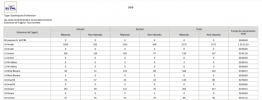
I understand this is 'by design' and makes sense, for instance if you assigned an extension number to someone new you'd want it splitting out in the data correctly among those two users (old and new). I believe it's triggered by updating the name on an extension number.
(I've included a screenshot that another user has previously posted of this behaviour).
OK, great, all good and agree with above as a good way of the data being kept valid.
However, my question is, when/how moving forwards does this historical data get dropped ref the old owner of an extension, i.e. how do you stop this data not appearing on reports anymore? I would have imagined if your chosen data range did not include a time period before the data on the extension was changed then the old extension details wouldn't be displayed.
Any idea's, am I missing something or is this a tiny bug?
Dave.
I understand this is 'by design' and makes sense, for instance if you assigned an extension number to someone new you'd want it splitting out in the data correctly among those two users (old and new). I believe it's triggered by updating the name on an extension number.
(I've included a screenshot that another user has previously posted of this behaviour).
OK, great, all good and agree with above as a good way of the data being kept valid.
However, my question is, when/how moving forwards does this historical data get dropped ref the old owner of an extension, i.e. how do you stop this data not appearing on reports anymore? I would have imagined if your chosen data range did not include a time period before the data on the extension was changed then the old extension details wouldn't be displayed.
Any idea's, am I missing something or is this a tiny bug?
Dave.


