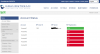
Server is cloud hosted, and all the phones (GXP2170) are Direct SIP (STUN-remote) on the same LAN. All the phones had been upgraded to the current supported firmware version from 3CX, and factory reset prior to provisioning.
I have tried deleting the phones from 3CX and factory resetting. Once provisioned again, same result. Rebooting does not fix the duplicates either. If I unplug a phone with duplicate entries, both with disappear after a few minutes. If I plug the phone in again, both with reappear.
EDIT: I also have 3 Yealink phones on the same LAN as the Grandstream phones, but no duplicates.
Are the IPs of the phones also appear identical in the management console? Also what version PBX are you running?
Do the affected extensions run a 3CX client or webclient also?
Are the IPs of the phones also appear identical in the management console? Also what version PBX are you running?
Do the affected extensions run a 3CX client or webclient also?
Phones appear in the phones tab when they are registered. Having duplicate entries would mean that you probably have double registrations coming from the same phone. Is there only one account provisioned on the phone? Can you login to the phones web interface and check if only one account is registered on them?
Phones appear in the phones tab when they are registered. Having duplicate entries would mean that you probably have double registrations coming from the same phone. Is there only one account provisioned on the phone? Can you login to the phones web interface and check if only one account is registered on them?
Does each phone have a unique SIP port or do all phones in the remote site have the same port under each extensions phone provisioning tab?
Each phone should have a unique SIP port for registering and signalling. The same applies for RTP port as each phone should have a unique set of RTP ports. Those ports then need to be forwarded to the local IP of the phone on the Firewall of the remote site. https://www.3cx.com/3cxacademy/videos/intermediate/configuring-remote-extensions/
Does each phone have a unique SIP port or do all phones in the remote site have the same port under each extensions phone provisioning tab?
Each phone should have a unique SIP port for registering and signalling. The same applies for RTP port as each phone should have a unique set of RTP ports. Those ports then need to be forwarded to the local IP of the phone on the Firewall of the remote site. https://www.3cx.com/3cxacademy/videos/intermediate/configuring-remote-extensions/