- Joined
- Jun 9, 2019
- Messages
- 4
- Reaction score
- 0
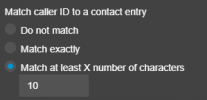
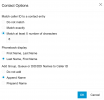
I have Dynamics 365 completely integrated into our 3CX. It is authorized, set to always query, and all the options are enabled for journaling and contact creation. When using the test button, it is searching correctly and returning valid results. Our 3CX is also correctly authorized and integrated with Microsoft 365 so extension users are matched to the correct dynamics 365 user.
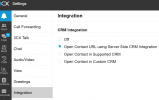
In PWA, under Settings and Integration, it is set to "Open Contact URL using Server Side CRM Integration"
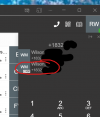
In PWA, if I type in a phone number to call, it is actively searching dynamics crm and finding valid contacts, showing the CRM initials over the contact image placeholder. If I click on a phone number in Dynamics, it is calling with Click 2 Call through 3CX and it triggers a Call Activity log entry pop-up.
On inbound phone calls into 3CX, nothing is happening. Nothing is triggering Dynamics to pop up with a new lead or call activity log. It just sits there. There is also no lookup option under the phone number. I have searched and scoured but I must be completely overlooking something.
Can someone point me to the right resource that I must of overlooked?
In PWA, under Settings and Integration, it is set to "Open Contact URL using Server Side CRM Integration"
In PWA, if I type in a phone number to call, it is actively searching dynamics crm and finding valid contacts, showing the CRM initials over the contact image placeholder. If I click on a phone number in Dynamics, it is calling with Click 2 Call through 3CX and it triggers a Call Activity log entry pop-up.
On inbound phone calls into 3CX, nothing is happening. Nothing is triggering Dynamics to pop up with a new lead or call activity log. It just sits there. There is also no lookup option under the phone number. I have searched and scoured but I must be completely overlooking something.
Can someone point me to the right resource that I must of overlooked?