Dynamics 365 Sales integration with 3cx v18 Update 5

Status
Not open for further replies.

end_user

SMB User
Joined
Sep 15, 2021
Messages
7
Reaction score
1
Hi All,

I'm getting two issues which I need help with please.

First is no CRM screen popping on ring OR answer (even though the system is aware of the caller - having correctly identified them on the incoming call list in the 3cx client and correctly writing the call journal against the appropriate client after the call has completed - with date/time stamps and caller info etc).

The second is missed/unanswered inbound calls getting journalled against the CRM contact as answered - per below... Call went through IVR, into Sales Queue - unanswered, then went to my personal voicemail where a message was left.


1664325269415.png


1664325578913.png

Any ideas on how to fix these issues?

Thanks
 
First is no CRM screen popping on ring OR answer (even though the system is aware of the caller - having correctly identified them on the incoming call list in the 3cx client and correctly writing the call journal against the appropriate client after the call has completed - with date/time stamps and caller info etc).
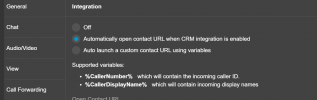
In the Web Client / Desktop App > Settings > Integration, ensure that you have selected "Automatically open contact URL when CRM integration is enabled".

The second is missed/unanswered inbound calls getting journalled against the CRM contact as answered - per below... Call went through IVR, into Sales Queue - unanswered, then went to my personal voicemail where a message was left.
In this case the call is answered. The IVR answers the call in order to interact with the user. The queue also answers the call if it was not answered before. So, from the 3CX perspective, the call has been answered, this is why the call is reported as answered even if the agent is not picking up the call transfer.
 
  • Like
Reactions: Evolute IT
Thanks - the screen popping is now working on answer. Is there a way to make it work on ring (previous behavior) as we don't have any ring all groups setup...

Re the second issue - there has been a change in behavior recently then? as the system never used to record missed calls as answered in the CRM. The call has not been answered by a live agent so should not be flagged as answered in the CRM in my opinion, is there the possibility of excluding these calls from the CRM - eg in the call journalling adding an option for unanswered incoming calls and being able to control the variables of having an exclude from journalling option.
 
Thanks - the screen popping is now working on answer. Is there a way to make it work on ring (previous behavior) as we don't have any ring all groups setup...
Unfortunately this is not possible at the moment.

Re the second issue - there has been a change in behavior recently then? as the system never used to record missed calls as answered in the CRM. The call has not been answered by a live agent so should not be flagged as answered in the CRM in my opinion, is there the possibility of excluding these calls from the CRM - eg in the call journalling adding an option for unanswered incoming calls and being able to control the variables of having an exclude from journalling option.
Yes, this is something that was changed in 3CX v18 Update 4. There is no way to exclude those calls without editing the template. However, the edit should be quite simple. In line 381 in the current Dynamics template you have this:
<Outputs AllowEmpty="true" Next="CreateCallActivity" />

You should change the AllowEmpty to false, as follows:
<Outputs AllowEmpty="false" Next="CreateCallActivity" />

This will cause that the call is not logged when no CRM agent can be mapped. As these system extensions (queue, IVR) don't have an email associated, the CRM should not find a matching agent, and the call should not be logged.

In addition to change that line, please do the following:
1) Rename the file, for example to "Dynamics_Custom.xml".
2) Edit the name attribute in the second line of the file, from Name="Microsoft Dynamics 365" to Name="Microsoft Dynamics 365 Custom".

Then use the Add button in the 3CX Console > Settings > CRM page to upload your edited template.
 
Unfortunately this is not possible at the moment.


Yes, this is something that was changed in 3CX v18 Update 4. There is no way to exclude those calls without editing the template. However, the edit should be quite simple. In line 381 in the current Dynamics template you have this:
<Outputs AllowEmpty="true" Next="CreateCallActivity" />

You should change the AllowEmpty to false, as follows:
<Outputs AllowEmpty="false" Next="CreateCallActivity" />

This will cause that the call is not logged when no CRM agent can be mapped. As these system extensions (queue, IVR) don't have an email associated, the CRM should not find a matching agent, and the call should not be logged.

In addition to change that line, please do the following:
1) Rename the file, for example to "Dynamics_Custom.xml".
2) Edit the name attribute in the second line of the file, from Name="Microsoft Dynamics 365" to Name="Microsoft Dynamics 365 Custom".

Then use the Add button in the 3CX Console > Settings > CRM page to upload your edited template.
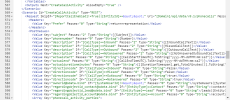
Thanks, I checked this out. I have nothing like that in line 381... but something similar in line 567 (as below).

1664842046897.png

I copied and pasted the file content edited line 567 substituting false for true, saved it under a new name and uploaded through the 3cx console as instructed... and then all my settings in the general configuration area of the CRM server side page were wiped (application id, tenant, domain and the auth token) - all nuked. Had to restore from backup to get the settings back...

Is that normal?
 
Thanks, I checked this out. I have nothing like that in line 381... but something similar in line 567 (as below).
Yes, OK, this is because you're getting the contents from the Management Console, which re-generates the XML from the information in memory, and that causes that there are a few empty elements that increase the file size. Anyway, this is fine.

I copied and pasted the file content edited line 567 substituting false for true, saved it under a new name and uploaded through the 3cx console as instructed... and then all my settings in the general configuration area of the CRM server side page were wiped (application id, tenant, domain and the auth token) - all nuked. Had to restore from backup to get the settings back...
Yes, this is correct, because you're dealing with a new integration, not the standard integration, so any configuration is not kept. You will need to reconfigure and re-authorize your integration, sorry I didn't mention this.
 
  • Like
Reactions: Evolute IT
Hi Support,

There is no CRM screen popping on ring OR answer (even though the system is aware of the caller - having correctly identified them on the incoming call list in the 3cx client and correctly writing the call journal against the appropriate client after the call has completed - with date/time stamps and caller info etc

Using the refence above, i am currently experiencing the same issue
 
  • Like
Reactions: Evolute IT
Hi Support,

There is no CRM screen popping on ring OR answer (even though the system is aware of the caller - having correctly identified them on the incoming call list in the 3cx client and correctly writing the call journal against the appropriate client after the call has completed - with date/time stamps and caller info etc

Using the refence above, i am currently experiencing the same issue
In the app (considering you use the Webclient/PWA/DesktopApp), go to ... > Settings > Integration and make sure it's set to "Automatically open the contact page when server-side integration is enabled".
 
  • Like
Reactions: edossantos
i did that already but still no window pop up
 
Are you using the webapp or DesktopApp? In Edge/Chrome, you may need to allow popups as they will get blocked by default.
i did that already but still no window pop up
 
i'm currently using edge
let me check if pop up are allowed
 
Are you sure that the name it finds is not from a contact or another user (mobile numbers for users are searched.)

If a contact in the phonebook or a user is found, it won't look into the CRM.

To confirm, do you have the contact card icon appearing in the dialer interface? If so, click on it, does it open the contact page?

If no icon, then the lookup isn't even working.
 
Pop ups are allowed
 
i can see the contact icon

the contact icon card opens and populates the contact details
 
i can see the contact icon

the contact icon card opens and populates the contact details
Can you share a screenshot of the Web Client when you receive an inbound call from a matching contact?

Are you testing with your mobile phone by any chance? Please note that if your extension is configured with this number, you will not get the popup.
 
  • Like
Reactions: Evolute IT
Status
Not open for further replies.