


- Joined
- Apr 4, 2020
- Messages
- 1
- Reaction score
- 0
This may be a stupid question, but I'll ask it anyway.
Background first. I am testing 3CX to see if we can replace our very old office PBX (12 year old Avaya system) with it. We have 4 incoming POTS lines that ring to all the phones in the office. 3 of the lines are general inquiry, and the 4th is a line that has to be answered at a higher priority than the other 3. So if a call comes in on that 4th line, someone is expected to their call on hold and answer that 4th line. In order to facilitate this, each line is assigned to a BLF key on all phones and the 4th line has a different ringtone.
I have created a group and set the DIDs to ring to the group, but I can't see how to set a different ringtone for that DID. Also, in my attempts to program the BLF keys on the Fanvil X5G phones I've purchased for testing, I see the following options for the keys:
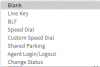
If I choose "Line Key" it sets the BLF to the local extension #. Am I missing something or am I just an idiot? I've gone through the documentation on the 3CX website and searched the web for about 3 days to try to find this information.
Can I setup 3CX to do what I need and if so how do I do that?
Thanks.
Slash.Whack.
Background first. I am testing 3CX to see if we can replace our very old office PBX (12 year old Avaya system) with it. We have 4 incoming POTS lines that ring to all the phones in the office. 3 of the lines are general inquiry, and the 4th is a line that has to be answered at a higher priority than the other 3. So if a call comes in on that 4th line, someone is expected to their call on hold and answer that 4th line. In order to facilitate this, each line is assigned to a BLF key on all phones and the 4th line has a different ringtone.
I have created a group and set the DIDs to ring to the group, but I can't see how to set a different ringtone for that DID. Also, in my attempts to program the BLF keys on the Fanvil X5G phones I've purchased for testing, I see the following options for the keys:
If I choose "Line Key" it sets the BLF to the local extension #. Am I missing something or am I just an idiot? I've gone through the documentation on the 3CX website and searched the web for about 3 days to try to find this information.
Can I setup 3CX to do what I need and if so how do I do that?
Thanks.
Slash.Whack.


