Emails not being delivered, certificate expired

Status
Not open for further replies.

Ruwo05

Forum User
Joined
Aug 9, 2022
Messages
3
Reaction score
0
Hi,

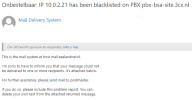
Since last week i've been getting lots of emails telling me messages can not be delivered and a certain IP has been blacklisted on the portal.
The first image displays the errors i've been receiving lately.
1660044828084.png
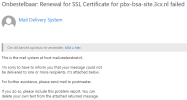
I have tried to renew the certificate with the commandline tool PbxConfigTool.exe, but it fails and sends me the following email:
1660044942335.png

When i try to login on the portal it also tells me the https link is incorrect and thus the certificate is invalid.
License is Standard Annual 15.5.20000.6, i can't update to a later version because the server is running Windows Server 2012 R2 Standard and isn't compatible.
I have tried multiple options i found online but nothing worked yet, this system has been setup by former colleagues and there is no documentation at all how it functions.

What are my options?

Regards,
Rowan
 
The only solution is to upgrade the the latest version, as 3cx have made some changes to 3cx licensing servers, etc.

As you are running Server 2012 R2, install MS HyperV function on this server and create a 3cx debian installation using the 3cx debian ISO image.
 
  • Like
Reactions: Ruwo05
The only solution is to upgrade the the latest version, as 3cx have made some changes to 3cx licensing servers, etc.

As you are running Server 2012 R2, install MS HyperV function on this server and create a 3cx debian installation using the 3cx debian ISO image.
Thanks for the information, i'll give that a try!
 
Backup the existing 3cx server, with fqdn and licensing info , move this backup to a local machine.

Changed all the 3cx services on the Server 2012 to manual, so these do not start on reboot.

Change the server IP address.

Install MS-HyperV, create a virtual machine ready for your 3cx debian - https://www.3cx.com/docs/installing-microsoft-hyper-v/

Install 3CX - https://www.3cx.com/docs/manual/installing-debian-linux-pbx/ giving the 3cx server the same IP address as the server 2012 before you changed the IP

Run the 3cx configuration wizard, and select restore from backup , use the previous saved backup

When you know that the 3cx debian is working, uninstall 3cx from serve 2012
 
Backup the existing 3cx server, with fqdn and licensing info , move this backup to a local machine.

Changed all the 3cx services on the Server 2012 to manual, so these do not start on reboot.

Change the server IP address.

Install MS-HyperV, create a virtual machine ready for your 3cx debian - https://www.3cx.com/docs/installing-microsoft-hyper-v/

Install 3CX - https://www.3cx.com/docs/manual/installing-debian-linux-pbx/ giving the 3cx server the same IP address as the server 2012 before you changed the IP

Run the 3cx configuration wizard, and select restore from backup , use the previous saved backup

When you know that the 3cx debian is working, uninstall 3cx from serve 2012
Hi Saqqara,

I have been trying to install a virtual machine with the debian iso, but i have literally zero knowledge how any of this works so i'm not making any progress.
 
Hi Saqqara,

I have been trying to install a virtual machine with the debian iso, but i have literally zero knowledge how any of this works so i'm not making any progress.

Follow the links in the previous posts.

You create the virtual machine - memory, network , disks etc. Attached the ISO to the virtual machine, boot the server using the ISO image.
 
Status
Not open for further replies.

Forum statistics

Threads
111,974
Messages
590,083
Members
164,899
Latest member
mazet