


- Joined
- Mar 1, 2021
- Messages
- 2
- Reaction score
- 0
Hi!
I'm using wordpress and the plugin works just fine, but I already have some floating buttons so I wouldn't want to add another one to the list.

This button is on the bottom left side of my website and upon clickin on it another two option appears.
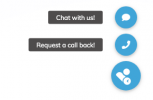
When, clicking request a call back, it takes me to my contact page where call-backs can be requested. I would want to do the exact same thing with the chat option. Is it possible to embed the chat into a page instead of opening it in a new window?
Thank you!
I'm using wordpress and the plugin works just fine, but I already have some floating buttons so I wouldn't want to add another one to the list.
This button is on the bottom left side of my website and upon clickin on it another two option appears.
When, clicking request a call back, it takes me to my contact page where call-backs can be requested. I would want to do the exact same thing with the chat option. Is it possible to embed the chat into a page instead of opening it in a new window?
Thank you!


