Solved Enable Microsoft Teams Direct Routing: Private key and certificate do not match. Upload the correct certificate and key

Status
Not open for further replies.

Andrea Gail

New User
Joined
Dec 24, 2021
Messages
5
Reaction score
2
Hello,
I'm working to test Microsoft Teams Direct Routing.

My cert is from Sectigo (appear in ms list). The cert comes with .crt extension but it's in PEM format (I can read the content in text)

3CX do not accept it and return this error:
Private key and certificate do not match. Upload the correct certificate and key

The cert Is NOT a wildcard.
In this site: https://www.sslshopper.com/certificate-key-matcher.html
Certificate and private key match
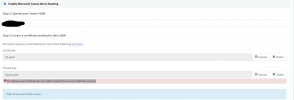
 

Attachments

  • 3cx.png
    3cx.png
    32.2 KB · Views: 15
Thank you for your reply.

issue occurs again :-(
 
Thank you for your reply.

issue occurs again :-(
Do you have experience with SSL certificates?

It's not super simple and can be tricky so if you are not experienced a bit with this, it might be easier to ask a Partner or an internal IT guy.
 
Also, make sure the order of the Cert file is this:

1. Your certificate
2. The intermediate
3. The root

Make sure the private key is not encrypted. It should start by "BEGIN PRIVATE KEY" and not "BEGIN RSA PRIVATE KEY".
 
Do you have experience with SSL certificates?

It's not super simple and can be tricky so if you are not experienced a bit with this, it might be easier to ask a Partner or an internal IT guy.
Yes, I'm familiar with ssl cert, and you? :) I tried any "trick", also converting with OpenSSL. I also used this type of certificate with other server *nix and Win.

As I siad the cert and private key seems ok. So the error can be a bug and not directly related to the SSL cert.
 
Yes, I'm familiar with ssl cert, and you? :) I tried any "trick", also converting with OpenSSL. I also used this type of certificate with other server *nix and Win.

As I siad the cert and private key seems ok. So the error can be a bug and not directly related to the SSL cert.
Not a bug. It works for hundreds of people. Sometimes it's a matter of formatting, the 3CX is very picky with that.

You shouldn't have to convert it if it's all readable format.

I'm curious, can you DM me? Maybe I can figure it out for you. If it's really a bug, I will be able to submit a ticket for it.
 
Of course the certificate and private key can work in another situation (I tested it). .
To add the intermediate in the "pem" do not get better

The firts part of my files:

cert:
-----BEGIN CERTIFICATE-----
MIIGOTCCBSGgAwIBAgIQWXm9HO/SqPgQrRBeXYg1fzANBgkqhkiG9w0BAQsFADCB
jzELMAkGA1UEBhMCR0IxGzAZBgNVBAgTEkdyZWF0ZXIgTWFuY2hlc3RlcjEQMA4G
A1UEBxMHU2FsZm9yZDEYMBYGA1UEChMPU2VjdGlnbyBMaW1pdGVkMTcwNQYDVQQD
Ey5TZWN0aWdvIFJTQSBEb21haW4gVmFsaWRhdGlvbiBTZWN1cmUgU2VydmVyIENB ......

Private key:
-----BEGIN PRIVATE KEY-----
MIIEvwIBADANBgkqhkiG9w0BAQEFAASCBKkwggSlAgEAAoIBAQCn5J2t2y9CQGSP
pxnWW5BH58WLMnfj2L7KKj8+v1zHi2gBnd6mfw5PZ1u/41yrCXiPvf7JKgXgrkes
Sbd/E3itYFNH3N4ZnwRfcHs9o66n9nqgCrdooChzZr8rq/bVD+DzbQsE2fMW9WIr
 
Of course the certificate and private key can work in another situation (I tested it). .
To add the intermediate in the "pem" do not get better

The firts part of my files:

cert:
-----BEGIN CERTIFICATE-----
MIIGOTCCBSGgAwIBAgIQWXm9HO/SqPgQrRBeXYg1fzANBgkqhkiG9w0BAQsFADCB
jzELMAkGA1UEBhMCR0IxGzAZBgNVBAgTEkdyZWF0ZXIgTWFuY2hlc3RlcjEQMA4G
A1UEBxMHU2FsZm9yZDEYMBYGA1UEChMPU2VjdGlnbyBMaW1pdGVkMTcwNQYDVQQD
Ey5TZWN0aWdvIFJTQSBEb21haW4gVmFsaWRhdGlvbiBTZWN1cmUgU2VydmVyIENB ......

Private key:
-----BEGIN PRIVATE KEY-----
MIIEvwIBADANBgkqhkiG9w0BAQEFAASCBKkwggSlAgEAAoIBAQCn5J2t2y9CQGSP
pxnWW5BH58WLMnfj2L7KKj8+v1zHi2gBnd6mfw5PZ1u/41yrCXiPvf7JKgXgrkes
Sbd/E3itYFNH3N4ZnwRfcHs9o66n9nqgCrdooChzZr8rq/bVD+DzbQsE2fMW9WIr
You need both intermediate and root, below the main cert. It should definitely work, specially if you tried elsewhere.

Just for fun, are you on the latest v18?
 
Yes 18... I don't know why, but re-key the cert worked! (without the intermediate, because the CA is in MS list )

Thank you
 
Status
Not open for further replies.

Members Online Now

No members online now.

Forum statistics

Threads
111,831
Messages
589,277
Members
164,660
Latest member
RJenkinsROCK