Solved Enable the side-view of the Navigation (instead of showing at the bottom)

Status
Not open for further replies.

Ariel Tolome

Customer
Joined
Nov 15, 2024
Messages
16
Reaction score
3
Hi,

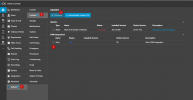
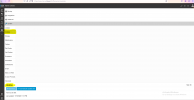
In my Weblogin, when I navigate through different features or options, Navigation sub-menus are displayed at the bottom of the screen. I have seen few screenshots where the Navigation sub-menus are displayed on the right.

How to change the view from Bottom view, to Right view? I tried both in Firefox and Chrome.
 
Can you add some screenshots so we can see what you mean?
 
Attached the screenshots for reference. 'Navigation_opening_submenus_at_the_bottom.png' shows my screen display, while the other file I downloaded from net.
 

Attachments

  • Navigation_Options_opening_on_right(sample_from_net).png
    Navigation_Options_opening_on_right(sample_from_net).png
    119 KB · Views: 16
  • Navigation_opening_submenus_at_the_bottom.PNG
    Navigation_opening_submenus_at_the_bottom.PNG
    46.9 KB · Views: 16
What browser are you using? You should be using Chrome or Edge. That seems like a browser messing up the layout, not a design concept of 3CX.
 
Clear your browser cache.
 
I am using Firefox. Attached screenshot has the version details.
 

Attachments

  • Firefox_browser.PNG
    Firefox_browser.PNG
    97.8 KB · Views: 5
On my laptop (with Firefox browser), Navigation opens the sub-menus on the right side. But, Navigation menus are shown at the bottom, on my PC which is connected to 24-inch monitor.
 
As mentioned above by @ConceptsWeb clear your browser cache, but also try with Chrome, and clear cache.

This is something your browser is doing. We do not have our menus like that. Its not a 3CX thing.
 
  • Like
Reactions: Evolute IT
I checked Chrome now and it is displaying as expected (on sideways), though Firefox is showing the issue. Will use Chrome for navigation. Thanks for the prompt support.
 
  • Like
Reactions: NicholasP_3CX
Status
Not open for further replies.