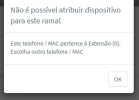
Aivar Customer Intermediate Cert. Joined Apr 5, 2021 Messages 27 Reaction score 3 May 4, 2021 #1 ao atribuir um ramal a um telefone grandstream gxp 1615 , recebo a mensagem seguinte: Não é possível atribuir dispositivo para este ramalEste telefone / MAC pertence à Extensão {0}. Escolha outro telefone / MAC Como resolvo isso? Já tentei fazer o reset de fábrica no telefone mas não resolveu.
ao atribuir um ramal a um telefone grandstream gxp 1615 , recebo a mensagem seguinte: Não é possível atribuir dispositivo para este ramalEste telefone / MAC pertence à Extensão {0}. Escolha outro telefone / MAC Como resolvo isso? Já tentei fazer o reset de fábrica no telefone mas não resolveu.
VasilisV_3CX Customer Joined Jan 12, 2021 Messages 4,360 Reaction score 951 May 4, 2021 #2 Hi @Aivar, This means that you've assigned the phone to a different extension. Do you know which extension the phone is assigned to? If you check the Phone section, you should see a non-bold Grandstream (if it has been added to a phone on THAT PBX). Are you able to log in to the phone's UI and reset it there?
Hi @Aivar, This means that you've assigned the phone to a different extension. Do you know which extension the phone is assigned to? If you check the Phone section, you should see a non-bold Grandstream (if it has been added to a phone on THAT PBX). Are you able to log in to the phone's UI and reset it there?
Aivar Customer Intermediate Cert. Joined Apr 5, 2021 Messages 27 Reaction score 3 May 4, 2021 #3 VasilisV como vc pode ver na foto ele ainda está negritado. eu já resetei para configurações de fábrica, não há nenhuma configuração no telefone.
VasilisV como vc pode ver na foto ele ainda está negritado. eu já resetei para configurações de fábrica, não há nenhuma configuração no telefone.
Aivar Customer Intermediate Cert. Joined Apr 5, 2021 Messages 27 Reaction score 3 May 4, 2021 #4 sim eu consigo acessar o gui do telefone.
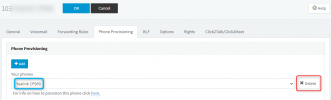
VasilisV_3CX Customer Joined Jan 12, 2021 Messages 4,360 Reaction score 951 May 4, 2021 #5 Hi @Aivar, This means that the phone has been assigned to an extension on the PBX before. In the Management Console, go to the Extension options, then Phone Provisioning tab and delete the phone from the drop down. Example below: Reactions: Aivar
Hi @Aivar, This means that the phone has been assigned to an extension on the PBX before. In the Management Console, go to the Extension options, then Phone Provisioning tab and delete the phone from the drop down. Example below:
Aivar Customer Intermediate Cert. Joined Apr 5, 2021 Messages 27 Reaction score 3 May 4, 2021 #6 ok. obrigado. problema resolvido.
VasilisV_3CX Customer Joined Jan 12, 2021 Messages 4,360 Reaction score 951 May 4, 2021 #7 Great @Aivar, glad you got this resolved. If you need any further assistance, feel free to open a new thread.
Great @Aivar, glad you got this resolved. If you need any further assistance, feel free to open a new thread.