Error answering call from door entry phone

Status
Not open for further replies.

Richard Apthorp

Customer
Joined
Aug 18, 2017
Messages
20
Reaction score
2
Hi,

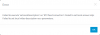
Has anyone else seen an error like this:
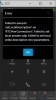
Call group.png

We get this on the web browser extension when trying to answer a call from a 2N Helios IP Vario video door entry phone. Dialing from the extension to the Vario works fine although we don't get a video picture.

Works fine from the Windows client including video. Andriod and IOS clients can make and receive calls to the Vario but don't get any video. I wonder if video is related to the extension throwing an error when we try to answer as an audio call?

Thanks, Richard.
 
Hello @Richard Apthorp ,
Can you please try the same scenario with Web Client and let me know please?
 
Hi Constantinos,

I disabled the extension but still get the same error on the Web Client:
1596195224760.png

I get the same error on multiple PC's running the Extension.

Thanks, Richard.
 
It seems that the issue is related to video negotiation.

You can run a capture and see what this "door phone" sends to webclient.
 
Hi Constantinos,

As you thought it was video negotiation related I had a look at the phone settings. We only had H.236 and H.236+ enabled. When I enabled H.264 we can now answer the audio call and video is also working. It's odd that without the video codec enabled we couldn't receive an audio call.

Is there anyway to automatically initiate a video call from the door phone with a dialing suffix or something to cause 3CX to request video on answering?

Thanks, Richard.
 
Hi Richard,

If the WebRTC SDP fails you can make adjustments on your device. Have you tried just disabling the other 2 codecs and leaving H.264 only?

The thing with the doorphone is that it will offer video when it invites the webclient, so the webclient needs to respond to it accordingly IF it supports common codecs.

You do have the option though to pick how you answer, but it will depend in the content of the invite the doorphone sends (and the SDP of course).

Example Supported Doorphone: Fanvil i30
1597841811749.png

Also works in Chrome Extension
1597841998689.png
 
  • Like
Reactions: Evolute IT
Hi John,

I seem to get the same results if H.264 is the only codec enabled or they are all enabled.

I don't get a video button using the web client and the video button is greyed out on the web extension, on both I can answer the audio call and then press video to get a picture. The windows client allows me to answer as a video call and answers with video.

What SDP H.264 Payloads do you expect? I'm sending Type1 of 123 and Type2 of 124, if I enable a compatibility mode that doesn't send the 'sendonly' flag then the video button isn't greyed out in the extension and I can answer with a picture but I'm getting a picture in picture of me as the extension is showing my video preview.

Thanks, Richard.
 
Hi Richard,

Payload Type 124 should be fine, although this is dynamic because its not so much the number(so 124 is not strict).

I can provide you with a sample of what a 3CX supported doorphone sends in the SDP.
This is from the same device I mentioned earlier, and works as you see above.

Hope this can be of help to you:

1597995495765.png
 
Hi John,

It's very odd, this is the SDP that doesn't give the option to answer as a video call:
Code:
v=0
o=-_ 1838708266 5140304472083154721 IN IP4 10.0.18.178
s=HIP 2.29.1.38.8
c=IN IP4 10.0.18.178
t=0 0
m=audio 5000 RTP.AVP 9 0 8 101
c=IN IP4 10.0.18.178
a=rtpmap:9 G722.8000
a=rtpmap:0 PCMU.8000
a=rtpmap:8 PCMA.8000
a=rtpmap:101 telephone-_event.8000
m=video 5002 RTP.AVP 124
c=IN IP4 10.0.18.178
a=sendonly
a=rtpmap:124 H264.90000
a=fmtp:124 profile-_level-_id=42801E; packetization-_mode=1

But this does allow us to answer as a video call, all be it with a preview of my video being sent (as it's missing 'sendonly'):
Code:
v=0
o=-_ 288792920 7833109194220342785 IN IP4 10.0.18.178
s=HIP 2.29.1.38.8
c=IN IP4 10.0.18.178
t=0 0
m=audio 5000 RTP.AVP 9 0 8 101
c=IN IP4 10.0.18.178
a=rtpmap:9 G722.8000
a=rtpmap:0 PCMU.8000
a=rtpmap:8 PCMA.8000
a=rtpmap:101 telephone-_event.8000
m=video 5002 RTP.AVP 124
c=IN IP4 10.0.18.178

So presumably it's one of these lines that breaks it:
Code:
a=rtpmap:124 H264.90000
a=fmtp:124 profile-_level-_id=42801E; packetization-_mode=1
Can you see anything wrong with these lines?

Thanks, Richard.
 
Can't say for sure, you might have to look into the Chrome WebRTC internals during an incoming call and test the behavior.

The Webclient is built around WebRTC, so if the SDP offer coming in is not something that WebRTC accepts, then we cannot display the options to answer as Video/Audio. H.264 is supported, but there are different profile levels and bitrates that can exist within H.264 and I cannot say for sure which ones WebRTC will accept/reject. This can be an issue in your case.

There's also another possibility you can explore, to renegotiate the codecs on the fly:
- Try hitting the video button after the audio call is answered
- Try hitting hold/unhold
- Try calling the doorphone rather than receiving the call, and see if you can switch to video. Simultaneously capturing the traffic on the doorphone should show you what the webclient offered, and if it works you can see what WebRTC accepts (your doorphone's 200 OK upon answer should confirm)
 
  • Like
Reactions: Evolute IT
Yes pressing video whilst in an audio call or calling the door both initiate video, heres the SDP calling the door from the web extension:
Code:
v=0
o=3cxPS 296268857344 136264548353 IN IP4 10.0.0.30
s=3cxPS Audio call
c=IN IP4 10.0.0.30
t=0 0
m=audio7854 RTP.AVP 0 8 9 3 18112 101
a=rtpmap:0 PCMU.8000
a=rtpmap:8 PCMA.8000
a=rtpmap:9 G722.8000
a=rtpmap:3 GSM.8000
a=rtpmap:18 G729.8000
a=fmtp:18 annexb=no
a=rtpmap:112 opus.48000.2
a=fmtp:112 maxplaybackrate=16000;sprop-_maxcapturerate=16000
a=rtpmap:101 telephone-_event.8000
a=sendrecv
m=video 7856RTP.AVP 96 97 98 99 100101 102 122 127 121 125107 108 109 124 120 123119 114 115 116
c=IN IP4 10.0.0.30
b=AS:1024
a=rtpmap:96 VP8.90000
a=rtpmap:97 rtx.90000
a=fmtp:97 apt=96
a=rtpmap:98 VP9.90000
a=fmtp:98 profile-_id=0
a=rtpmap:99 rtx.90000
a=fmtp:99apt=98
a=rtpmap:100 VP9.90000
a=fmtp:100 profile-_id=2
a=rtpmap:101 rtx.90000
a=fmtp:101 apt=100
a=rtpmap:102 H264.90000
a=fmtp:102 level-_asymmetry-_allowed=1;packetization-_mode=1;profile-_level-_id=42001f
a=rtpmap:122 rtx.90000
a=fmtp:122 apt=102
a=rtpmap:127
I have also contacted 2N to see if they can help.
 
Status
Not open for further replies.

Forum statistics

Threads
112,349
Messages
592,026
Members
165,512
Latest member
gmacinit