


- Joined
- Oct 18, 2019
- Messages
- 89
- Reaction score
- 95
Hello,
we have still this problem:
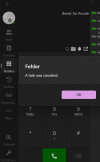
We posted this a few weeks ago under a blog post.
It happens nearly every time when we do outgoing calls with deskphone control selected.
To make sure, that this does not only happen with my extension, we tested another extension for a full week now and it applies here, too.
My extension uses yealink T46s. The other extension Fanvil X7C.
So it does not seem to be vendor specific.
We are having this since we use v20 with the new softphone (so several pbx builds and softphones releases).
Using Hosted by 3CX.
I´d be happy if this could be checked, because we will not further roll out v20 at our customers, until we know where this comes from.
we have still this problem:
We posted this a few weeks ago under a blog post.
It happens nearly every time when we do outgoing calls with deskphone control selected.
To make sure, that this does not only happen with my extension, we tested another extension for a full week now and it applies here, too.
My extension uses yealink T46s. The other extension Fanvil X7C.
So it does not seem to be vendor specific.
We are having this since we use v20 with the new softphone (so several pbx builds and softphones releases).
Using Hosted by 3CX.
I´d be happy if this could be checked, because we will not further roll out v20 at our customers, until we know where this comes from.


