


- Joined
- Jan 7, 2020
- Messages
- 49
- Reaction score
- 2
Hi 3CX Support,
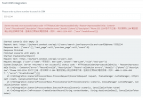
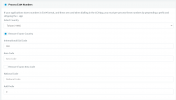
I'd like to integrate with Zendesk in one 3CX. However, I bumped into this screenshot situation - Phone 555-1234 format is invalid, Valid phone number must include national code, area code and subscriber's phone number. Meanwhile, I made sure that my E164 is normal. In fact, I have multiple 3CX environment, there's no like this error even though I type 555-1234 like this format. Also, our company phone number is 070.... which is not suitable to put it in(the same result as the screenshot).
Could you help me to figure it out?
Thanks in advance!
Kyle
NewWave
I'd like to integrate with Zendesk in one 3CX. However, I bumped into this screenshot situation - Phone 555-1234 format is invalid, Valid phone number must include national code, area code and subscriber's phone number. Meanwhile, I made sure that my E164 is normal. In fact, I have multiple 3CX environment, there's no like this error even though I type 555-1234 like this format. Also, our company phone number is 070.... which is not suitable to put it in(the same result as the screenshot).
Could you help me to figure it out?
Thanks in advance!
Kyle
NewWave


