Error: "Remote storage is partially configured" after upgrade to 8A

vvooiipp

Premier Customer
Advanced Certified
Joined
Aug 26, 2021
Messages
12
Reaction score
3
Admin console has the below error after upgrade.

3cx.png

I used the browse button to select the directory and saved.
Manual backup works. I can view the backup in the 3cx backup console and in the Google Cloud Storage bucket.
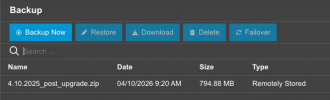
3cx-backup.png
 
Admin console has the below error after upgrade.

View attachment 51468

I used the browse button to select the directory and saved.
Manual backup works. I can view the backup in the 3cx backup console and in the Google Cloud Storage bucket.


View attachment 51469
This is because you have the backups being stored on the server and not remotely to an archiving server. This is not an error, it's just a warning informing you that you do not archive your data to a remote server, and it can be ignored if you do not like to archive it.

Note that it is always suggested to archive backups, recordings, voicemails, etc, because if for any reason the local drive of the PBX gets corrupted or anything happens to the server, your data can be lost, so archiving them is a good way to ensure you don't lose any data.
 
Nikolas, thanks for the speedy reply.

I am confused how it is not a remote server when the backup is on a Google Cloud Storage bucket.

gcs.png
 
Nikolas, thanks for the speedy reply.

I am confused how it is not a remote server when the backup is on a Google Cloud Storage bucket.

View attachment 51470
If you only archive backups, that means you have partially configured the remote archiving because you are not archiving your recordings, voicemails, chats, and faxes, and as such, you will see the warning that the archiving is partially configured.

Only after you archive all that data will the warning disappear.
 

Latest Posts

Forum statistics

Threads
111,880
Messages
589,533
Members
164,733
Latest member
HLISolutions