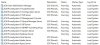
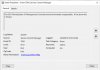
Error: "The 3CX PhoneSystem 01 Management Console service terminated unexpectedly. "

Status
Not open for further replies.

houston

Customer
Joined
Jul 21, 2009
Messages
66
Reaction score
2
I've recently installed 3CX on 4 brand new identical Windows 10 laptops. One on 3cx is working really well. On 3 the service keeps crashing.

I thought maybe it was because I'd used a backup of the 1st (working fine) system to speed up installing the other 3. (I restored without licensing info, then just adjusted passwords as needed for the differences in phones and trunks) So I uninstalled all 3, redid 1 by hand, and still hoping to save time, copied it to the other 2. Annnddd, same problem on all 3. If only the other 2 had a problem I'd have assumed it was using the backup to speed things along, but now, I dunno.

I've gone through logs and I can't find anything that seems to happen before the service crashes.

The other services run fine. It's just the management one that dies.

Any suggestions would be welcome.

 

Attachments

  • 3CX Error 1.jpg
    3CX Error 1.jpg
    237.5 KB · Views: 13
  • 3CX Error 2.jpg
    3CX Error 2.jpg
    105.5 KB · Views: 13
  • 3CX Error 3.jpg
    3CX Error 3.jpg
    50.5 KB · Views: 11
3 none working laptops, do they recover at anypoint on their own?

3 none working laptops, are they using a differing service pack than the one that is working?

3 none working laptops, windows logs could be very informative, control panel > admin tools > event viewer > windows logs > system and application logs are what i would look at.

3 none working laptops, what are the power profiles? control panel > power options > high performance is what i would set it to.

last of all, https://community.spiceworks.com/scripts/show/4378-windows-10-decrapifier-1803-1809


best of luck!
 
3 none working laptops, do they recover at anypoint on their own?

I've set the service to auto-restart. It's still crashing regularly, but now it starts back up. Sometimes just one crash, but I spotted one where it restarted a few times in a row one right after the other.

are they using a differing service pack than the one that is working?

All 4 are updated to the most recent Windows updates/version. ver shows them all at 10.0.17763.316

windows logs could be very informative, control panel > admin tools > event viewer > windows logs > system and application logs are what i would look at.

I couldn't find anything other than the "Terminated Unexpectedly" log entries in the screenshot in the original post. Possibly there is additional logging somewhere I'm not aware of?

what are the power profiles? control panel > power options > high performance is what i would set it to.

They had been set to High Performance. I noticed they were still going into Connected Standby, so I disabled that via the registry. I also checked all the advanced settings and set the majority to maximum performance/never power save. The service is still crashing :?


I'll give the decrapifier a shot, but AFAIK it's the same crap on all 4 laptops. The only difference I can think of is that one was set up a couple months before the other 3.

They're all using the same Yealink DECT phones, the same Callcentric service.

And all other services are running just fine. It's only the management one that crashes. It's almost like it's periodically updating some setting or another and then dies.

Any additional suggestions would be very welcome.
 
I did a Windows "Fresh Start", basically decrapifier on steroids. (Very slow, next time I'll just wipe and reinstall.)

Same problem.

It's almost like there's something with the license key that's off. I can't think of what else hasn't changed and could be crashing just the management service and nothing else.
 
Hi houston,

To avoid doing extra troubleshooting, I would start with 4 freshly formatted laptops (not cloned) with the latest Windows 10 updates. Then install 3CX independently with separate keys on each one and ensure that each PBX does not use the same ports as the other ones (SIP, Tunnel, RTP, HTTP, HTTPS).

What is your end goal, are they just meant for testing? Best to keep them on a separate network and note that for the FQDNs to work you will need to do some work if all 4 are under the same public IP
 
to avoid doing extra troubleshooting, I would start with 4 freshly formatted laptops (not cloned) with the latest Windows 10 updates.

I may need to do that.

I did try a "Fresh start" on one, didn't help. But that's not quite the same as a full install as it does leave some Acer software on it.

These are brand new laptops with the as-shipped Windows and updates run. The only difference between the 1 system working problem free and the other 3 is that the first 3cx was originally installed on a different model laptop (without sufficient storage for recording) a few months ago, and then backed up and restored to one of the newer laptops. That's running fine. That's the configuration that was then copied to the other laptops. (Each with their own serial number and FQDN) The 3 newer installs are all having the same problem with the management service crashing.

What is your end goal, are they just meant for testing? Best to keep them on a separate network and note that for the FQDNs to work you will need to do some work if all 4 are under the same public IP

4 different restaurants, physically different locations. Two are actually handling calls fine at present. I started the number ports before I realized there was a problem. Thankfully the web interface isn't really required right now, but it will be once management wants to start reviewing call recordings and such.
 
Elaborate please on the part where you say "That's the configuration that was then copied to the other laptops"

I suspect if you start from scratch for each system (OS and PBX install) you will not have this issue, so please try it and let us know of the results
 
I suspect if you start from scratch for each system (OS and PBX install) you will not have this issue, so please try it and let us know of the results

OK,

I downloaded Windows 10 from Microsoft. Deleted all partitions. Installed Windows 10 off a bootable USB. Ran updates. Installed 3cx. Restored the backup.

We'll see how things go.
 
I suspect if you start from scratch for each system (OS and PBX install) you will not have this issue, so please try it and let us know of the results

Well, no luck. Wiped, installed Win10, restored backup, same thing. If it was hardware, I'd think it'd cause problems across the board, not just with the management service.

I brought one of the laptops back with me. I'll wipe and install Win 10. Then I'll hand configure 3cx.

Replacing the laptops isn't a practical option. If "everything from scratch" doesn't resolve things, any chance support might be willing to poke at it directly?
 
Do not restore the backup in this case (I suppose since there are 4 different restaurants this should have not been necessary in the first place anyway). Do it all from scratch to eliminate the possibility of bringing anything in from the backup that could potentially causing this and see how it goes.

In case the issue persists you can also open a ticket via support, but first let's see how the clean setup goes
 
Status
Not open for further replies.

Forum statistics

Threads
111,914
Messages
589,712
Members
164,785
Latest member
Texas Clay -