Error upgrade Desktop App in Management Console

Status
Not open for further replies.

TecnologiaMatrix

Customer
Joined
Apr 15, 2019
Messages
9
Reaction score
0
Hi, I upgraded my 3CX Server on-premises to version 18.0 build 939, but I can't upgrade the Windows Desktop App. When I try, occurred these log errors and if I try the access the URL address, showed this block page.
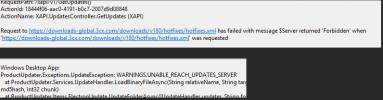
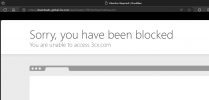
1699879713746.png
1699879849732.png

And when I try to download and install in my webclient, occurred below error.
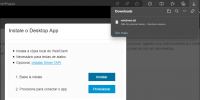
1699879968785.png

Can you help me about these errors?

Thank you.
 
Hi @TecnologiaMatrix the message in the webclient is due that the system have not downloaded the installer yet, so when you try to download it shows that there is not any file.

I wonder if from the pbx management console do you still see the update to download the windows desktop app?
 
Hi @Alejandro_3CX, I can still see the download in management console, and if I try download, occurred the error logs in server and the access to URL address is blocked, but this block is not mine.
 
ok, I see, there are reasons for this, the system can not connect to our servers or you are missing any permission on the folders used to save the installer once downloaded.

In any of these cases, could you please ask your 3cx partner to open a support ticket with us.

I see you are from Brazil, he can open it in portuguese, it will be necessary to check the logs and captures of the event in order to assist you.

Ficarei no aguardo!
 
Ok, I will contact my 3CX partner.

But can I download the MSI installer of this Desktop App version? If yes, where?
 
Ok, I will contact my 3CX partner.

But can I download the MSI installer of this Desktop App version? If yes, where?
The desktop app is downloaded from the webclient, you can use the pwa instead, please check here
 
Ok, and can I make anything without 3CX partner? Because I had a functional system and after the upgrade I lost this feature.
 
Ok, and can I make anything without 3CX partner? Because I had a functional system and after the upgrade I lost this feature.
There is no issue to download the app, this is an on premise installation, in your particular case as mentioned before there are two reason for this, there is a connection issue to the download servers or there is any permission error to save the file on the server.

On premise installation the admin should take care of the network, OS, server.
 
Perfect, I thinked this error is caused by 3CX and not by me, because this URL address, that show the error "Forbidden", is not accessed by any devices in differents networks.
 
Give it a try installing a FREE/SMB version and then try to download the desktop app from your network and also trying a different network.

As mentioned before, there is not any issue to download the application.

Take care!
 
  • Like
Reactions: IrinaP_3CX
Ok, when I will migrate the 3CX Server para a new server, I will test this solution.

Thank for your help.
 
Status
Not open for further replies.

Forum statistics

Threads
111,974
Messages
590,081
Members
164,899
Latest member
mazet